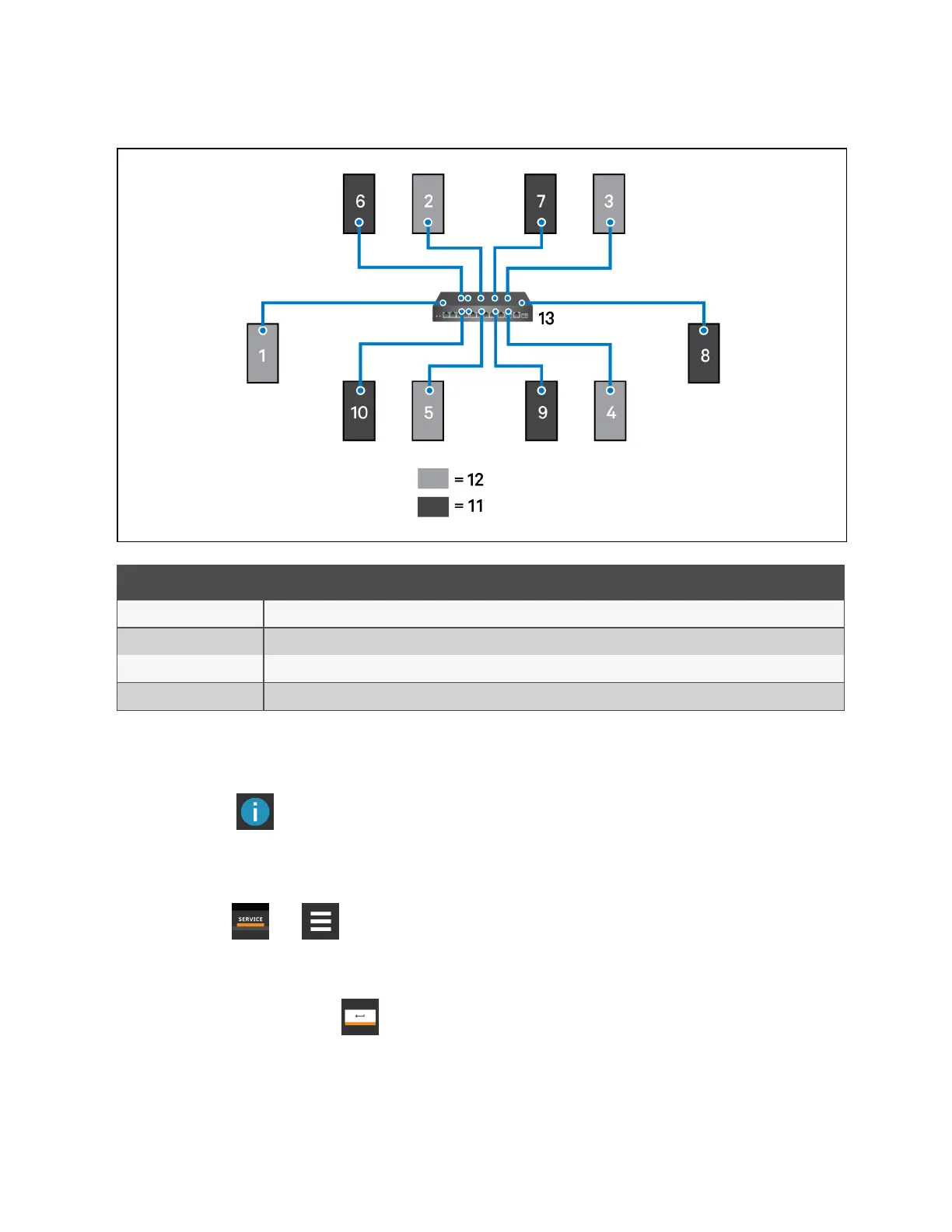
Figure 5.1 Example Layout Standby/Operating Unit Address Assignment
Item Description
1 to 10 Assigned address of the thermal management unit
11 Operating units.
12 Units on standby
13 Network switch
5.2 Configuring U2U Network Settings
The U2U NETWORK SETTINGS configure Vertiv™ Liebert® iCOM™’s unit to unit communication andincludes
informationbuttons, , that display pop-up field descriptions. The panel also indicates issues with the network settings.
For resolution, see Troubleshooting Network Settings Issues on page100 .
To configure unit to unit networking:
1. Touch , then > BMS & Teamwork Setup > U2U Setup.
The U2U NETWORK SETTINGS panel opens.
2. Touch the field to edit. The keypad opens.
3. Type the entry and touch .
4. When all fields to edit are updated, touch Save & Restart.
NOTE: Depending on the changes made, the Save button updates to indicate the components that need rebooted or
restarted. If the control board reboots, the cooling unit suspends operation for 60 seconds, then resumes operating.
5 U2U Networking
98
Vertiv™ Liebert® iCOM™Installer/User Guide










 To Next Page