User Guide
10
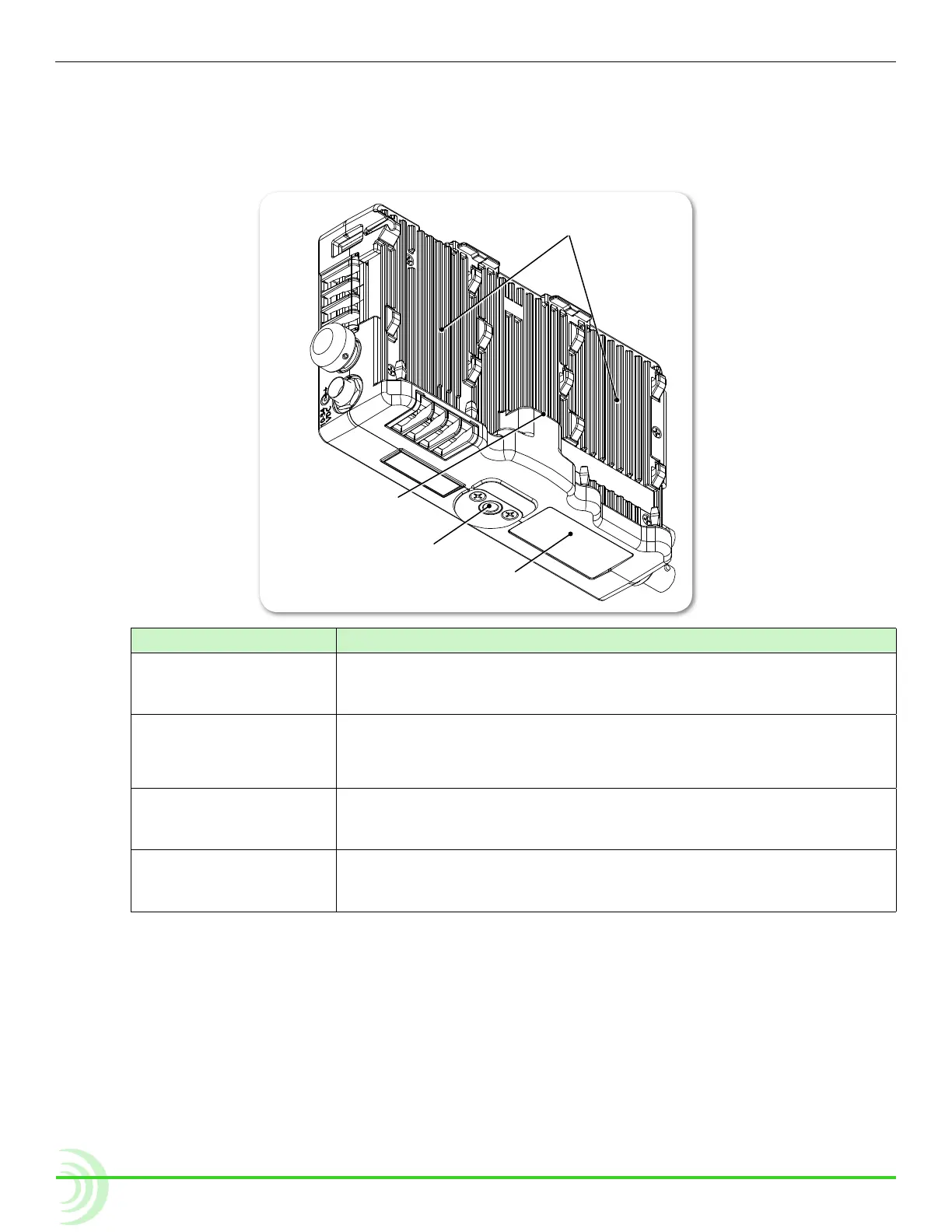
Back and Bottom Panels
The back panel features two battery mounts and a USB connector for mounting
a SpeedDrive. The bottom panels offers a 1/4-inch, 20-threaded mounting point
to secure the monitor to cameras and other devices.
USB Connector
Battery Mounts
Mounting Point
Protective Cover
Feature Description
Battery Mounts Located on the left and right side of the back panel are two mounts
for Sony
®
L-Series Lithium-ion batteries, or third-party batteries
compatible with the mount.
USB Connector Centered between the battery mounts on the back panel is the USB
connector for a SpeedDrive with installed mSATA drive.
i The USB connector cannot be used with any USB-based drive.
Mounting Point Centered on the top and bottom panels, a 1/4-inch, 20 threaded,
stainless-steel mounting point may be used to attach the monitor to
a camera or other production gear, such as the PIX-ARM.
Protective Cover This removable cover is attached with adhesive to the monitor’s bot-
tom panel and protects the connection used for integration with the
optional PIX-LR accessory.
⚠ Caution regarding battery usage: There is danger of explosion if the bat-
tery is incorrectly replaced. Replace only with the same or equivalent
type. Properly recycle batteries. Do not crush, disassemble, incinerate,
dispose in a re or expose batteries to high temperatures.



 To Next Page