User Guide
54
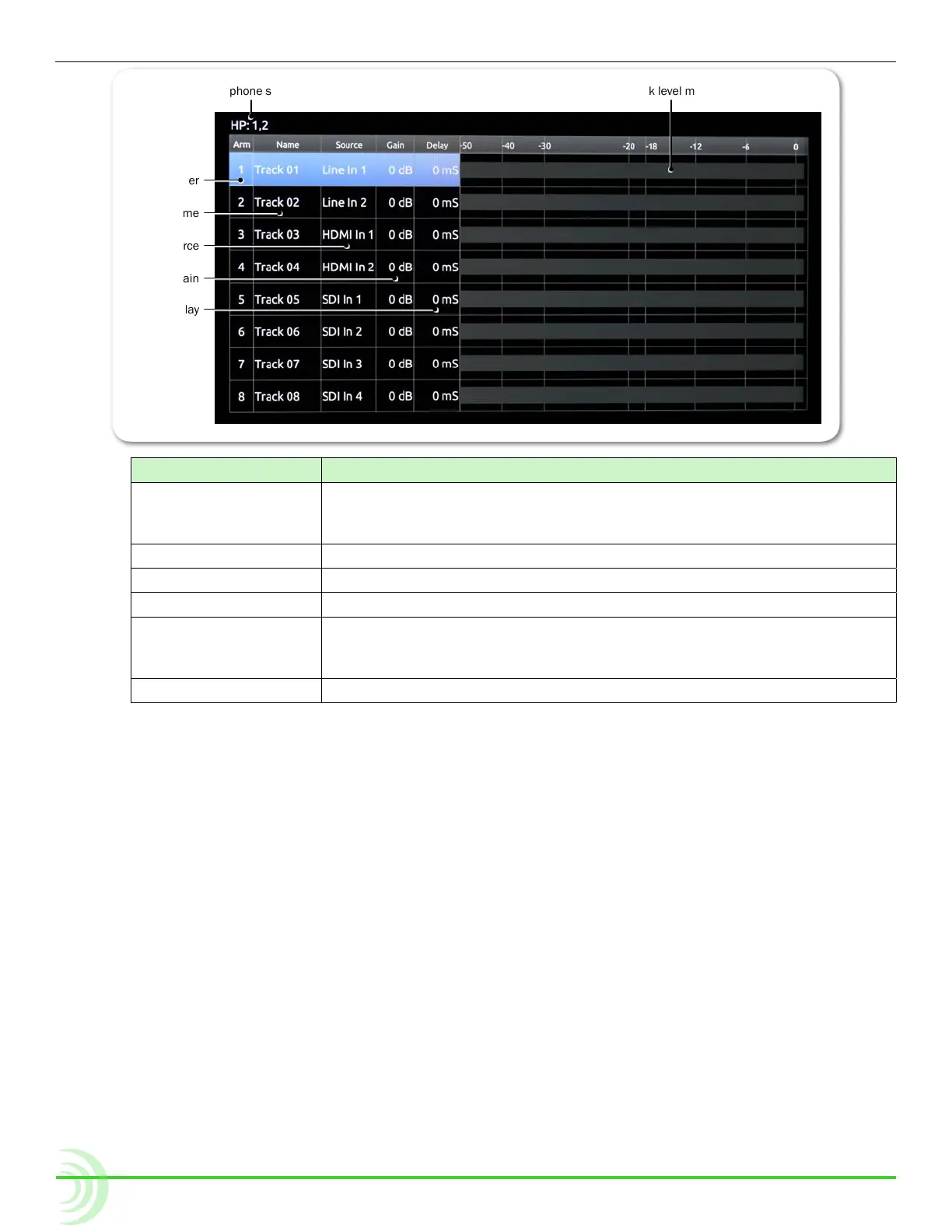
Track number
Track level meterHeadphone source
Track delay
Input gain
Input source
Track name
screen eLeMent Description
Track number Displays the number of the track and a color indicating whether the
track is armed. Red background: Armed track.
Black background: Unarmed track.
Track name The name of the track.
Input source The source of the track’s input.
Input gain The input gain value in dB.
Headphone source The source for headphone output. Left and right channels are
separated by a comma. For more information on setting up headphone
source, see Routing Audio Output.
Track level meter The audio level of the track.
i The Audio screen is not accessible during playback or while recording.
Setting up Audio Input
The PIX-E5 can record audio from the SDI input, HDMI input, 3.5 mm stereo
line input, and the optional PIX-LR accessory. The PIX-E5H does not have an
SDI input, but can record audio from the HDMI input, 3.5 mm stereo line input,
and the PIX-LR accessory, if attached.
To set the audio input:
1. From the Audio screen, select the track to adjust.
2. Turn and press the Control knob to select the track’s Source eld.
3. Select the input source from the list of options, based on the following
table, which provides a list of input source options available on either the
PIX-E5 or PIX-E5H.



 To Next Page