9
OVERVIEW OF THE CHASSIS
Feature Description
Soft Key Buttons Multi-functional buttons. Each soft key button’s function is displayed
as a label on the LCD directly above the button.
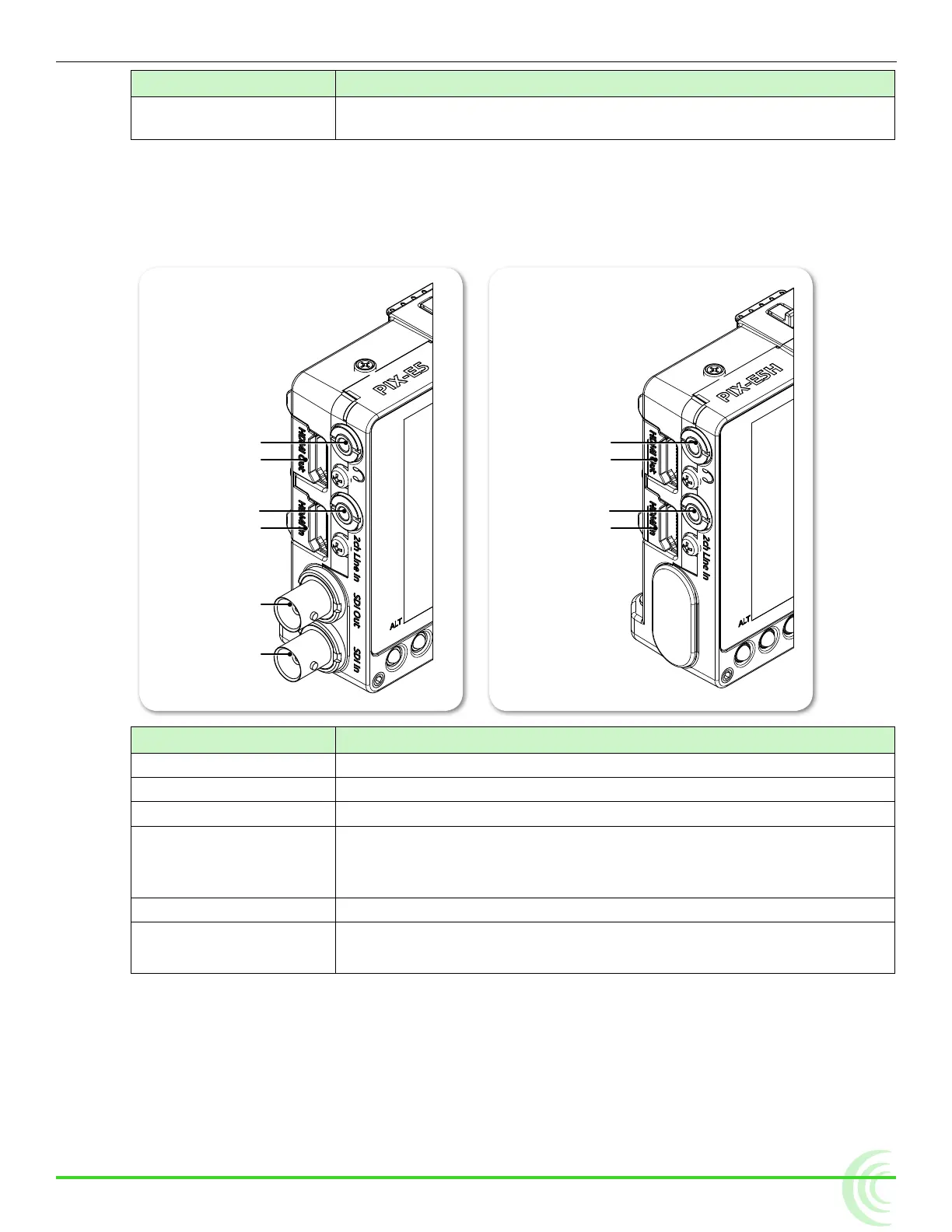
Left Side Panel
The left side of the PIX-E5 provides various I/O ports for audio and video. The
PIX-E5H is an HDMI only unit, so it does not have SDI ports.
Headphone Output
HDMI Output
Audio Input
HDMI Input
Headphone Output
HDMI Output
Audio Line Input
HDMI Input
SDI Output
SDI Input
Feature Description
Headphone Output 1/8-inch (3.5mm) unbalanced stereo headphone output.
HDMI Output Outputs HDMI video with up to two channels of embedded audio.
Audio Line Input 1/8-inch (3.5mm) unbalanced, line-level, 2-channel input.
HDMI Input Accepts HDMI (1.4a) signal with two channels of embedded audio.
i The monitor does not record or display content encoded with HDCP
copy protection.
SDI Output
*
Outputs up to 8 channels of embedded audio.
SDI Input
*
* Applies to PIX-E5 only
Accepts up to 8 channels of embedded audio.



 To Next Page