35
PIX-ASSIST MONITORING SUITE
The LUT menu appears superimposed over the image, along the bottom
of the screen, with four LUT options. The currently applied LUT appears
highlighted in green.
i The four options in the menu will vary depending on how LUTs are congured.
2. Tap each option to view the video image based on the chosen LUT.
To congure the LUT menu options:
1. Press MENU.
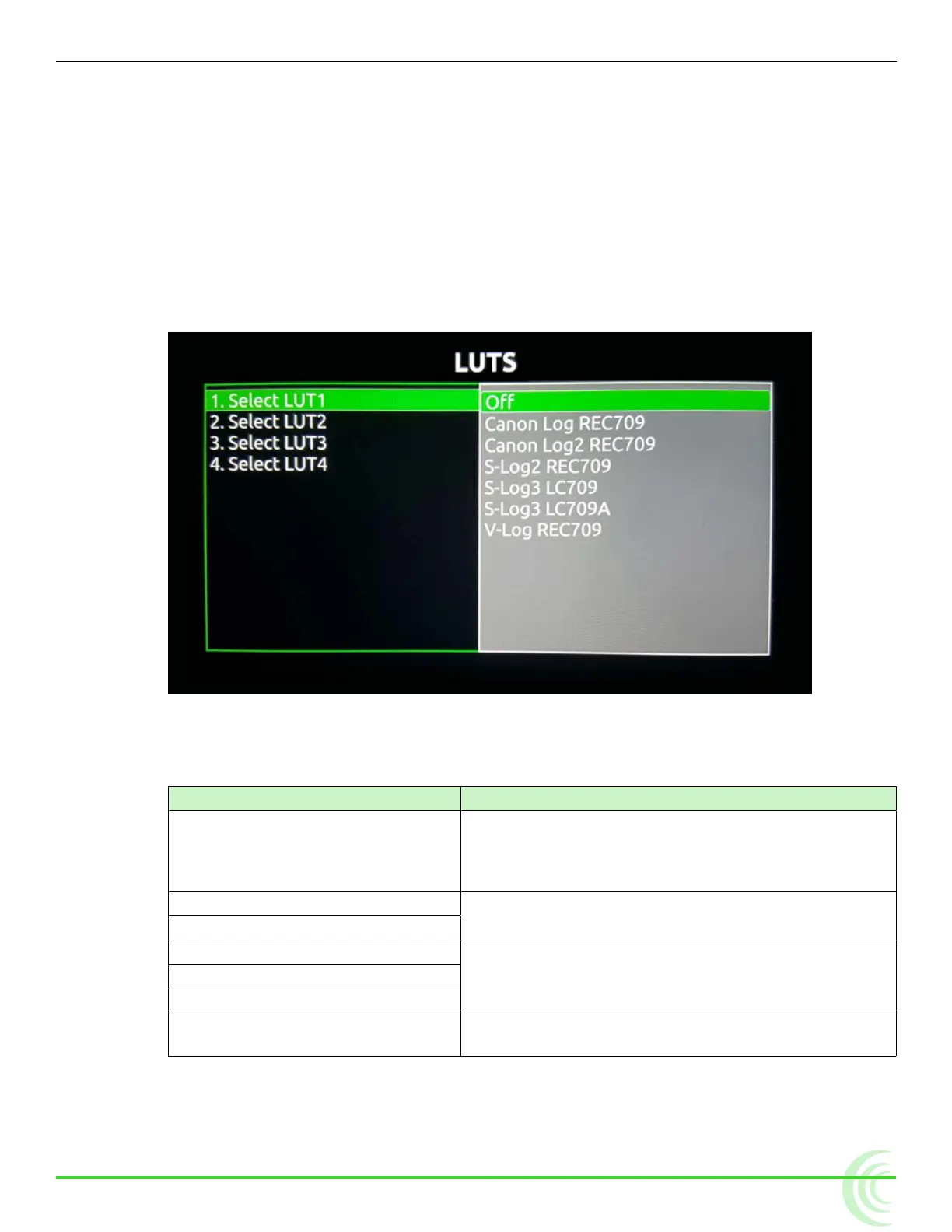
2. Select LUTs. The LUTS screen appears.
3. Dene each of the four options: LUT1, LUT2, LUT3, LUT4 by selecting from
the settings listed. The following table describes the standard settings
available.
setting Description
Off Select if you want one of the four options available
via the LUT soft key button menu to be Off. This
is useful as a quick LUT bypass when comparing
different looks.
Canon Log REC709 Canon logs are provided for use with Canon
®
camer-
as.
Canon Log2 REC709
S-Log2 REC709 S-logs are provided for use with Sony
®
cameras.
S-Log3 LC709
S-Log LC709A
V-Log REC709 The V-log is provided for use with Panasonic
®
cameras.
i The list could vary depending on if any custom LUTs are in the LUTs folder on the
attached SD card or SpeedDrive. Custom LUTs are appended to the end of the
list.



 To Next Page