Rev AA Changing the Position or Appearance of the Print 4-23
Videojet DataFlex 6420 Operator Manual
6 Touch the Home button to return to the home page.
Setting the Printhead Position
Note: This feature can be applied only on continuous mode applications.
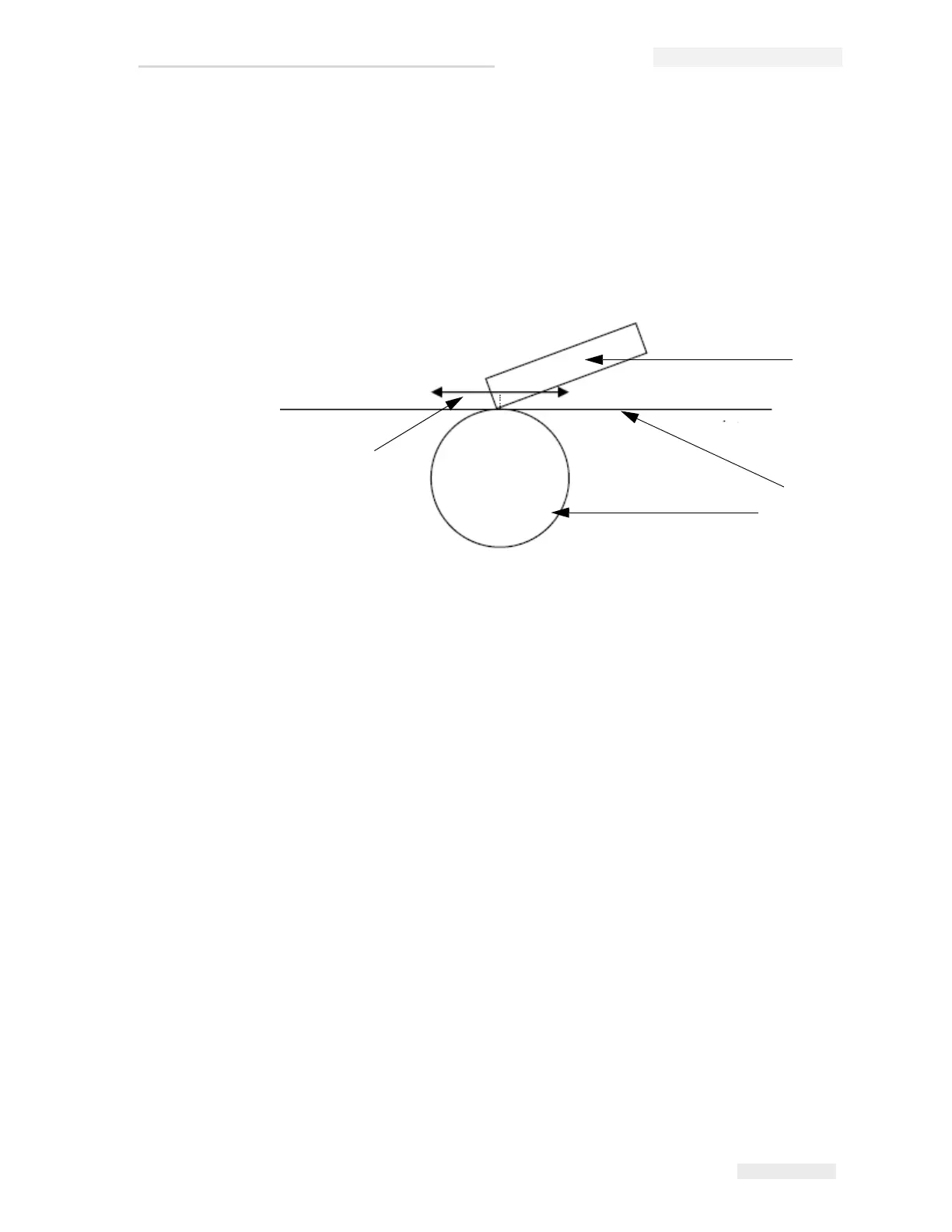
When printing continuously, the printhead will press the target material
down against the roller, as shown in Figure 4-17.
You can change the angle of the printhead against the target material, by
changing the printhead position. This angle affects the print quality. If the
angle is not suitable, the resulting print may appear faded.
To find a suitable printhead position, proceed as follows:
1 Touch the Tools button on the home page.
2 Touch the Setup button on the tools page.
3 Touch the Printhead button to open the printhead setup page.
4 Touch the Print Position button to open the print position parameters
setup page.
5 Enter a new value using the keypad.
Note: You should change the print position parameters in steps of 1 mm. The
print position parameter is in 0.01 mm units, so a change of 100 units will
move the printhead by 1 mm.
Examine the sample prints from each position until you find the
optimum print quality at the required print speed.
6 Touch the Home button to return to the home page.
1. Printhead
2. Target Material
3. Roller
4. Printhead Position Adjustment
Figure 4-17: Printhead Print Position
4
2
3
1



 To Next Page