Rev AA About the CLARiTY® Operating System 2-5
Videojet DataFlex 6420 Operator Manual
About the CLARiTY
®
Operating System
CLARiTY
®
is an icon-based operator control system. It has an easy-to-use
touch screen and most areas of the display are "active", that is, simply
touching an area of the screen is like pressing a "button" on a traditional
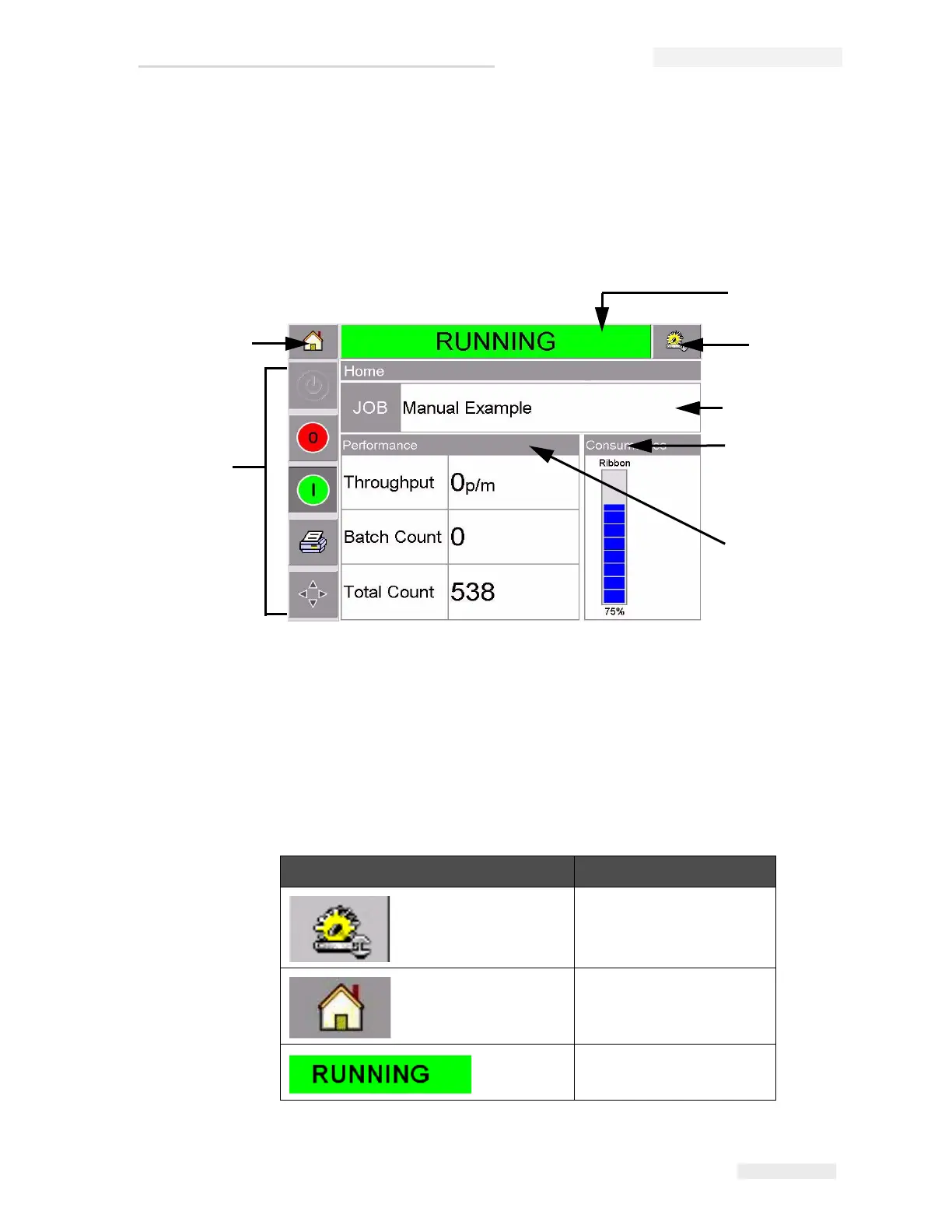
control panel. The CLARiTY
®
home screen’s main buttons are shown in
Figure 2-3.
Shortcut buttons take you directly to the key pages, regardless of the page
that you are currently viewing.
Table 2-1 provides the list of shortcut buttons to be used to access the
required pages.
Buttons Display
Tools Page for printer set
up and diagnostics
Home Page
Fault and Warning Pages
Table 2-1: List of Shortcut Buttons
Figure 2-3: CLARiTY
®
Home Screen
1
2
3
6
7
1. Machine Status Button
2. Tools Button
3. Current Job Details Button
4. Consumables Status Button
5. Production Performance
Button
6. Control Frame Buttons
7. Home Button
4
5



 To Next Page