— 4 —
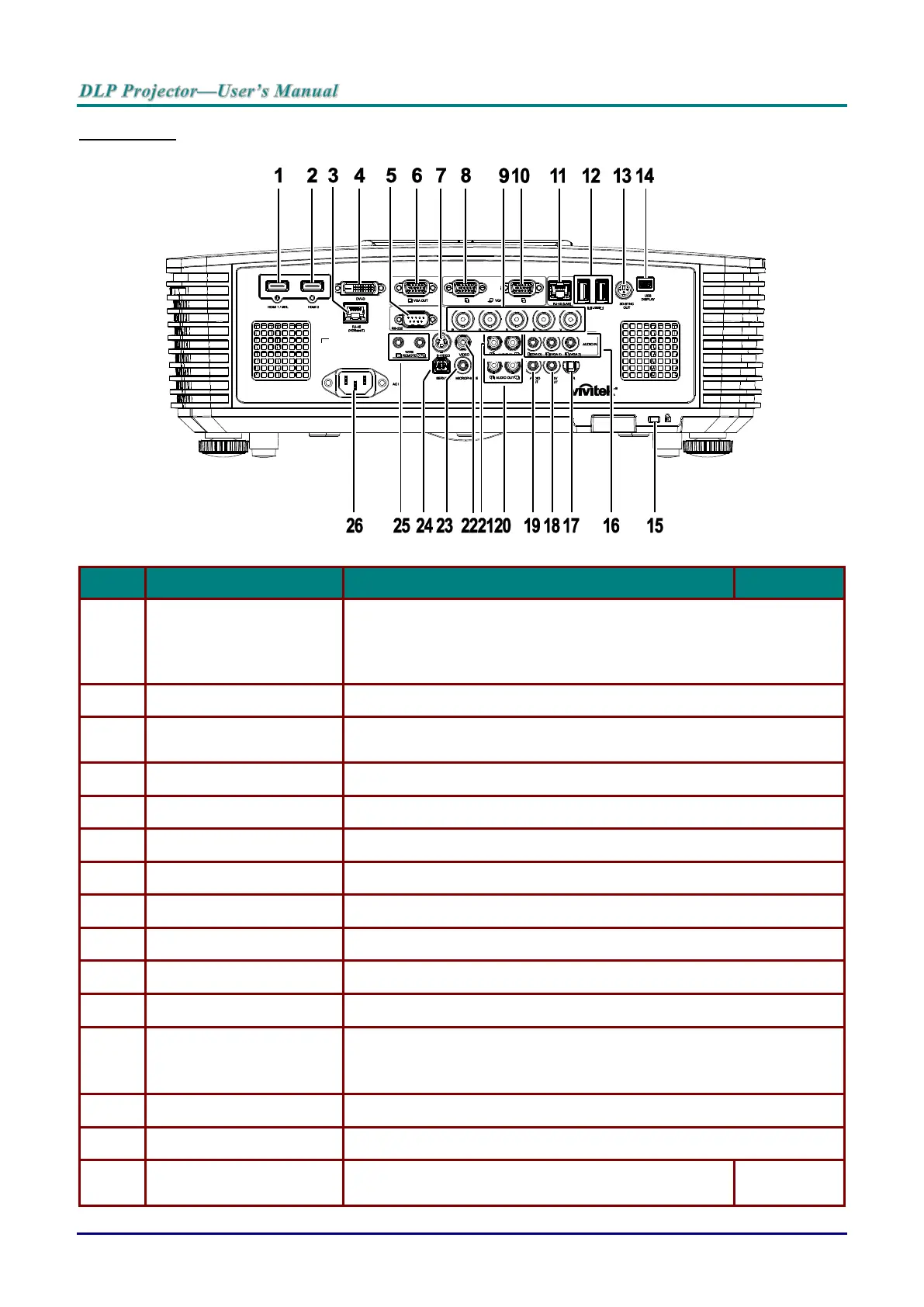
Rear view
Connect the HDMI/MHL cable from an HDMI/MHL device.
Note: Set the Source to HDMI 1/MHL also can be charging connected
MHL compatible smart device as long as the projector Power
On.
Connect the HDMI cable from an HDMI device.
RJ45 (HDBaseT)
(Available in DW3321)
Connect an RJ45 Cat5e/Cat6 cable for HDBaseT signal received.
Connect the DVI CABLE to a display.
Connects RS-232 serial port cable for remote control.
Connect an RGB cable to a display (Pass through by VGA1 only).
Connect a S-VIDEO cable from a video device.
Connect an RGB cable from a computer or a video enabled device.
Connect a BNC cable from a computer.
Connect an RGB cable from a computer or a video enabled device.
Connect a LAN cable from Ethernet.
Connect a USB cable for USB host.
Note: Support 5V/1.0A for each port output as long as the projector
Power On.
Connect 3D IR glasses receiver unit.
Connect your projector to a PC through a USB cable.
Secures to permanent object with a Kensington Lock
system.



 To Next Page