10
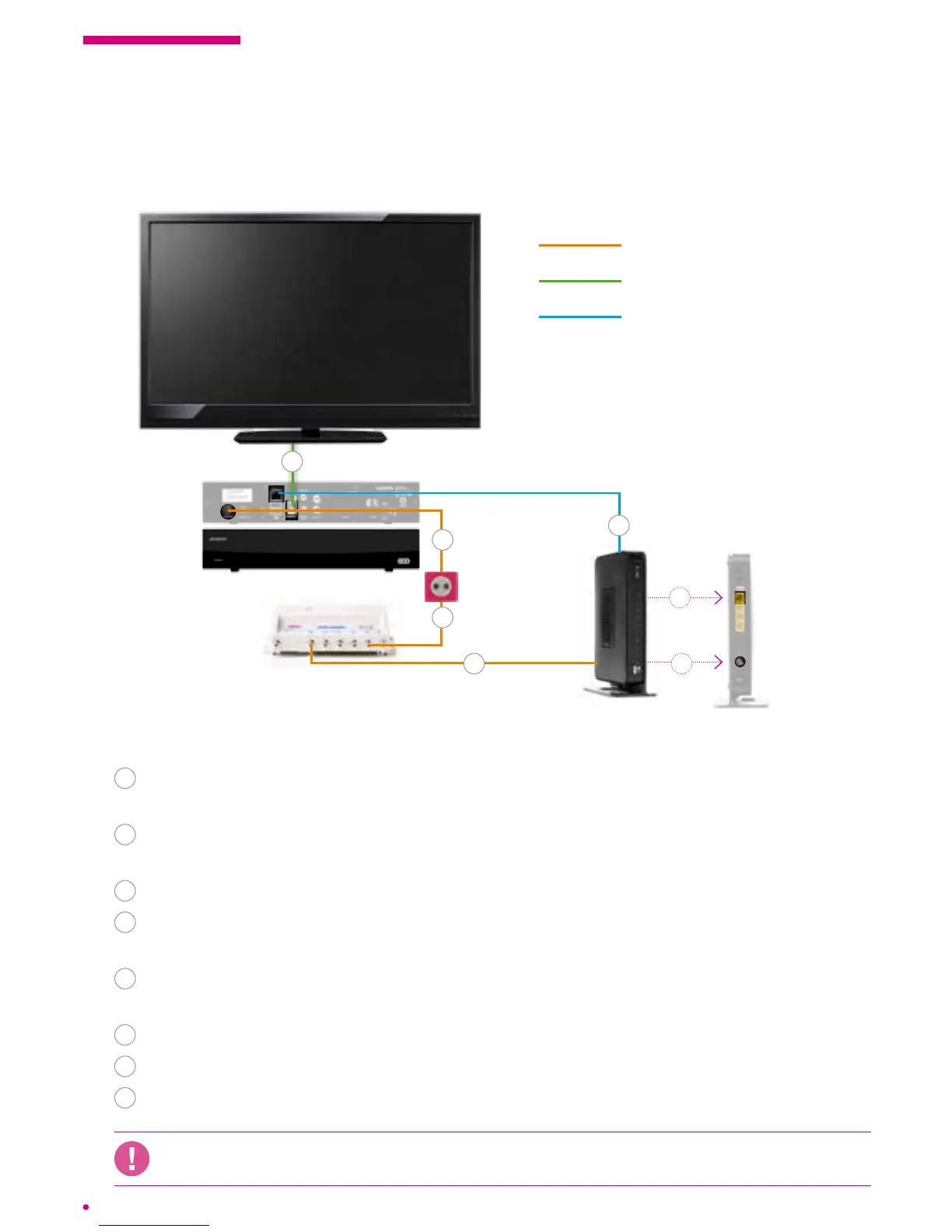
1.3 Connection diagrams
Connecting the box using an Ethernet cable
Follow these steps:
1
Connection between the Network Interface Unit (NIU) and the socket,
performed bythe installer.
2
Plug the coaxial cable from the TV output of the network interface unit (NIU)
intotheRF IN connector of the box.
3
Plug the box into the power outlet.
4
Connect the box to your television set using the HDMI cable or a scart cable
(depending on your TV model).
5
Plug the coaxial cable from the DATA output of the network interface unit (NIU)
intothe cable port of your VOO modem.
6
Plug the modem into a power outlet and switch it on.
7
Turn on your television set.
8
Plug the box into the modem using the Ethernet cable and switch it on.
If you have installed your own router, you must connect your box on this router to ensure
the proper functioning of your services.
coaxial cable
HDMI cable (supplied) or
Scart cable (not supplied)
Ethernet cable
modem
* It is possible that your model is not identical to the model shown but remains compatible.
.évasion box
Network Interface
Unit (NIU)*
cable tv
socket
5
1
2
4
8
5
8



 To Next Page