11
1.3 Connection diagrams
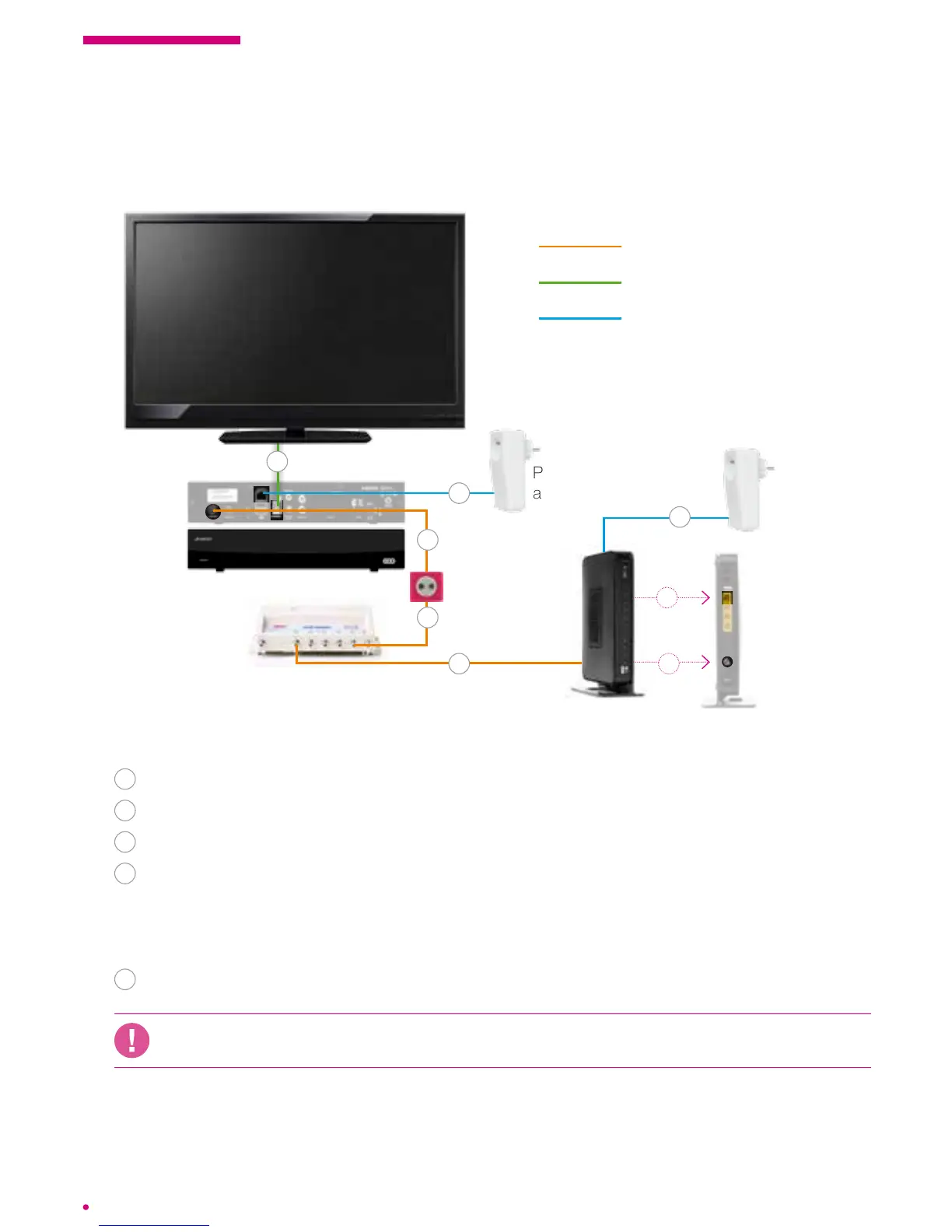
Connecting the box with Ethernet Powerline adapters
Follow steps 1 to 5 on p.10, then:
6
Connect your modem to a Powerline** adapter using the Ethernet cable.
7
Plug the modem into a power outlet and turn it on.
8
Turn on your television.
9
To secure the Internet ows through your grid, you must press the button
(locatednext to the Ethernet ports) of a Powerline adapter and then on the button
of the second adapter. The manoeuvre must be performed within a period of
2min.maximum.
10
Plug the box into a Powerline** adapter using the Ethernet cable and switch it on.
If you have installed your own router, you must connect your box on this router to ensure
the proper functioning of your services.
Powerline
adapter**
Powerline
adapter**
coaxial cable
HDMI cable (supplied) or
Scart cable (not supplied)
Ethernet cable
* It is possible that your model is not identical to the model shown but remains compatible.
** The equipment conguration steps are detailed in the operating instructions supplied with the equipment.
.évasion box
Network Interface
Unit (NIU)*
modem
cable TV
socket
5
1
2
8
5
4
6
10



 To Next Page