12
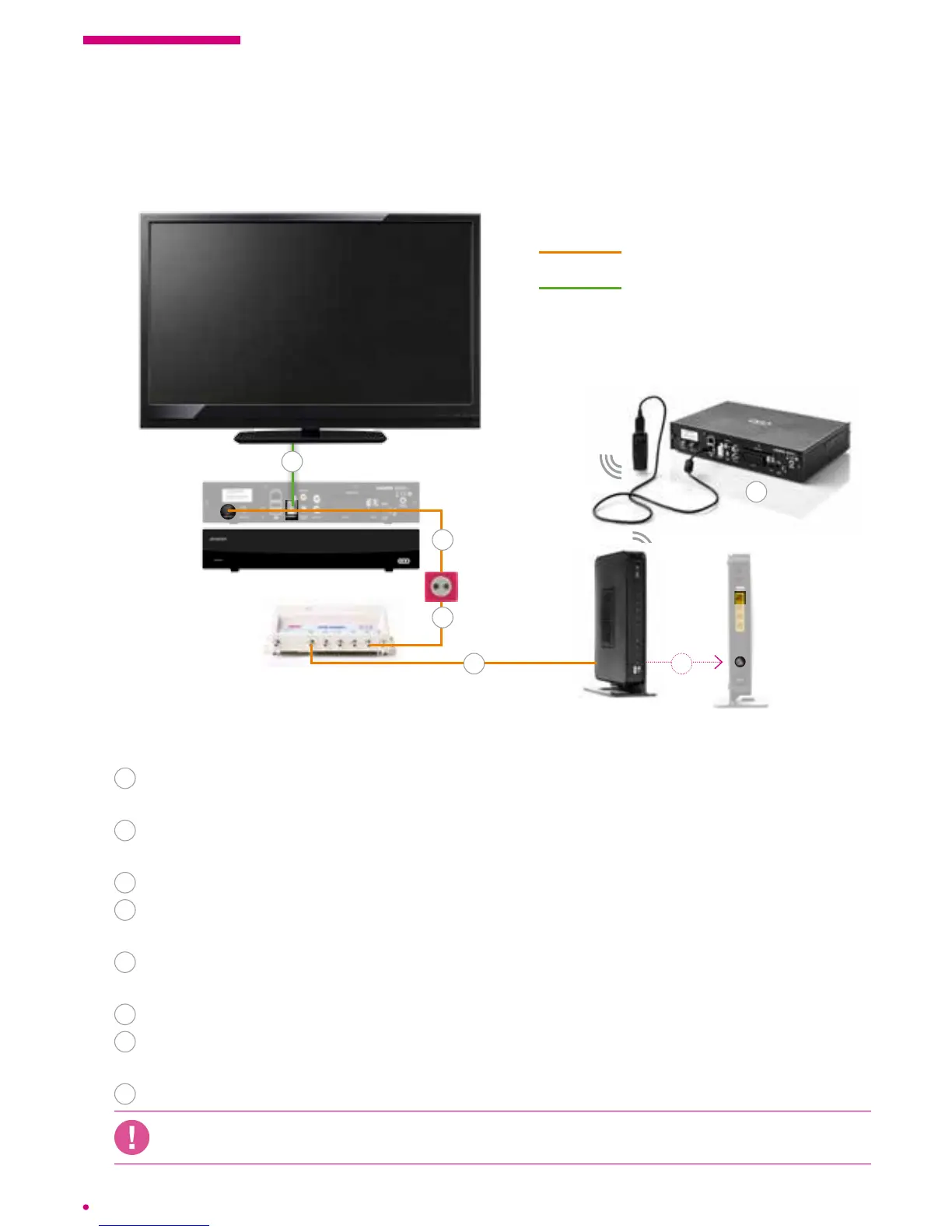
Follow these steps:
1
Connection between the Network Interface Unit (NIU) and the socket,
performedbythe installer.
2
Plug the coaxial cable from the TV output of the network interface unit (NIU)
intotheRF IN connector of the box.
3
Connect the box to the power outlet.
4
Connect the box to your television set using the HDMI cable or a scart cable
(depending on your TV model).
5
Plug the coaxial cable from the DATA output of the network interface unit (NIU)
intothe cable port of your VOO modem.
6
Plug the modem into a power outlet and switch it on.
7
Connect the Wi USB stick** to the box and switch it on. (Make sure that the
wireless network is properly illuminated.)
8
Switch on your television set.
VOO only guarantees a Wi connection with the WiFi stick sold through the installer
orVOOshop.
7
coaxial cable
HDMI cable (supplied) or
Scart cable (not supplied)
* It is possible that your model is not identical to the model shown but remains compatible.
** The equipment conguration steps are detailed in the operating instructions supplied with this equipment.
1.3 Connection diagrams
Connecting the box with a Wi USB stick
modem
.évasion box
Network Interface
Unit (NIU) *
cable distribution
socket
5
1
2
4
5



 To Next Page