7
1.2 Hardware description
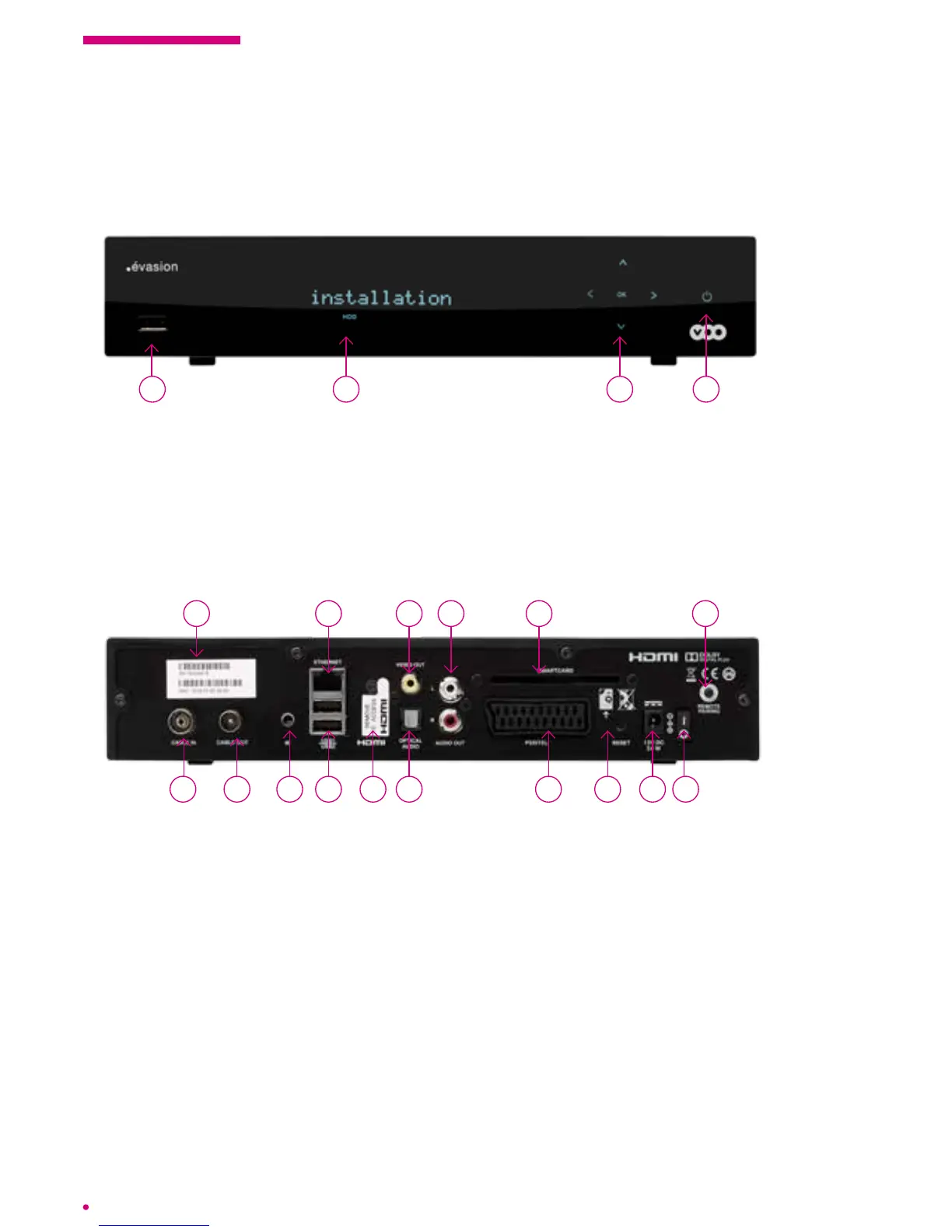
The .évasion box: front panel
1 Serial number
2 RF IN connector: to connect your box to the wall cable television socket or the network interface unit (NIU)
using the coaxial cable
3 RF OUT connector: to connect your box to a television set (for analogue television) or a recorder using
acoaxial cable
4 IR connector: to integrate an extension of the Infra Red receiver for remote control
5 Ethernet connector: to connect your box to your VOO modem via an Ethernet cable
6 USB connector: to connect a Wi USB stick (Dongle) or an external storage unit
7 HDMI connector: to connect your HD Ready or Full HD television using the HDMI cable
8 Video Out: analogue video connector to plug your box into an external device
9 Digital S/PDIF audio connector: to plug your box into a home cinema
10 RCA analogue audio connectors: to plug your box into an analogue amplier
11 Slot for smart card: not required on your box
12 Scart connector: to connect your box to your television if the latter has no HDMI port
13 Reset button
14 Power connector
15 ON/OFF button
16 Remote pairing button: to pair your box with a remote control
1
3
5
7
108 11
12 14 15
16
4 1392 6
134 2
1 Standby button
2 Navigation and conrmation keys
3 LED showing the channel or box status
4 USB connectivity
The .évasion box: back panel



 To Next Page