125
Programme unit
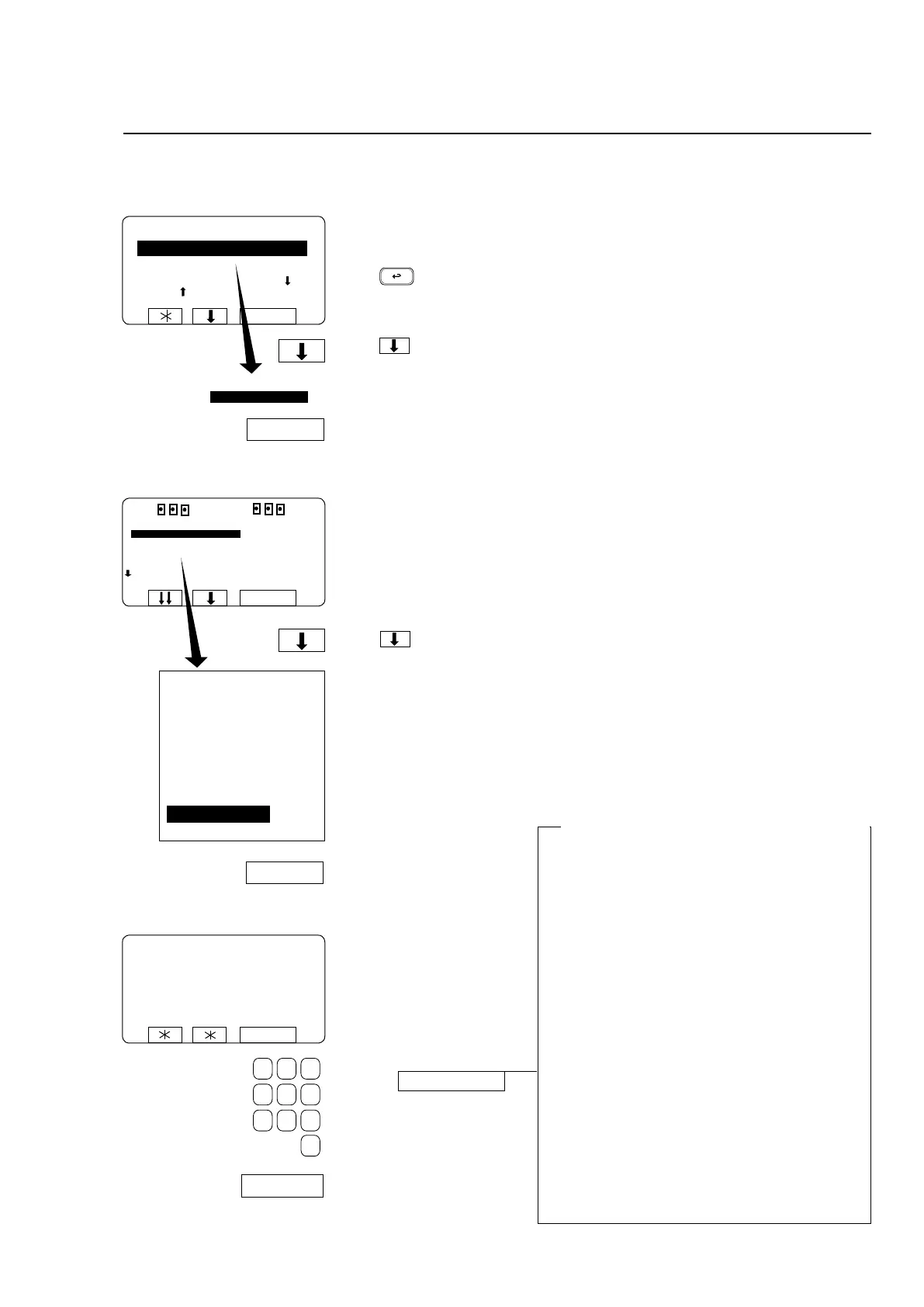
To select the ”SETTINGS 2” function
SELECT
SELECT
RUN A WASH PROGRAM
GO TO THE MENU
If this menu is not currently
displayed:
Press repeatedly.
Press to highlight ”GO
TO THE MENU”.
Press SELECT.
Press several times...
... to highlight ”SETTINGS
2”.
Press SELECT.
MENU
MAKE A CHOICE:
WASH PROGRAM LIBRARY
PROGRAMMING MODE
SETTINGS 1
MEMORY CARD
PAY-PERWASH
SERVICE MODE
WASH PROGRAM LIBRARY
PROGRAMMING MODE
SETTINGS 1
MEMORY CARD
PAY-PER-WASH
SERVICE MODE
STATISTICS
MANUAL FUNCTIONS
SETTINGS 2
EXIT
SELECT
SELECT
Enter the four-digit code
supplied by the supplier.
Press SELECT.
PLEASE ENTER YOUR PASSWORD:
SELECT
SELECT
SETTINGS 2
Changes in ”SETTINGS 2” must be approved
by the supplier
The variables which you can change via ”SET-
TINGS 2” belong to a category which, if they are
changed carelessly or incorrectly, could jeopardise
the machine’s safety system(s) or its reliability.
For this reason SETTINGS 2 is protected by a
code/password system. Every time you access
SETTINGS 2 you have to obtain a new password
from the supplier.
The system works like this:
• WhenyouopenSETTINGS2,youwillseean
eight-digitcode.Thiscodewillbedifferenteach
time you open SETTINGS 2.
• Youneedtotellthesupplier,Swedenexactly
what this code was. Using a special computer
program,theywillthenascertainthefour-digit
password which unlocks this code, and give it to
you.Thispasswordwillworkonlywiththeeight-
digit code you have noted this time.
• Onceyouhaveenteredthepassword,youhave
access to SETTINGS 2, and can change func-
tions as required.
CODE: XXXXXXX
RUN A WASH PROGRAM
GO TO THE MENU
MAKE YOUR COICHE WITH
OR AND PRESS SELECT
WEIGHT, KG 000,0







 To Next Page