1726 North Ballard Road, Suite 1 - Appleton, WI 54911 - 920.991.9082
Technical Support 855.804.5774 - Parts@waupacaelevator.com
PTE10200-A
13 MAR 2018
W
E
Series: 008, 021, 022, 114, 115, 116, 118, 210
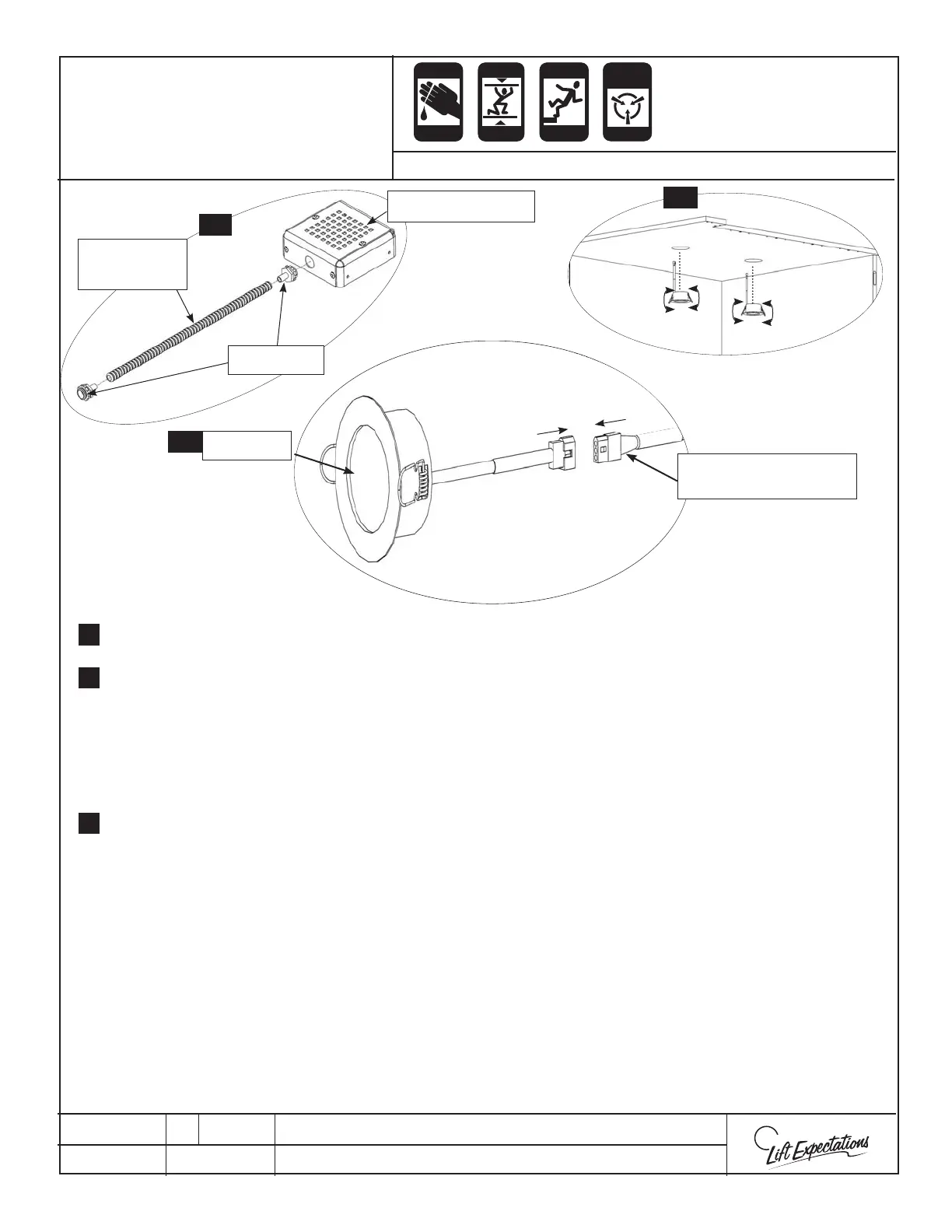
LED Light Installation
LED Light
LED Extension Cord
(To LED light Controller)
LED Light Cover
Connector
Flexible
Conduit
Assemble all the LED light covers with the provided hardware.
Insert all the LED lights by pulling the springs back and feeding the plug and light through the
holes in the ceiling from the inside of the elevator car.
Place and temporarily secure the power supply on top of the elevator car in desired location.
Note: While securing anything to the elevator car, verify nothing punctures through to
the interior of the elevator car.
Plug the LED extension cords into the LED lights after the desired route has been laid out. Cut the
connector o the unused end of the LED extension cord. Next feed it through the conduit until
it reaches the power supply. If the LED extension cord needs to be shortened remove it from the
conduit and cut to the desired length. Finally feed the wire back through the conduit.
Note: Before cutting, verify you’re cutting the right end of the LED extension cords, have
enough extension cord to reach the LED light controller box and enough to for future
maintenance. ( Like changing out a light) You may need to supply your own exible
conduit if more than 18” is required.
Remove a knockout and connect the power supply to the car top with the provided conduit wire
harness. Wire per wiring schematic.
Knock out the holes required on the power supply for the LED lights and securely fasten the
loose whips of the LED light cover assemblies.
1.
2
4.
4
1
2.
CRUSH
HAZARD
CUTTING
HAZ ARD
CRUSH
HAZARD
CRUSH
HAZ ARD
FALLING
HAZ ARD
ANTI-
STATIC
ALERT
6.
5.
3.



 To Next Page