44
• Raft Top Line Width (mm): This is the width of the lines in the top surface of the raft.
These lines can be thin so that the top of the raft is smooth.
• Raft Middle Line Width (mm): This is the width of the lines in the middle raft layers.
Making the second layer extrude more causes the lines to stick to the build plate.
• Raft Base Line Width (mm): This is the width of the raft base layer. These should be
thick lines to assist with build plate adhesion.
• Prime Tower Line Width (mm): This is the extrusion width of the prime tower.
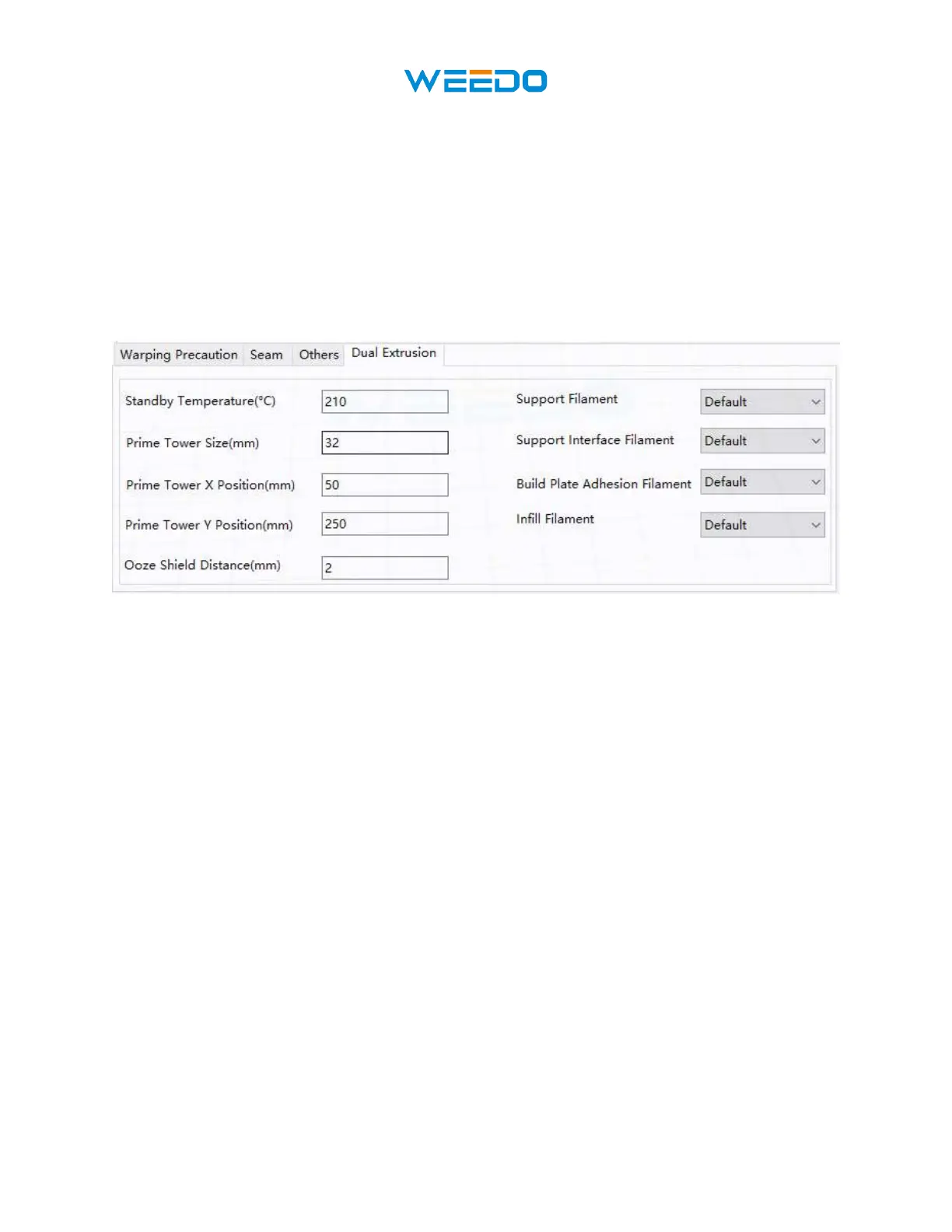
8.12 Dual Extrusion Tab
Pic77
• Standby Temperature (°C): Sets the temperature of the second extruder when not
actively printing.
• Prime Tower Size (mm): This is the extrusion width of the prime tower. The prime
tower is a location that the printer will use to switch nozzles during dual extrusion to
prevent a gap in the model by printing a small amount of filament at the prime tower
location.
• Ooze Shield Distance (mm): This is the size of the circle of protection layers printed on
the edge of the model.
• Support Extruder: Selects which extruder to use for printing support structures.
• Support Interface Extruder: Selects which extruder to use for printing supports.
• Build Plate Adhesion Extruder: Selects which extruder to use for printing the initial
layer.
• Infill Extruder: Selects which extruder to use for printing the infill.



 To Next Page