1
WEILER E1650 REMIXING TRANSFER VEHICLE
3-26
Operating Instructions
3
Paving
Truck Signal Lights (Optional)
The truck signal lights indicate to the truck driver if the truck should raise, lower, move, or hold the
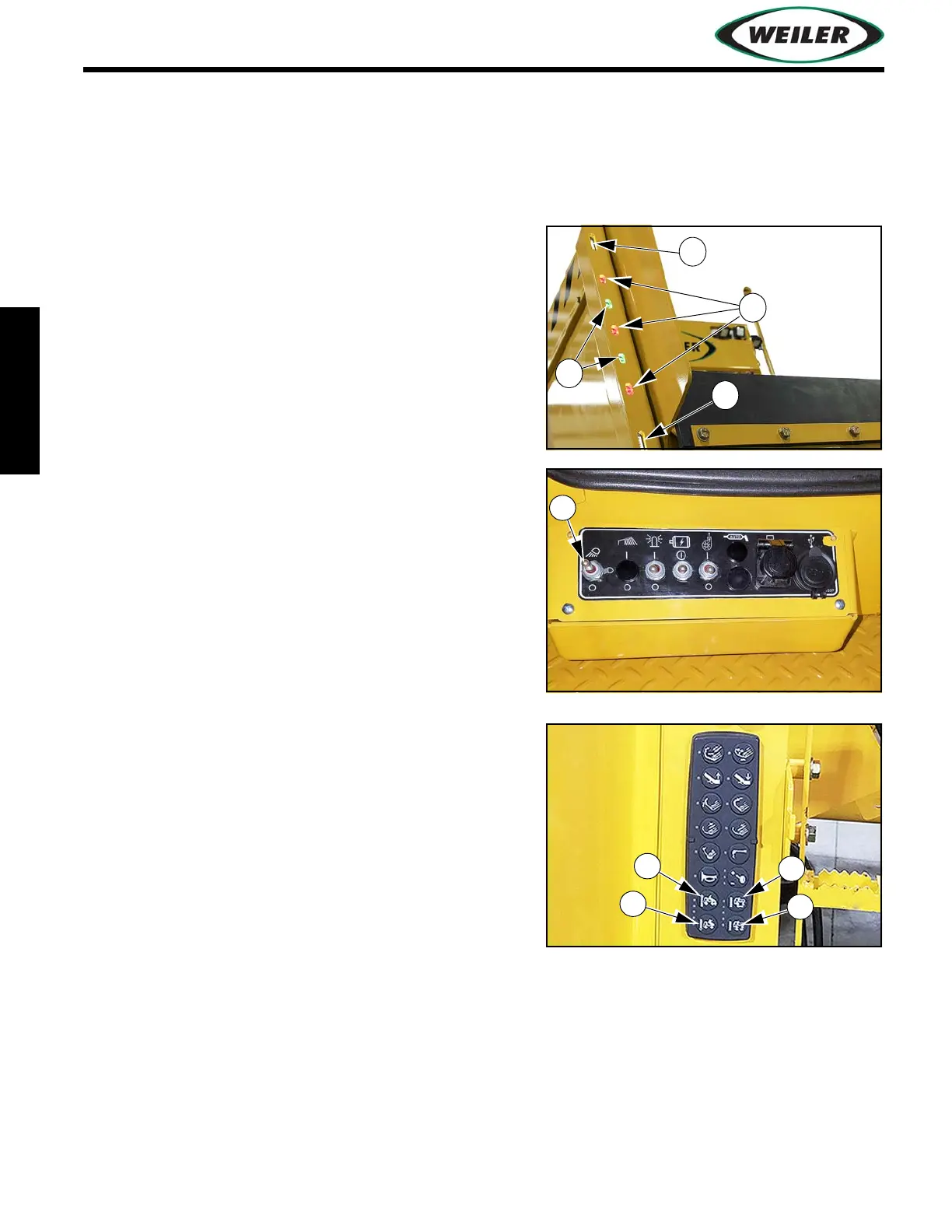
truck bed position for delivery of asphalt to the dump hopper. The truck signal lights (A) and (B) can
be controlled from the dash panel or from either of two dump hopper control panels. When activated,
top and bottom white lights (C) are constantly on and act as running lights.
The truck signal lights consist of 3 red and 2 green LED
lights. Red lights (A) notify the truck driver to hold the
truck bed position. Green lights (B) notify the truck
driver to move the truck bed position.
1. Activate white LED running lights using Work
Lights Switch (1).
2. Push Truck Signal Light Raise Button (2) to signal
truck driver to give more material by raising truck’s
dump box.
Green lights will strobe upward for 30 seconds.
3. Push Truck Signal Light Lower Button (3) to signal
truck driver to stop giving material by lowering
truck’s dump box.
Green lights will strobe downward for 30 seconds.
4. Push Truck Signal Light Move Button (4) to flash
green lights, signaling driver to move.
5. Push Truck Signal Light Hold Button (5) to hold red
lights on steady, signaling driver to stop.


 To Next Page