EasyManua.ls Logo

Welbilt Merrychef eikon e1s - Page 111

Welbilt Merrychef eikon e1s
148 pages
Print Icon
To Next Page IconTo Next Page
To Previous Page IconTo Previous Page
Loading...
111
eikon e1s
Service and repair guide
Automatic updates using Autoupd.ATE files
1.
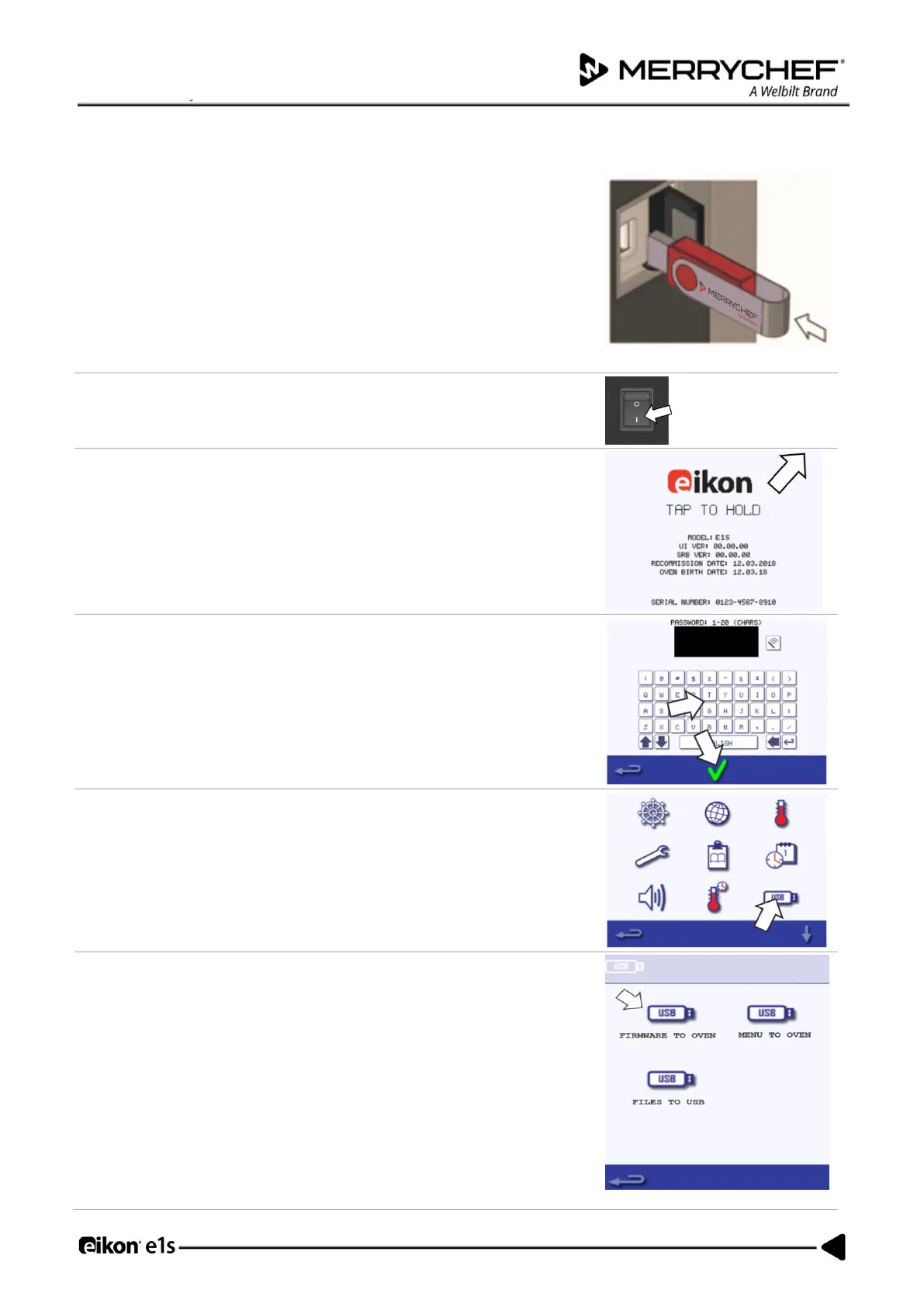
Load the USB stick with the Autoupd.ATE file.
Copy the following firmware files to the ROOT directory of the USB memory
stick:
QTS-eX-XXX-VX.X.XX.BIN
SRB-eX_X_X_XXX.BIN
VX-APP-eX.CBR
Autoupd.ATE
With the oven switched OFF, open the cover of the USB port and insert the
USB memory stick into the slot.
2.
Switch ON the oven.
3.
Tap the top right of the screen to bypass the preheat stage.
4.
Enter the password "MANAGER" and select OK to display the settings menu.
5.
Select the USB symbol.
6.
Select the 'Firmware to Oven' USB symbol.

Table of Contents

Related product manuals