6-10
Starting Quick Test Mode
All of the steps below must be done in sequence
in order to reach the Diagnostic Test. This
executes the automatic test but does not run
the user interface test.
1. Close the door.
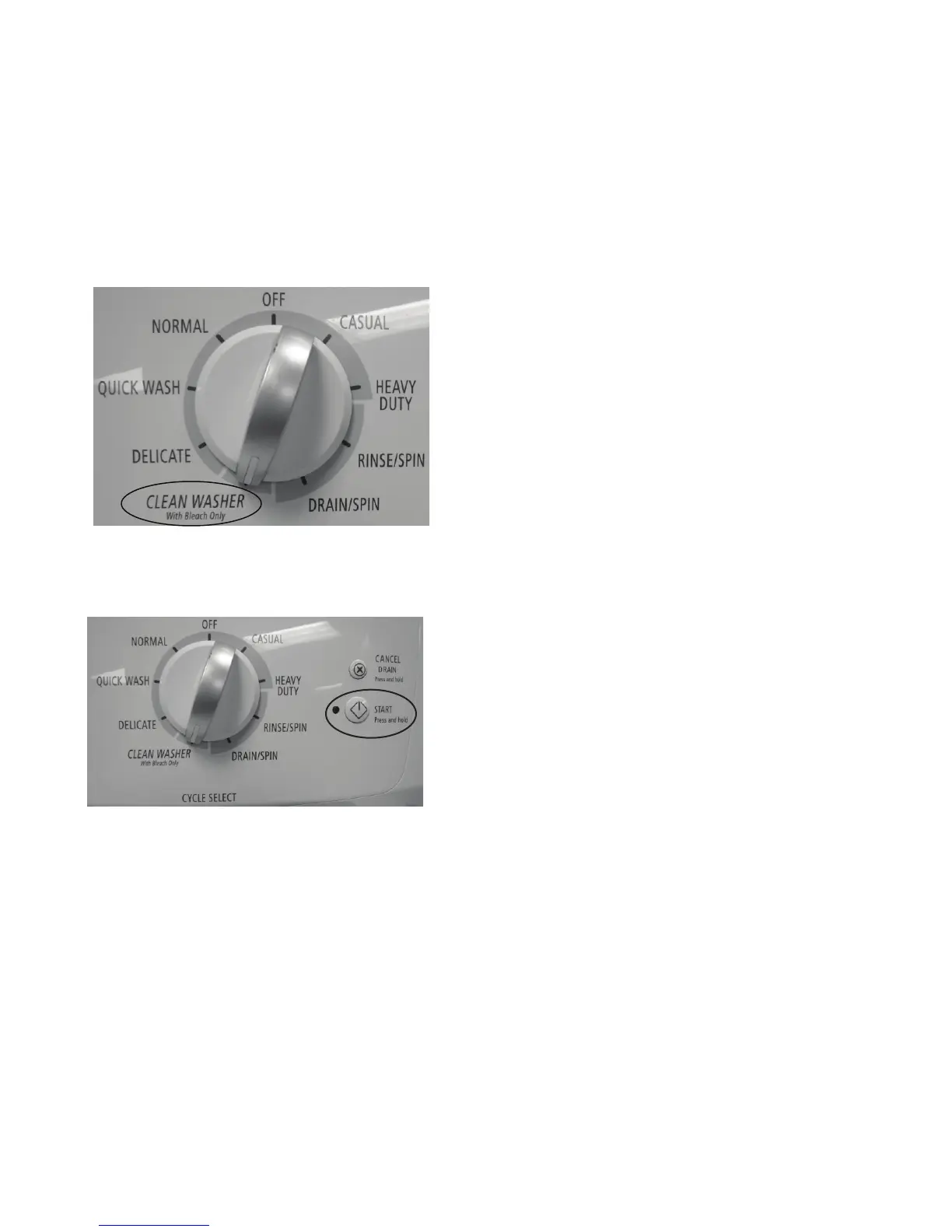
2. Switch the knob and select the CLEAN
WASHER cycle.
NOTES:
Please ensure that current machine status is in
PROGRAM (SELECTION) mode. Otherwise,
please follow the instructions below to bring it
back to PROGRAM (SELECTION) mode.
1) PAUSE mode: Press and hold CANCEL/
DRAIN button for 3 seconds for reset, then
switch knob to enter PROGRAM mode.
2) FAILURE mode: Switch knob to enter
PROGRAM mode.
3) EXECUTION mode: Press and hold
CANCEL/DRAIN button for 3 seconds for
reset, then switch knob to enter PROGRAM
mode.
4) STANDBY mode: Press START button or
switch knob to enter PROGRAM mode
5) DELAY START mode: Switch knob to enter
PROGRAM mode.
3. Press “START” button for 4 times within 5
seconds.
4. Following steps are automatically driven,
or they can be manually advanced by
pressing the Cancel/Drain button 2 times.
See table page 6-11.



 To Next Page