92
ENGLISH
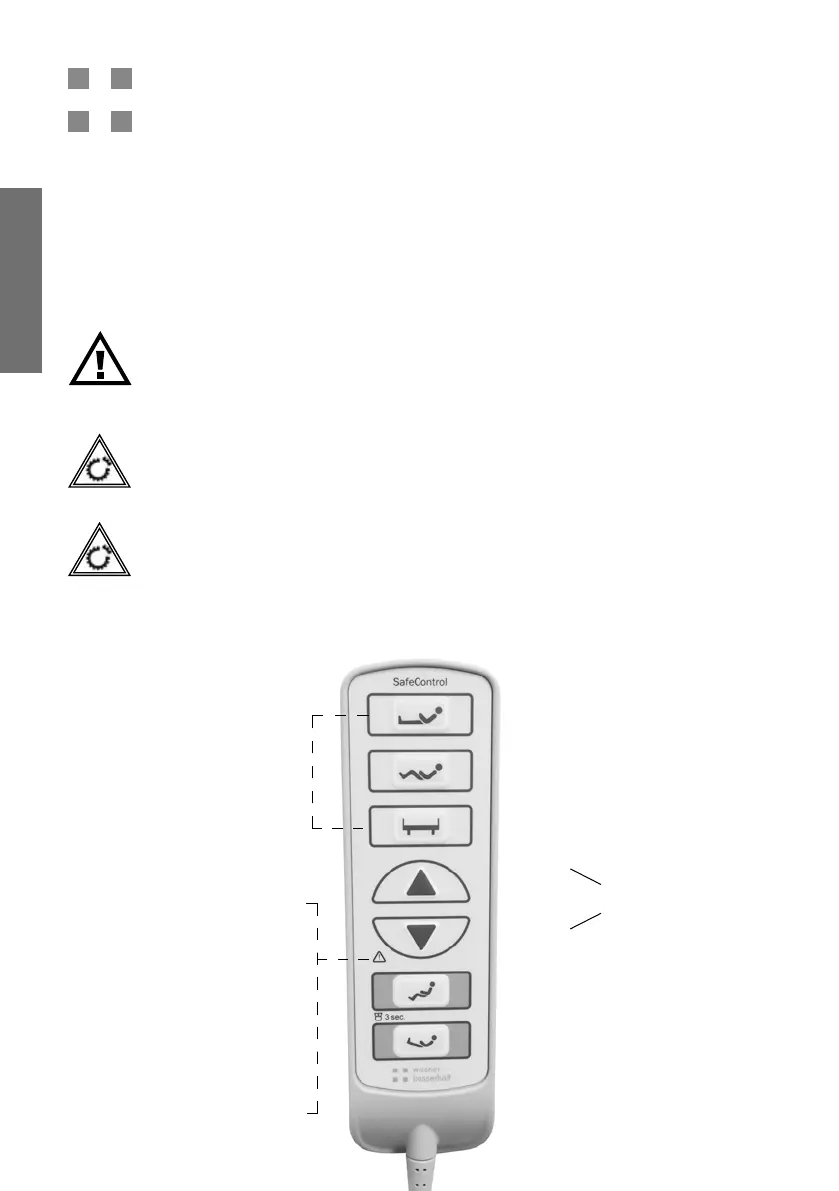
6. Handset SafeControl
First-fault safety of the handset:
The handset of the nursing home beds has a rst-fault safety feature. This means that adjus-
ting the bed by accidentally pressing a button or playing with the handset is prevented. The
functions of the handset are explained in detail in the following chapters.
Attention!
All electrical functions can be faulty. Unless you lock them and release them for
the duration of the function.
Attention!
Other devices emitting electromagnetic radiation (e.g., DECT cordless telephones)
may affect electrical bed functions. Therefore, bed functions that are not required
must be locked for safety. The use of such devices in the environment should be
avoided if possible.
Danger!
When moving the bed to the various positions, make sure that there are no per-
sons, body parts or objects in the adjustment range or between the head part/
footrest and the oor or underneath the patient surface.
Backrest
Seating position
Height adjustment
Automatic comfort seating
Automatic prevention
Up
Down
Description of the LED display
Green: No action key pressed or
System is ready for operation or in
locking mode.
Unlit: Bed is not connected to the
mains
Yellow for 2 sec.: Locking mode
is switched on or off; continuous:
Bed is being moved, or: Error
(even if no button is pressed)
Arrow buttons ash after
a function key is selected
Functions in resident mode
Functions in nursing mode
Locking mode
When the handset is moved, the
rst and third buttons ash green
to indicate lock mode.


 To Next Page