Features
975-0307-01-01 1–5
Features
Indicator Lights Four lights on the front panel indicate the operating status and network
status of the XW Auto Generator Start.
Connectors Two network ports on the bottom panel connect the XW Auto Generator
Start to the Xanbus system. A 20-contact pluggable connector (also on the
bottom panel) allows the XW Auto Generator Start to connect to the
generator’s starting circuitry, thermostats and external switches. See
“Bottom Panel” on page 1–6.
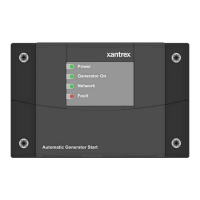
Front Panel
Figure 1-2
XW Auto Generator Start Front Panel
Table 1-1
Front panel features
Feature Description
1
Power light (green) indicates the
XW Auto Generator Start is
receiving network power.
2 Generator On light (green) indicates the generator is running.
This light turns on when the generator run signal is active.
See “Important” on page 2–24.
3
Network light (green) indicates the
XW Auto Generator Start
is communicating with other Xanbus-enabled devices.
4
Fault light (red) indicates an
XW Auto Generator Start fault
has occurred.
See “Troubleshooting” on page 5–1 for information about
XW
Auto Generator Start
faults.
1
2
3
4


 To Next Page
 Loading...