
 Need help?
Do you have a question about the Xantrex XW and is the answer not in the manual?
Provides general safety guidelines and precautions for using the device.
Details precautions related to explosive gas hazards when installing or using the device.
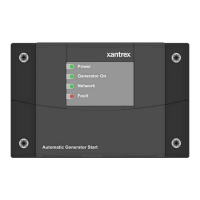
Lists the minimum basic system components required for the XW Automatic Generator Start.
Covers planning, tools, materials, and choosing a location for installation.
Explains how to route connections to the generator, thermostats, and network.
Provides steps for mounting the unit and connecting the wiring harness.
Details circuit limitations and wiring harness connections for the 20-contact connector.
Guides on identifying generator wires and selecting generator types for connection.
Lists settings for start-stop parameters like QT EN, QT Begin, QT End, Gen Type.
Contains settings for automatic start/stop triggers based on battery, thermostat, and load.
Explains how the device generates faults/warnings and how to acknowledge them.
Lists warning messages, their cause, and recommended actions.
Lists fault messages, their cause, and recommended actions for troubleshooting.
 General
| Maximum Power Point Tracking (MPPT) | Yes |
|---|---|
| Model | XW |
| Category | Controller |
| Maximum PV Array Voltage | 150V |
| Nominal Battery Voltage | 48V |
| Output Voltage | 48V |





 To Next Page