Gaining remote access from
a PC that has Windows 7
installed
Changing the settings of a PC for
remote accessing
1
Click “View network status and tasks” in
“Control Panel”.
2
Click “Set up a new connection or network”.
3
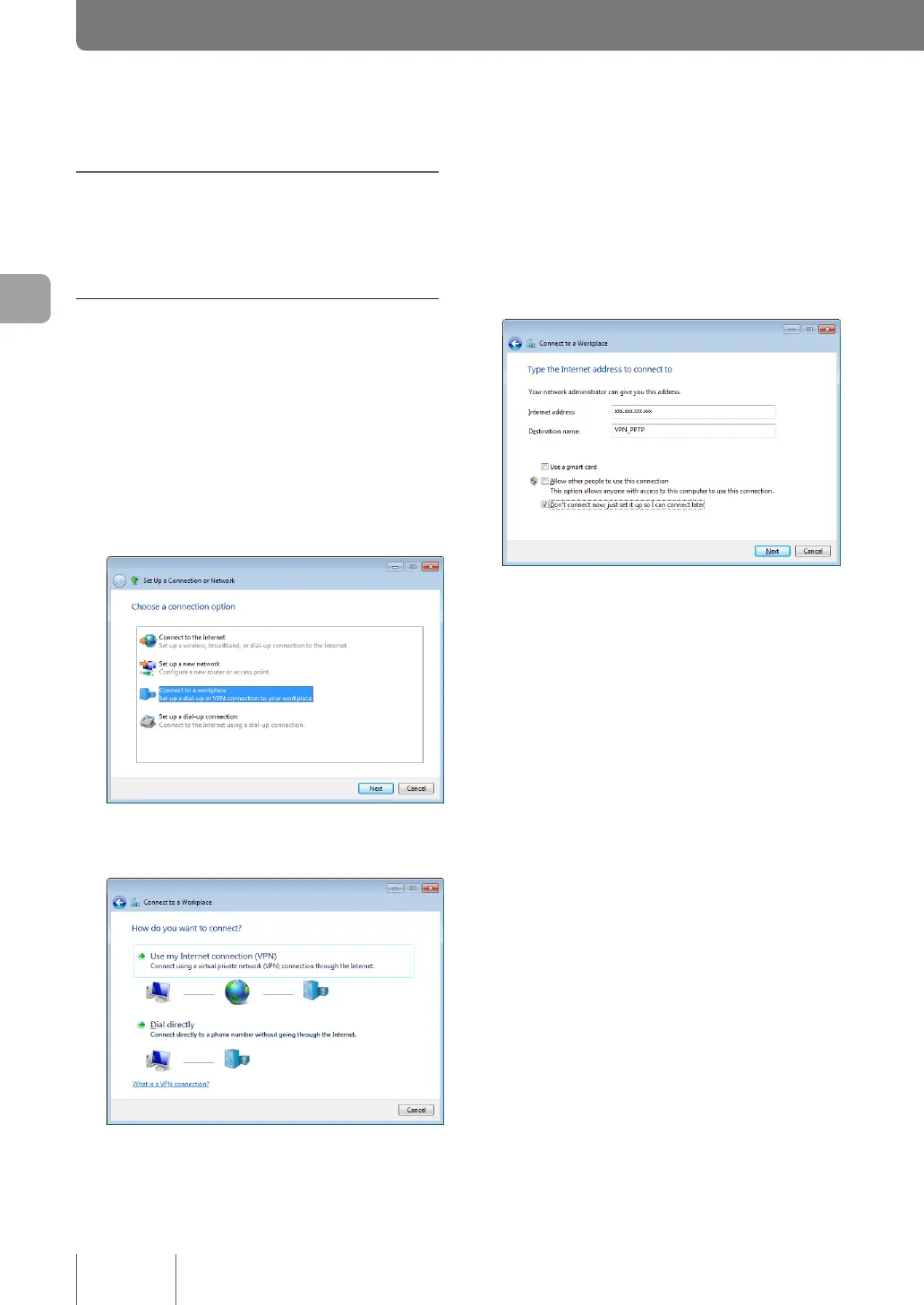
Select “Connect to a workplace” and then click
“Next”.
4
Click “Use my Internet connection (VPN)”.
5
In “Internet address”, enter the host address
obtained with the netvolante DNS service or
the WAN IP address of the product.
6
Type “VPN_PPTP” in “Destination name”.
7
Select “Don't connect now, just set it up so I
can connect later” and then click “Next”.
8
Click “Create” button.
9
Click “Close” button.
Now, the setting up of a remote access connection is
complete.
74
Implementing site-to-site VPN connections
4
Gaining remote access using PPTP
(Continued from the previous page)



 To Next Page