76
Implementing site-to-site VPN connections
4
Gaining remote access using PPTP
(Continued from the previous page)
11
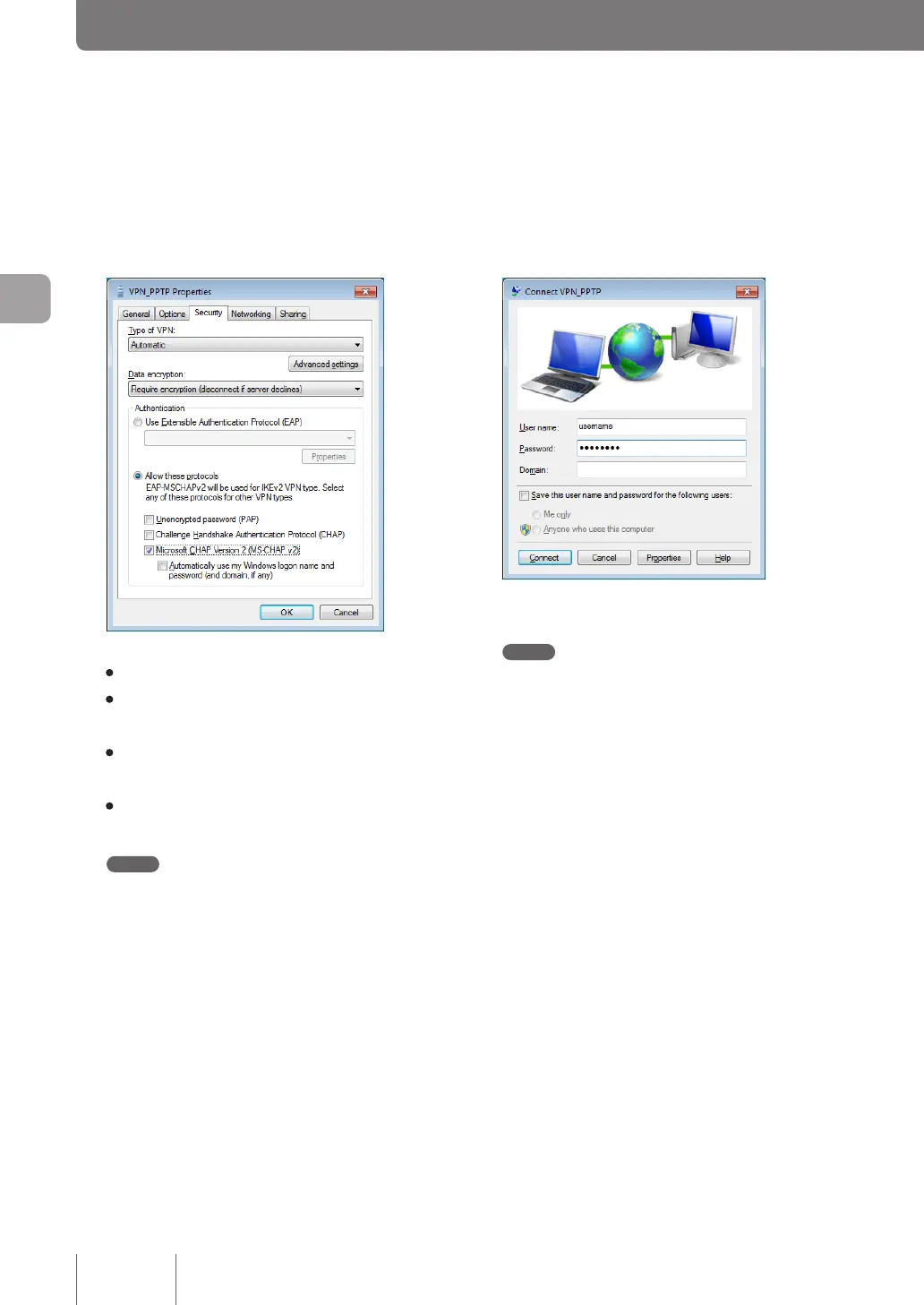
Under “Authentication”, select “Allow these
protocols”, select the check boxes as shown
below and then click “OK”.
• Unencrypted password (PAP): Unchecked
• Challenge Handshake Authentication Protocol
(CHAP): Unchecked
• Microsoft CHAP Version 2 (MS-CHAPv2):
Checked
• Automatically use my Windows logon name
and password (and domain, if any): Unchecked
Note
Windows 7 does not support Microsoft CHAP Version 1
(MS-CHAP). Note the settings you congured in Step 4
on page 76.
12
Click “OK” in “VPN_PPTP Properties” window
and close the window.
13
Enter the authentication user ID in “User
name” and password in “Password” you set
in Step 4 on page 73 and click “Connect”.
VPN connection to the product now begins.
Note
If you select “Save this user name and password for the
following users:” check box, you no longer need to enter
the password. If you do not select it, you need to enter the
password each time you connect to the VPN.
14
To disconnect from a VPN connection, click
“Disconnect”.
This breaks a connection to the product.



 To Next Page