User’s Manual 1PH HYD3000-HYD6000-ZSS
Rev. 1.1 16/03/2021
Identification: MD-AL-GI-00
Rev. 1.1 of 16/03/2021 - Application: GID
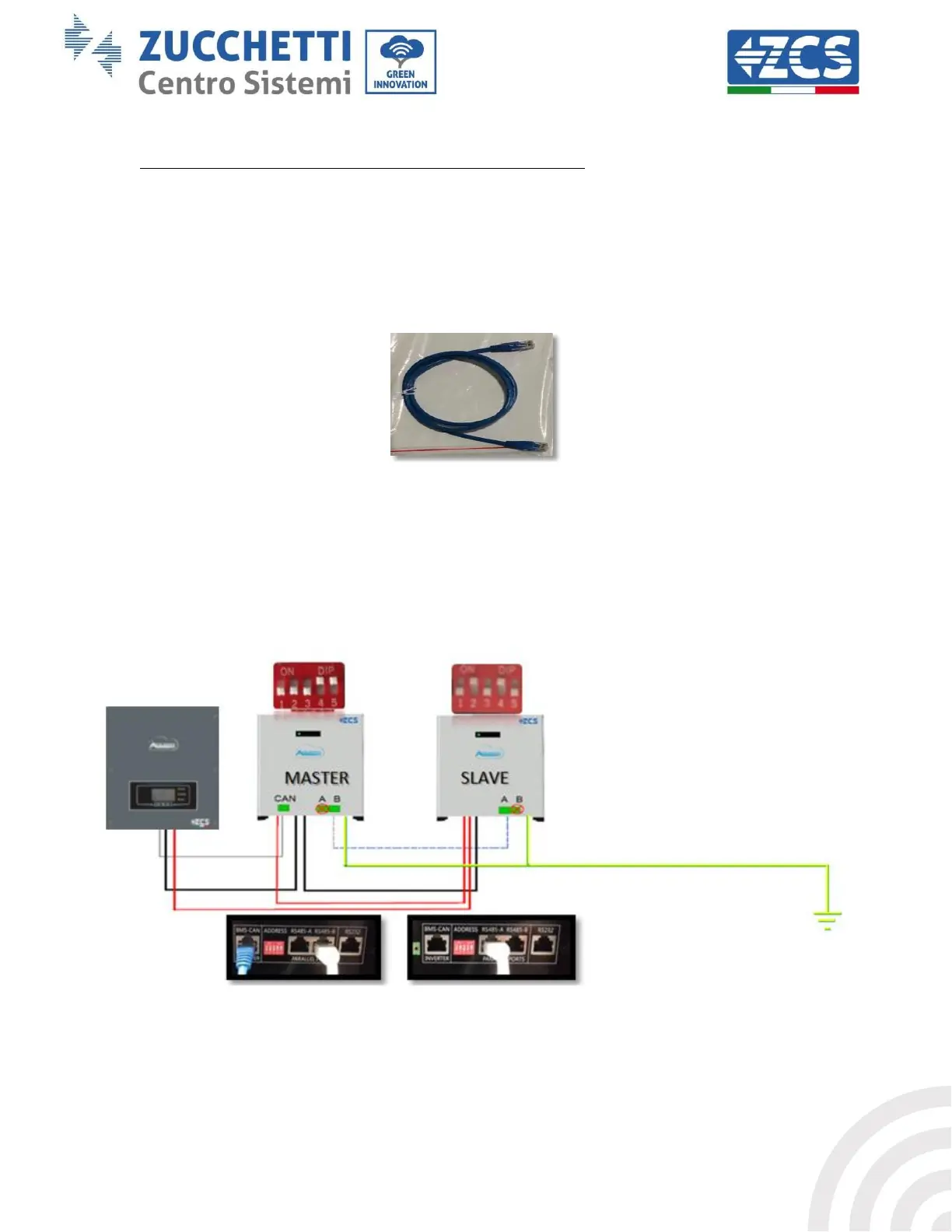
b. Set the DIP switches correctly according to the number of batteries connected, as shown in the figure
(warning: only make changes when the battery is switched off).
c. Connect the communication cable inserted in the CAN port of the inverter to the CAN-BUS port of one
of the batteries, this will now become the MASTER battery.
d. The MASTER must be connected to the communication cable inside the battery box starting from the
RS485-B port and arriving at the RS485-A communication port of the Slave 1 battery. (Attention: do
not connect the RS485-A port to the Master battery).
Figure 14 – Communication cable between the batteries
e. In case of additional batteries, the communication cable will be connected as indicated above for the
connection of the MASTER battery to SLAVE 1.
f. The last battery will only have the RS485-A port connected.
Figure 15 – Parallel connection of two WeCo batteries









 To Next Page