User’s Manual 1PH HYD3000-HYD6000-ZSS
Rev. 1.1 16/03/2021
Identification: MD-AL-GI-00
Rev. 1.1 of 16/03/2021 - Application: GID
4.7. Connecting a Critical Load (EPS function)
Critical Load (LOAD): in the event of a power failure (or operation in Off-Grid mode), if the EPS function is
enabled, the 1PH HYD3000-HYD6000-ZSS inverter will work in Emergency Power Supply (EPS) mode, using
the energy stored in the battery to supply energy to the critical load via the LOAD connection port.
The LOAD connection port is only for connecting critical loads. The power of critical loads must not exceed
3000VA.
The procedure for connecting the LOAD port is the same as that for connecting the grid.
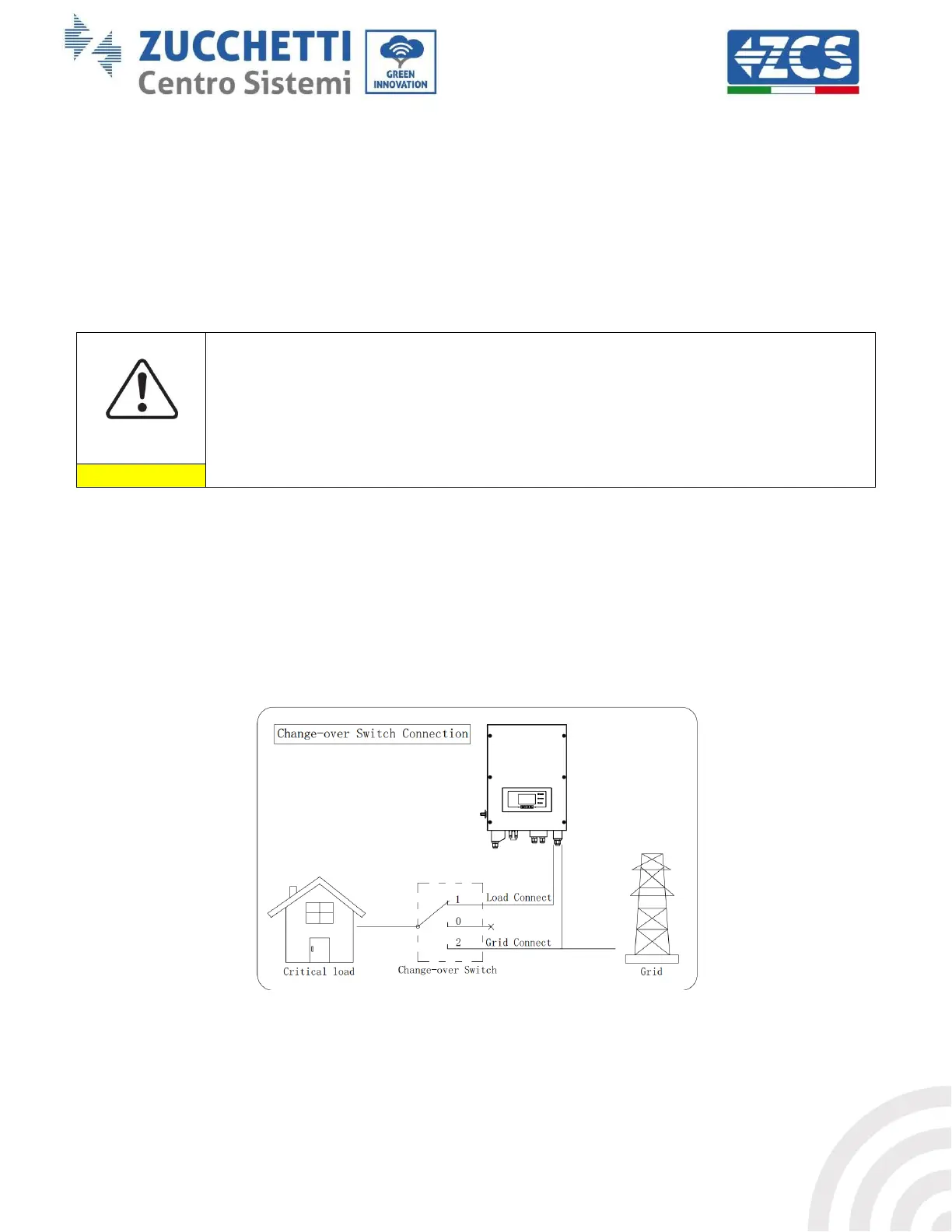
A change-over switch must be inserted between the EPS output of the inverter and the critical loads.
Change-over positions
The change-over switch is necessary.
When checking/repairing critical loads, make sure that the change-over switch is in the 0
position.
When checking/repairing the 1PH HYD3000-HYD6000-ZSS inverter, make sure that the
change-over switch is in the 0 position, and that the 1PH HYD3000-HYD6000-ZSS inverter is
disconnected from the grid.
Under normal conditions: change-over switch is in position 1. The 1PH HYD3000-HYD6000-ZSS inverter
can supply power to critical loads in the event of a power failure.
If the 1PH HYD3000-HYD6000-ZSS inverter is faulty, manually move the switch to position 2. The grid will
supply energy to the critical load.
Note: If the system is equipped with a production metre, take into account that the energy for the critical load is
drawn before the meter and therefore this energy, even if produced by photovoltaic panels, is not counted as
energy produced. If necessary, the system designer can use appropriate external switch contactors to ensure
that the energy for the critical load is drawn downstream of the production meter during normal grid operation
and that it only changes over to the EPS output of the inverter in the event of a power failure.
Figure 32 – Connecting the change-over switch









 To Next Page