User’s Manual 1PH HYD3000-HYD6000-ZSS
Rev. 1.1 16/03/2021
Identification: MD-AL-GI-00
Rev. 1.1 of 16/03/2021 - Application: GID
7.1. Checking the settings
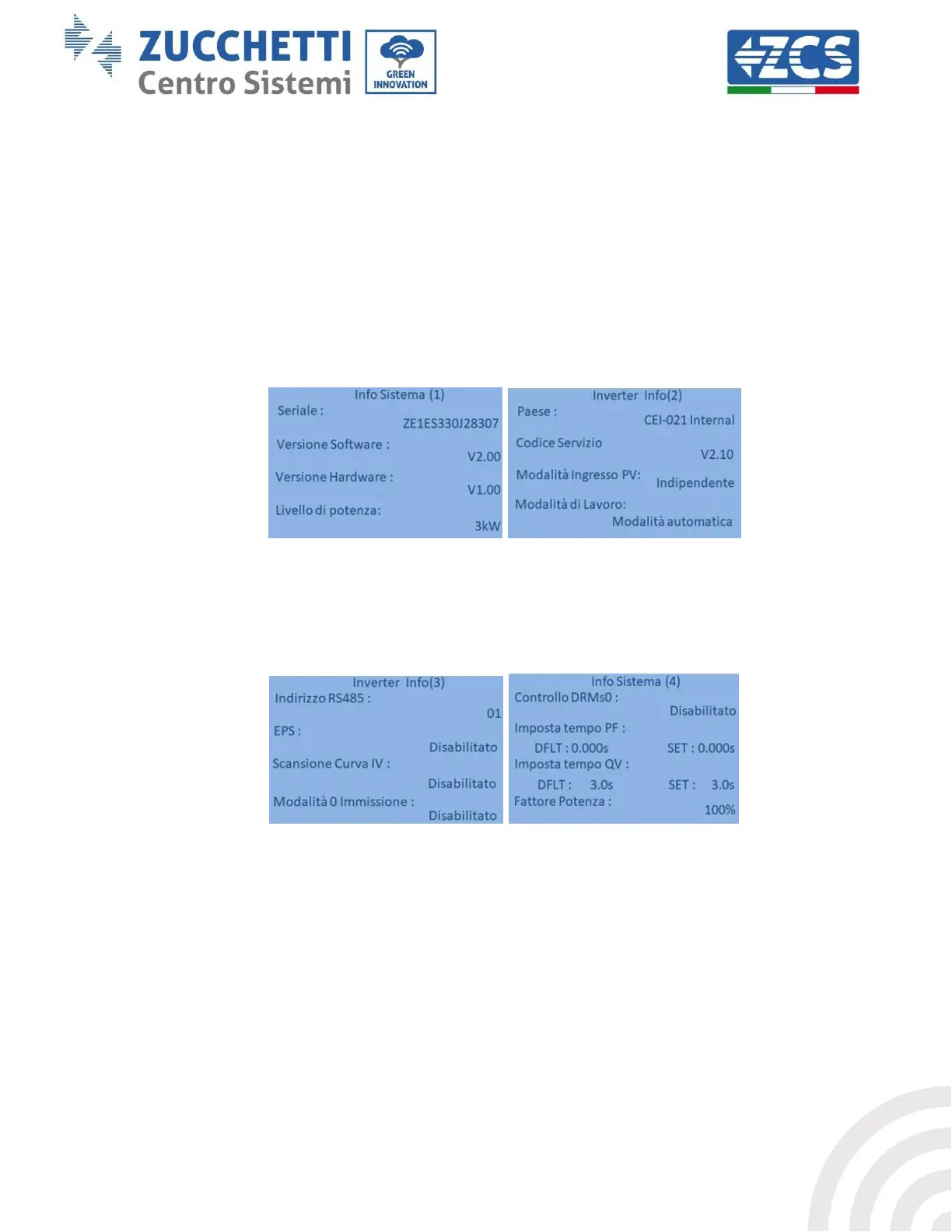
1. Below is a summary of all the settings on the device, which you can find in the system info menu. In
particular, it is necessary to check that the parameters circled in red are correct. To access this menu,
from the main screen:
1.1. Press the first key from the left;
1.2. Press the third ↓ key twice;
1.3. Enter the “System Info” menu by pressing the fourth key;
1.4. To scroll through the images, press the third ↓ key.
Country: Check that the country code is correct for the regulation in force
PV Input Mode : Check that the correct setting has been set according to the system configuration.
Working mode: in order to minimise exchanges with the grid, the correct mode will be “Automatic Mode.”
RS485 Address: check that it has a value of 01 so that you can monitor your systems via the app or website.
EPS: check that the setting is enabled when using EPS mode.
IV Curve Scan: to be enabled if there is constant shading on the panels.
0 In-feed Mode: to be enabled if you want to avoid feeding into the grid.
DRMs0 Control (or Logical Interface): it must be disabled.









 To Next Page