Copyright © 2022 Nortek Security & Control LLC
31
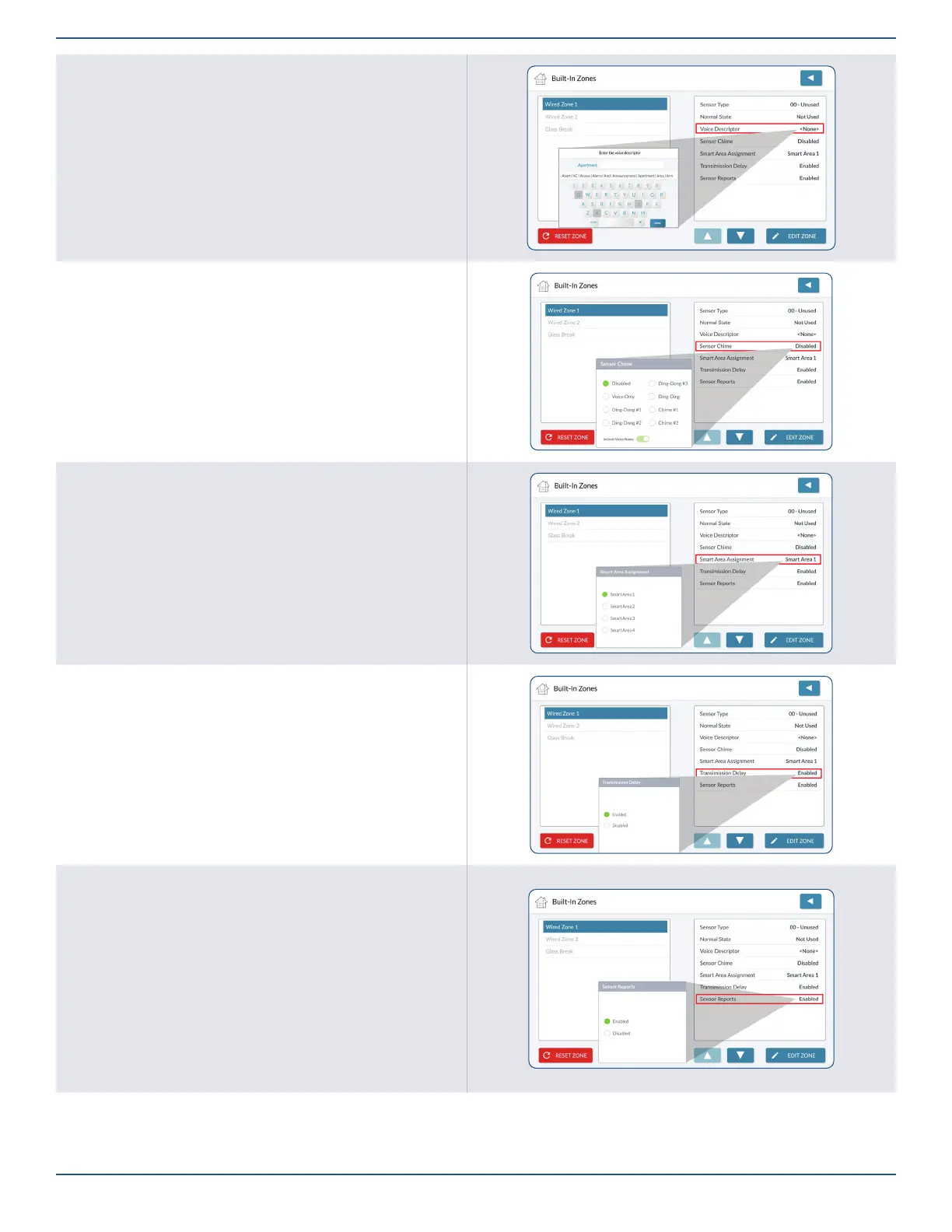
Voice Descriptor
1. Highlight Voice Descriptor.
2. Tap Edit Voice Descriptor to reveal the keypad.
3. Enter the rst few letters of the desired word.
4. Tap the matching word above the keypad.
5. Repeat the steps above to enter a phrase.
6. Tap Done.
7. Review the voice descriptor.
8. Tap to move to the next option.
Sensor Chime
1. Highlight Sensor Chime.
2. Choose the desired chime from the list. The default setting is Disabled.
Smart Areas Assignment
1. Highlight Smart Areas Assignment.
2. Choose a Smart Area (Partition) for the zone.
3. Tap to move to the next option.
Transmission Delay
1. Highlight Transmission Delay.
2. Choose Enabled or Disabled.
3. Tap to move to the next option.
Sensor Reports
1. Highlight Sensor Reports.
2. Choose Enabled or Disabled.
3. Tap to move to the next option.



 To Next Page