35
Copyright © 2021 Nortek Security & Control LLC
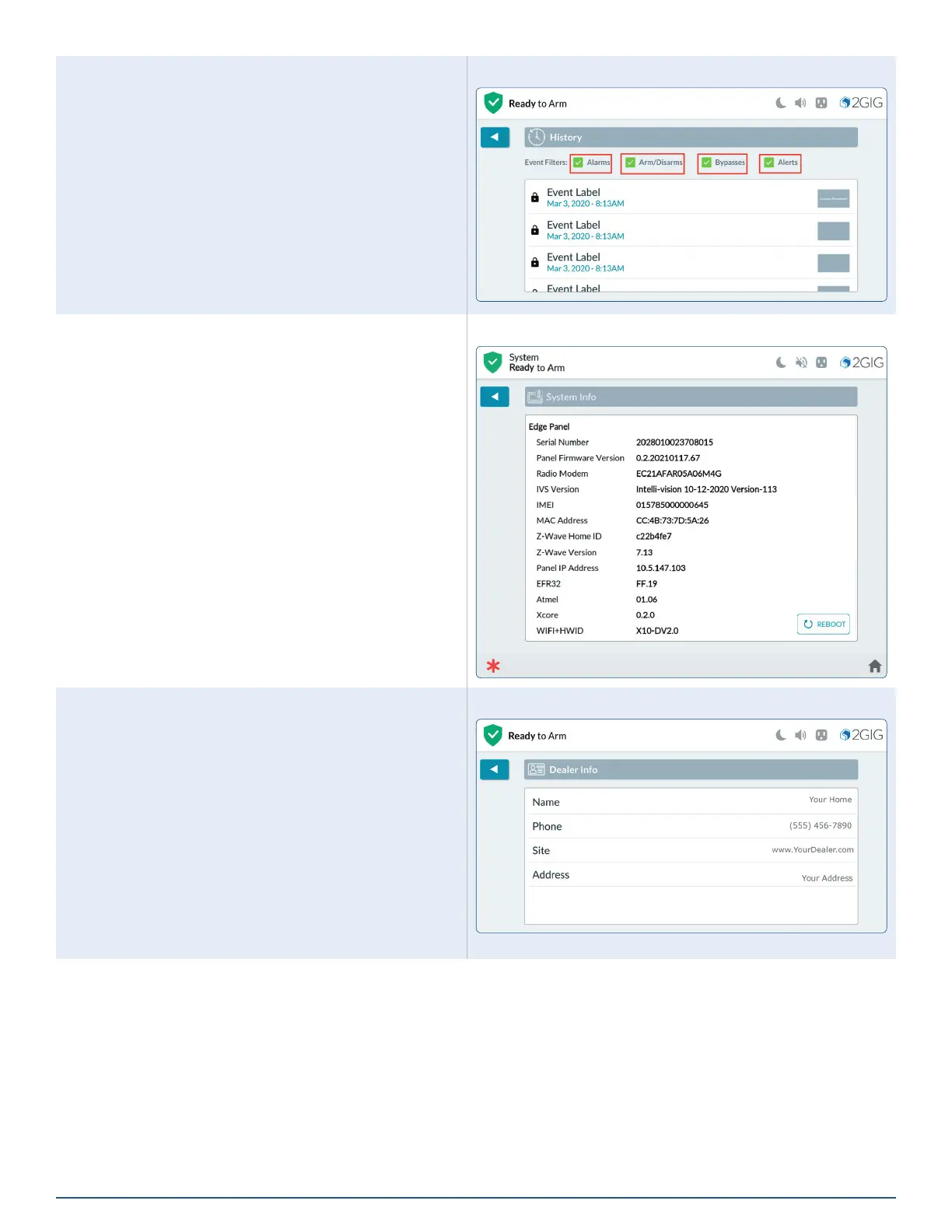
Filtering History
You can lter the list in the History screen to show or
hide alarms, bypasses, or alerts.
At the History screen, tap one or more check boxes to
add or remove lters.
Filter History
System Info
The System Info screen shows the following information
about your 2GIG EDGE Panel (depending on the
features that are active in your system):
»
Serial Number
»
Panel Firmware Version
»
Radio Modem
»
IVS Version
»
IMEI
»
MAC Address
»
Z-Wave Home ID
»
Z-Wave Version
»
Panel IP Address
»
EFR32
»
Atmel
»
Xcore
»
WIFI+HWID
»
Build Version
Reboot
Tap Reboot to restart the panel. Master User pin number
is required to complete the process.
System Info Screen
Dealer Info
The Dealer Info screen shows basic contact information
for your 2GIG alarm dealer.
Dealer Info Screen



 To Next Page