82 ZX2 GAS-INSULATED MEDIUM VOLTAGE SWITCHGEAR
5.6. View ports
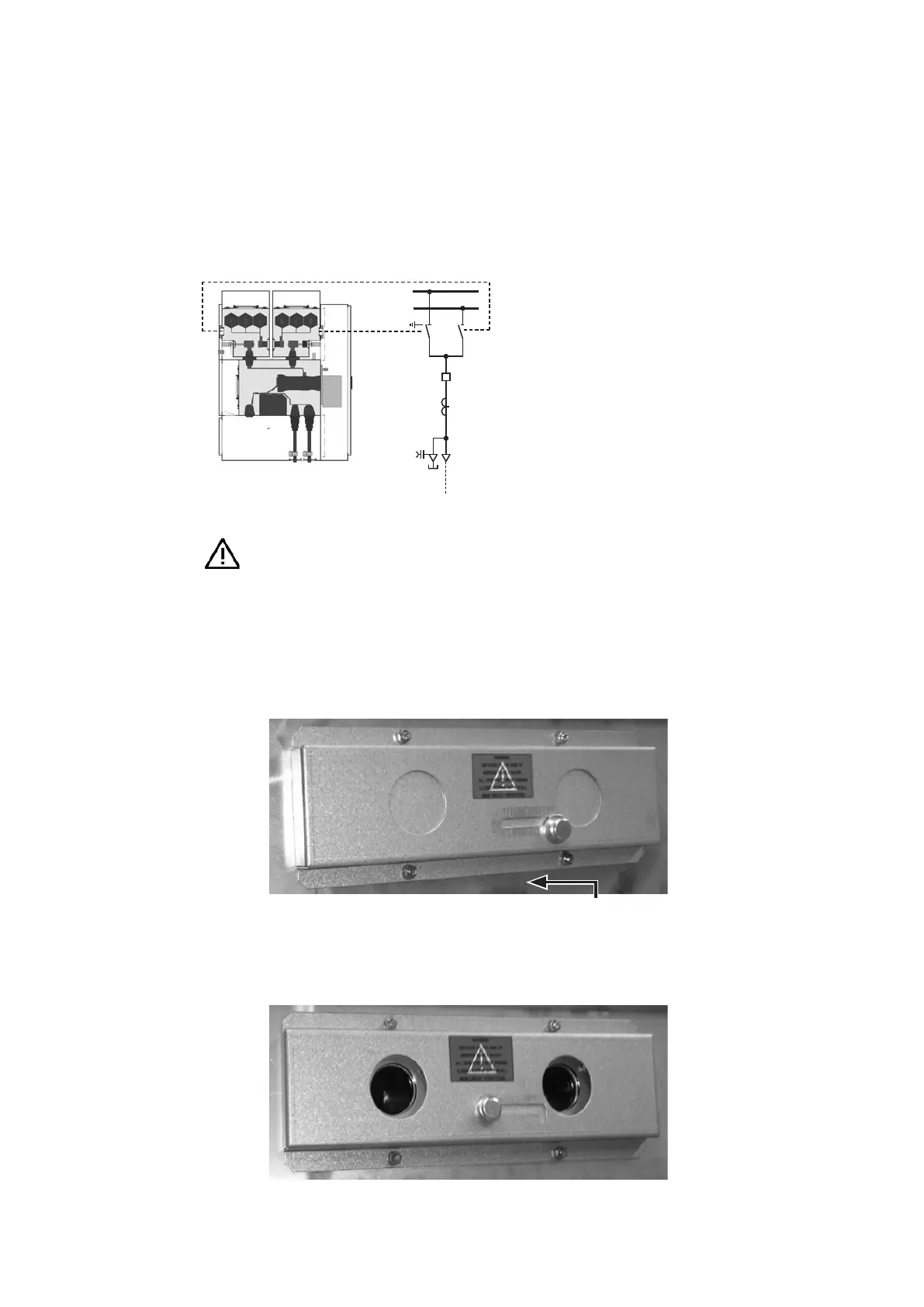
The switchgear is equipped with view ports to
safely verify the contact positions of the busbar
three-position disconnect and the busbar
disconnect. The locations of these view ports are
shown in fig. 5.6.1 below.
To open the view port cover, move the bolt
upwards and to the left as shown in fig. 5.6.2.
When you have finished using the view ports,
close the cover by moving the bolt in the reverse
direction.
Visual checking of the switch position, using the
example of the three-position switch in busbar
compartment I:
• Move the switch.
• Open the view port cover.
• Point a flashlight through one view port, and
check the position of the moving contact
through the other view port. Always use the
best view port for viewing when checking the
three phases of a switch.
Hazard warning
The view port must be closed during
movement of a switching device to
prevent possible damage to the
unprotected eye.
—
Fig. 5.6.1:
Position of the
view ports
—
Fig. 5.6.2:
View ports, closed
—
Fig. 5.6.3:
View ports, open
—
Fig. 5.6.1.
—
Fig. 5.6.2.
—
Fig. 5.6.3.


 To Next Page