Chapter 9: Monitoring Status and Activity ● 120
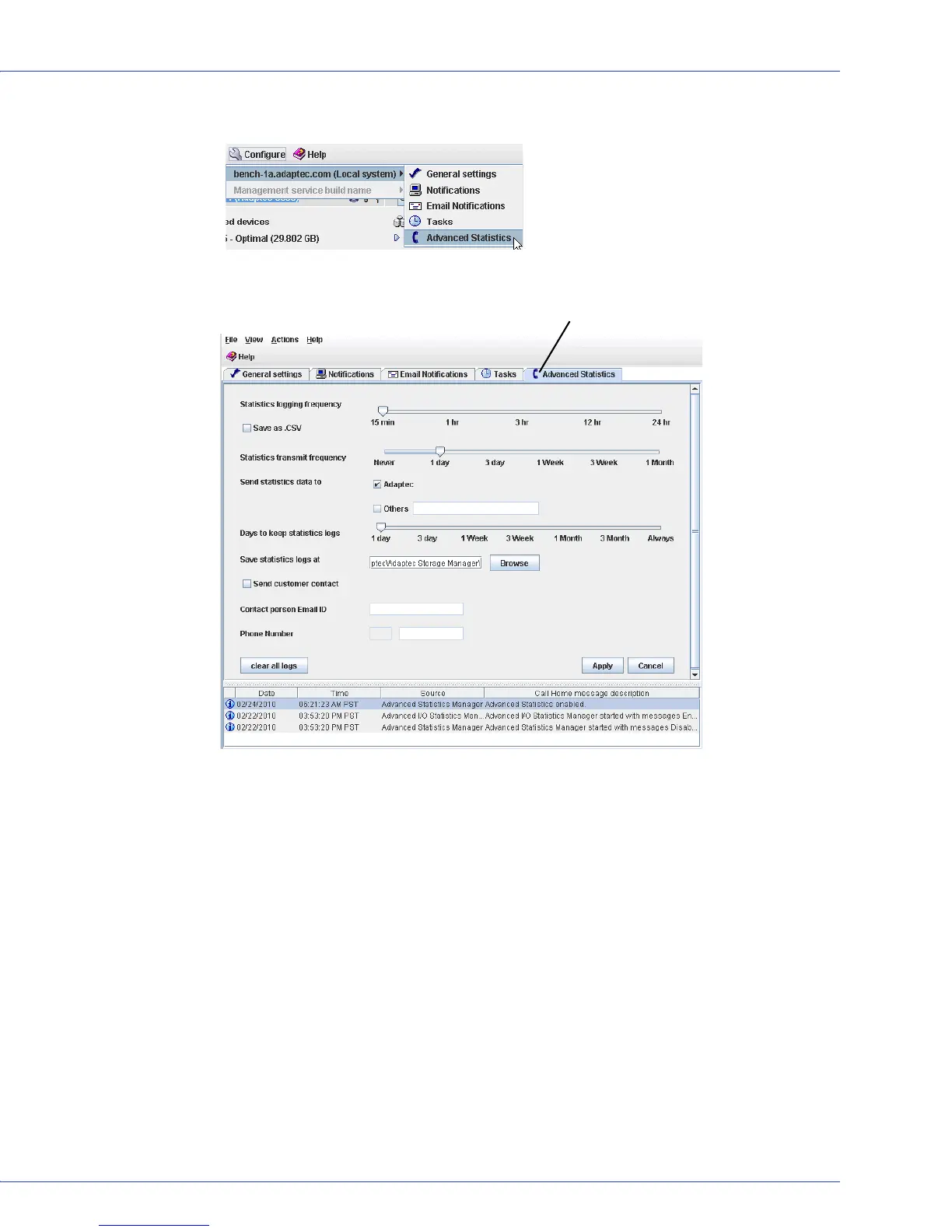
2 On the tool bar, click Configure, point to the system, then click Advanced Statistics.
The Advanced Statistics Manager opens.
3 Adjust the Statistics logging frequency slider. (The default is 15 minutes.) Select Save as
.CSV to save the statistics logs in both CSV and XML format; the default is XML only.
4 Adjust the Statistics transmission frequency slider. (The default is 1 day.)
5 In the Send statistics to field, select Adaptec and/or Others. If you select Others, enter the
datacenter URL in the text box.
6 Adjust the Days to keep statistics logs slider. (The default is 1 day.)
7 Enter the storage location for the statistics logs or use the default location. Click Browse to
select a location in your file system.
8 To send customer contact information along with the statistics logs, click Send customer
contact, then enter the contact’s email address and phone number.
9 Click Apply.
Note:
To transmit the statistics immediately and to delete the statistics logs, click Clear all
logs, then click Yes to confirm.
Advanced Statistics Manager on Advanced Statistics Tab



 To Next Page