45
To pause or end your workout, see section 3.2.9. To sync your workout data, see section 2.3.3.
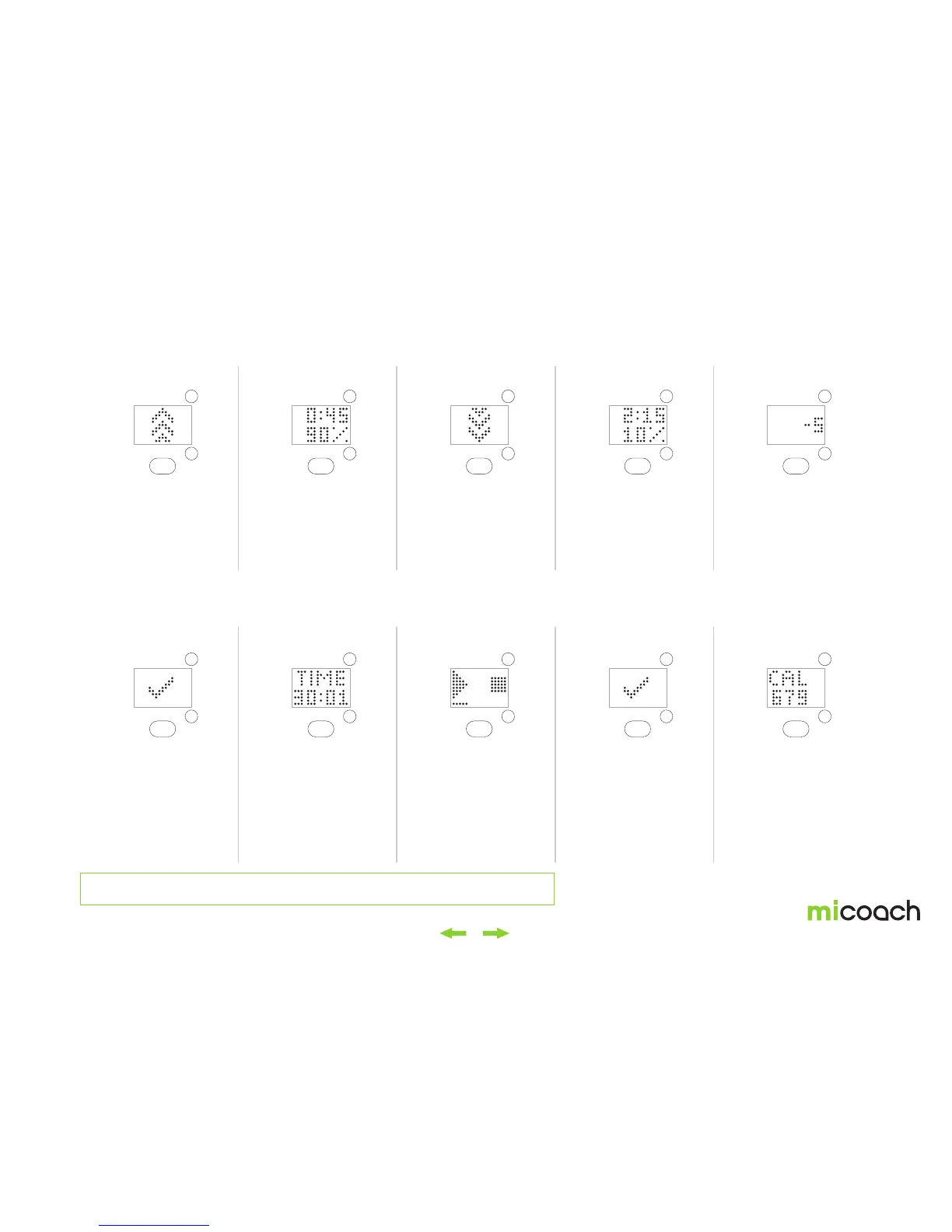
17. Change zones
22. Completed
18. 90% zone
23. Continue tracking
19. Change zones
24. Pausing workout
21. Countdown
26. Workout summary
20. 10% zone
25. Ending workout
Now increase to 90%
effort zone. The speed
up animation is displayed
three times and the FIT
SMART vibrates three
times.
Once the countdown
is finished, the workout
completed icon is
displayed for 1 second.
Run at 90% effort for 45
seconds. A countdown is
shown.
After the workout
completed screen, the
workout continues as a
Free Workout and the
screen shows the metrics
setup in preferences in
the app.
Now decrease to 10%
effort. The slow down
animation is displayed
three times and the FIT
SMART vibrates three
times.
Long press to pause your
workout. The resume
option is selected by
default.
Walk at 10% effort for 2:15
minutes. A countdown is
shown.
To manually end your
workout, toggle to the
end icon after your long
center button press and
select. The checkmark
icon will be shown.
During the final 5 seconds
of the Assessment
Workout, your FIT SMART
will display a countdown
of -5, -4, -3, -2, -1, 0.
Here you can toggle
through the workout
statistics. Toggling
functions the same way
as during the workout.
(You can see one metric
per screen if you kept with
the standard settings.)


 To Next Page