457
ADOBE ILLUSTRATOR CS2
User Guide
WBMP
WBMP format is the standard format for optimizing images for mobile devices, such as cell phones. WBMP supports
1-bit color, which means that WBMP images contain only black and white pixels. (See “Optimization options for
WBMP format” on page 463.)
See also
“About the Save For Web dialog box” on page 452
“To optimize and save web graphics” on page 452
Optimization options for GIF and PNG-8 formats
A
B
C
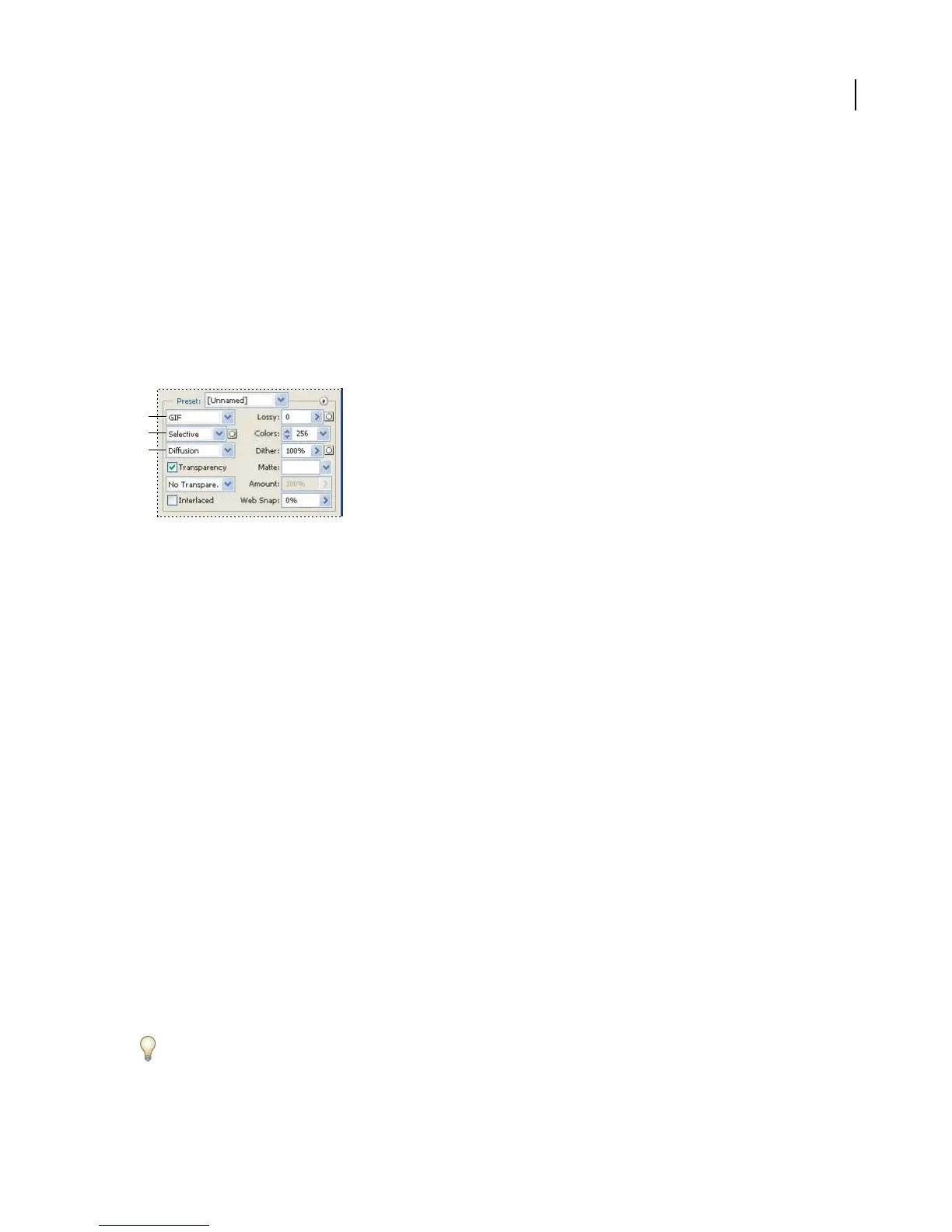
Optimization settings for GIF
A. File format menu B. Color Reduction Algorithm menu C. Dithering Algorithm menu
Lossy (GIF only) Reduces file size by selectively discarding data. A higher Lossy setting results in more data being
discarded. You can often apply a Lossy value of 5–10, and sometimes up to 50, without degrading the image. File size
can often be reduced 5%–40% using the Lossy option.
Note: You cannot use the Lossy option with the Interlaced option or with Noise or Pattern Dither algorithms.
Color Reduction Method and Colors Specifies a method for generating the color lookup table and the number of
colors you want in the color lookup table. You can select one of the following color reduction methods:
• Perceptual Creates a custom color table by giving priority to colors for which the human eye has greater sensi-
tivity.
• Selective Creates a color table similar to the Perceptual color table, but favoring broad areas of color and the
preservation of web colors. This color table usually produces images with the greatest color integrity. Selective is the
default option.
• Adaptive Creates a custom color table by sampling colors from the spectrum appearing most commonly in the
image. For example, an image with only the colors green and blue produces a color table made primarily of greens
and blues. Most images concentrate colors in particular areas of the spectrum.
• Web Uses the standard 216-color color table common to the Windows and Mac OS 8-bit (256-color) palettes.
This option ensures that no browser dither is applied to colors when the image is displayed using 8-bit color. (This
palette is also called the Web-safe palette.) Using the web palette can create larger files, and is recommended only
when avoiding browser dither is a high priority.
• Custom Preserves the current perceptual, selective, or adaptive color table as a fixed palette that does not update
with changes to the image.
Use the Color Table palette in the Save For Web dialog box to customize the color lookup table.



 To Next Page