BYB User Manual Page 30 of 55 PN: 90020 Version: 1.4
STEP 8: Installing Cables
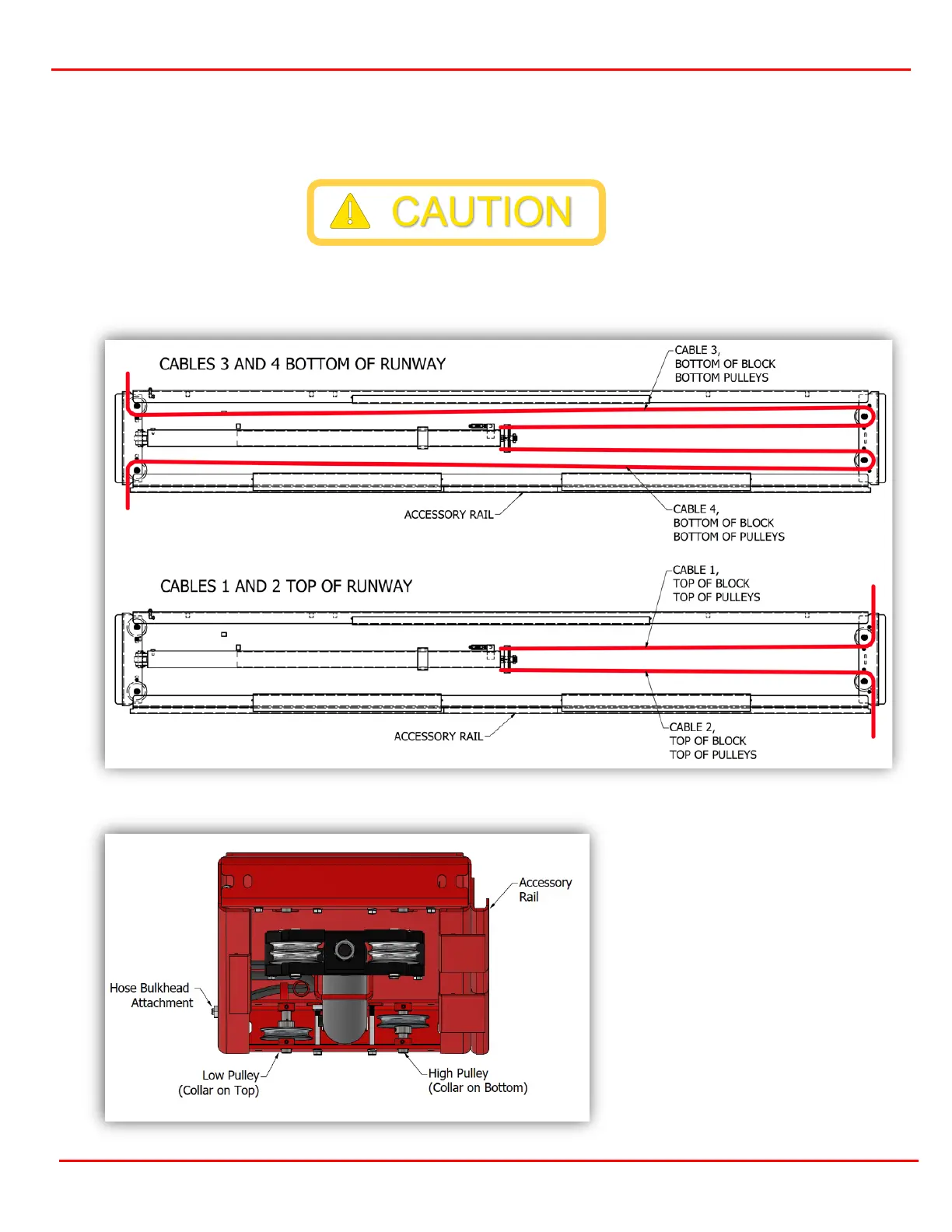
The cables come pre-installed and pre-routed on the cylinder runway. Begin by finding the zip ties and
cutting with a pair of side cutters. Caution, the cables may be under tension. Make sure to cut the cable tie
only (Figure 8.1 or 8.2 for XT).
Next, feed the threaded ends of the cables wrapped around the pulleys from each end and side of the
Cylinder Runway towards each end of the Crossmember. Two of the cables will need to pass through the
openings in the non-power track just below the attaching bolts. (Figures 8-4)
Figure 8.1 Cables Routing CL, WF, WB, BB, BT
Figure 8.2 XT Pulley Location
Figure 8.2 shows the single
pulley location on the XT
runway only.
For all other lifts both single
pulleys will be towards the
bottom of the runway with the
collars above the pulley.


 To Next Page