AES 7707 RF Subscriber 14
Part No. 40-7707 Rev. 3a 10/23/2017
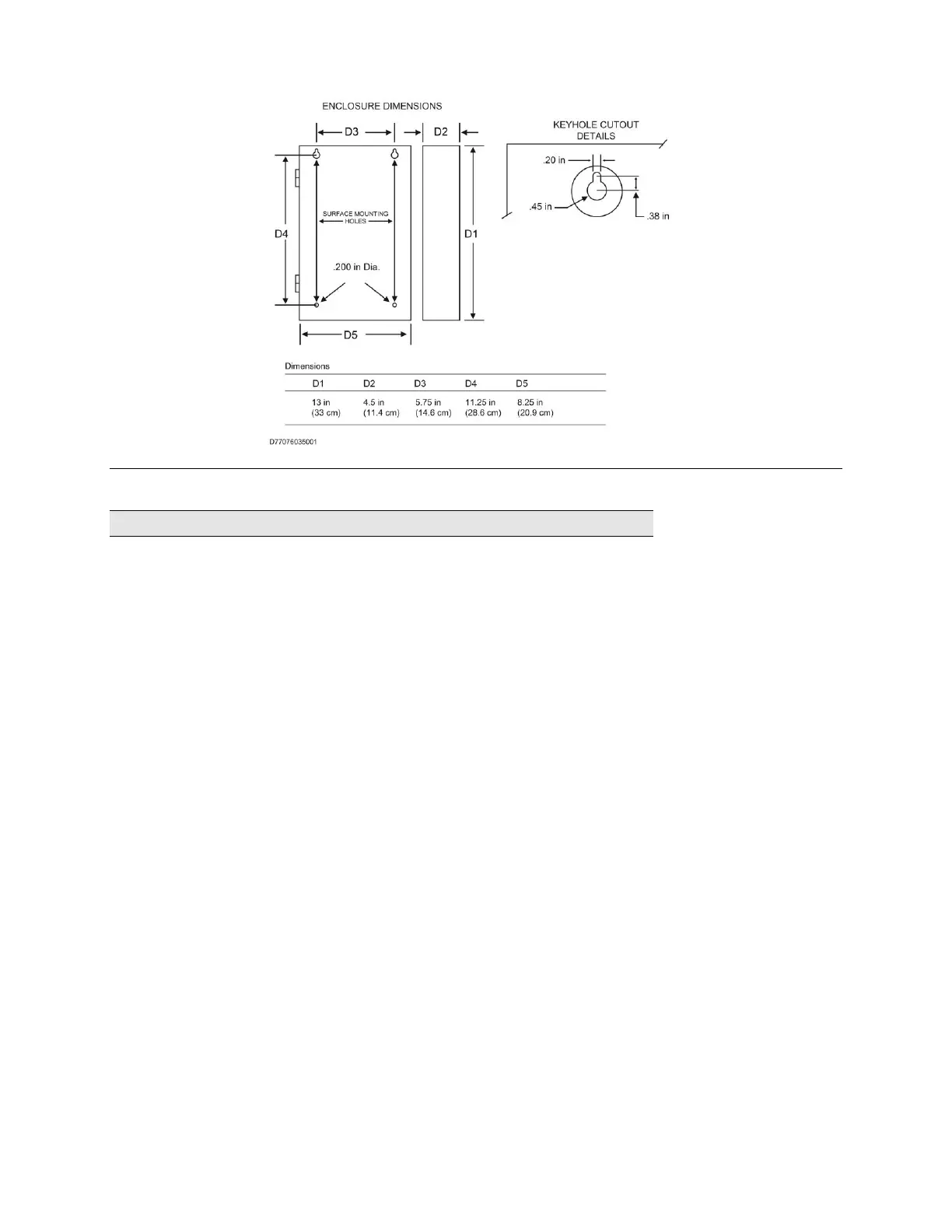
Figure 1. Enclosure Mounting – Hole Location and Sizes
Important! Use knockout plugs to close any unused conduit holes in the enclosure.
To remove electronic boards mounted in the enclosure, perform the following steps for boards installed.
Removing the 7794A IntelliPro
1. If the subscriber is supplied with a 7794A IntelliPro, remove the cabling. Remove the hex nuts holding the
board to the four standoffs.
2. Grasp the card and pull straight upward off the standoffs.
3. Remove the hex standoffs.
Removing the Zone Input Board
1. If the subscriber is supplied with a zone input board, remove the hex nuts holding the board to the
standoffs.
2. Grasp the board at each end by the standoff, and pull straight upward to unseat the card from the socket
connector on the Subscriber mainboard.
3. Remove the hex standoffs.
Removing the Mainboard
1. With all mounted boards removed from the top of the mainboard, remove the remaining hex nuts or
standoffs holding the mainboard to the enclosure.
2. Grasp the board on each side, and pull straight upward to lift the card off the mainboard support standoffs
attached to the enclosure.


 To Next Page