AES 7707 RF Subscriber 25
Part No. 40-7707 Rev. 3a 10/23/2017
8.2 Programming Interface
Important! Eliminate false alarms by notifying the central station operator ahead of time before the Subscriber is
powered on. A false alarm/report and dispatch of services to the previous Subscriber location may occur if this is not
done.
The Model 7707 is programmed using a graphical interface through a smartphone, a laptop/tablet, or other web
browser capable device.
The Subscriber is connected to a LAN through the J10 Ethernet connector. The default network protocol is DHCP.
The IP address obtained is shown on the LCD display during Subscriber power-up. An example display is shown
below. The actual IP address will depend on the network a Subscriber is connected to.
Note: If DHCP is not available, the IP address is set to 169.254.100.1.
8.3 Logging In
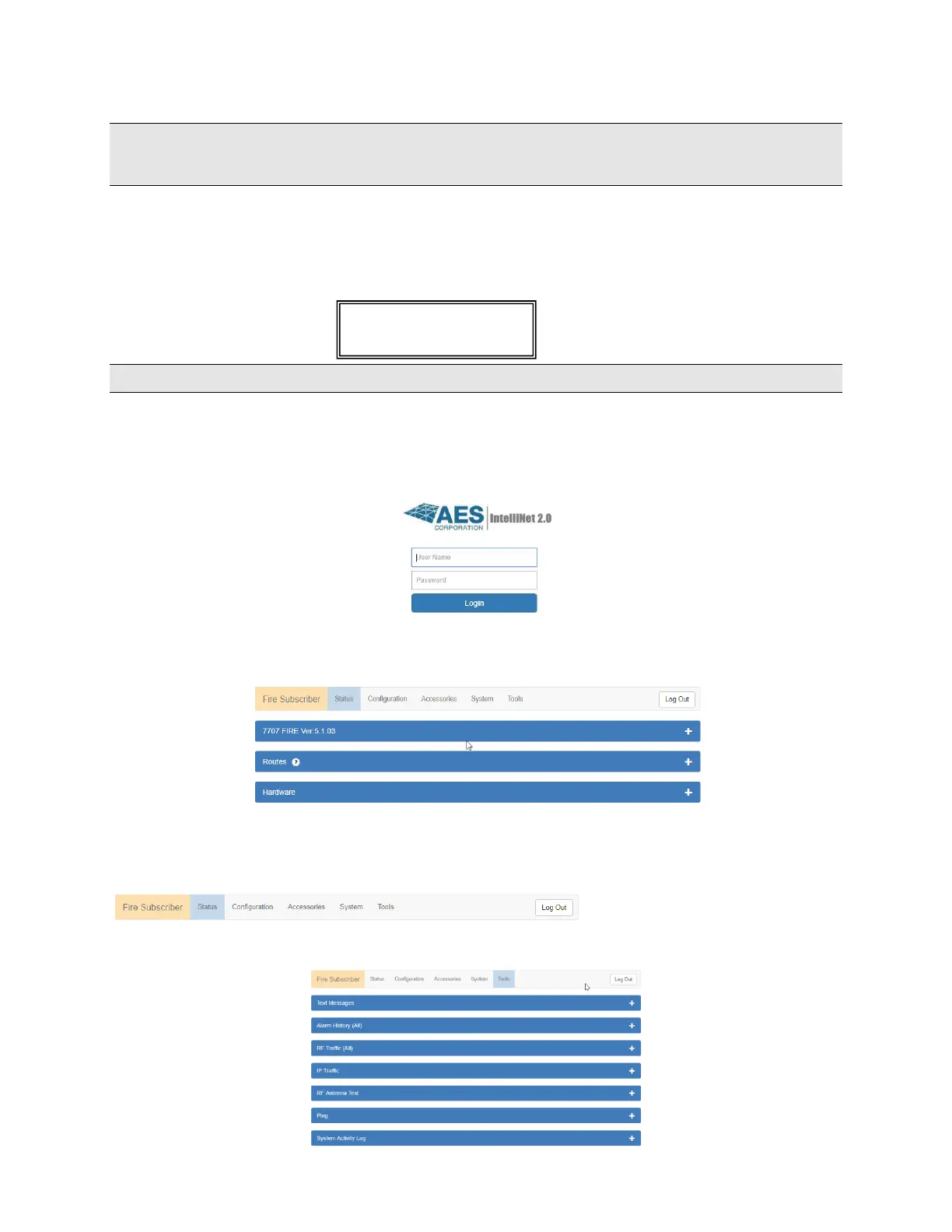
Connecting to the 7707 configuration page requires a login. Enter the IP address of the subscriber in the web
browser. Then enter your username (in the Username box) and password at the login screen. The default User Name
and Password is admin (lower case):
The following screen appears after a successful login:
8.4 Configuration Interface
Navigation
Individual pages are listed in a tab bar:
To go to a page, select a tab by clicking on it. For example, the Tools page is accessed by pointing and clicking on
Tools. Each page displays a set of controls as shown below:


 To Next Page