AES 7707 RF Subscriber 26
Part No. 40-7707 Rev. 3a 10/23/2017
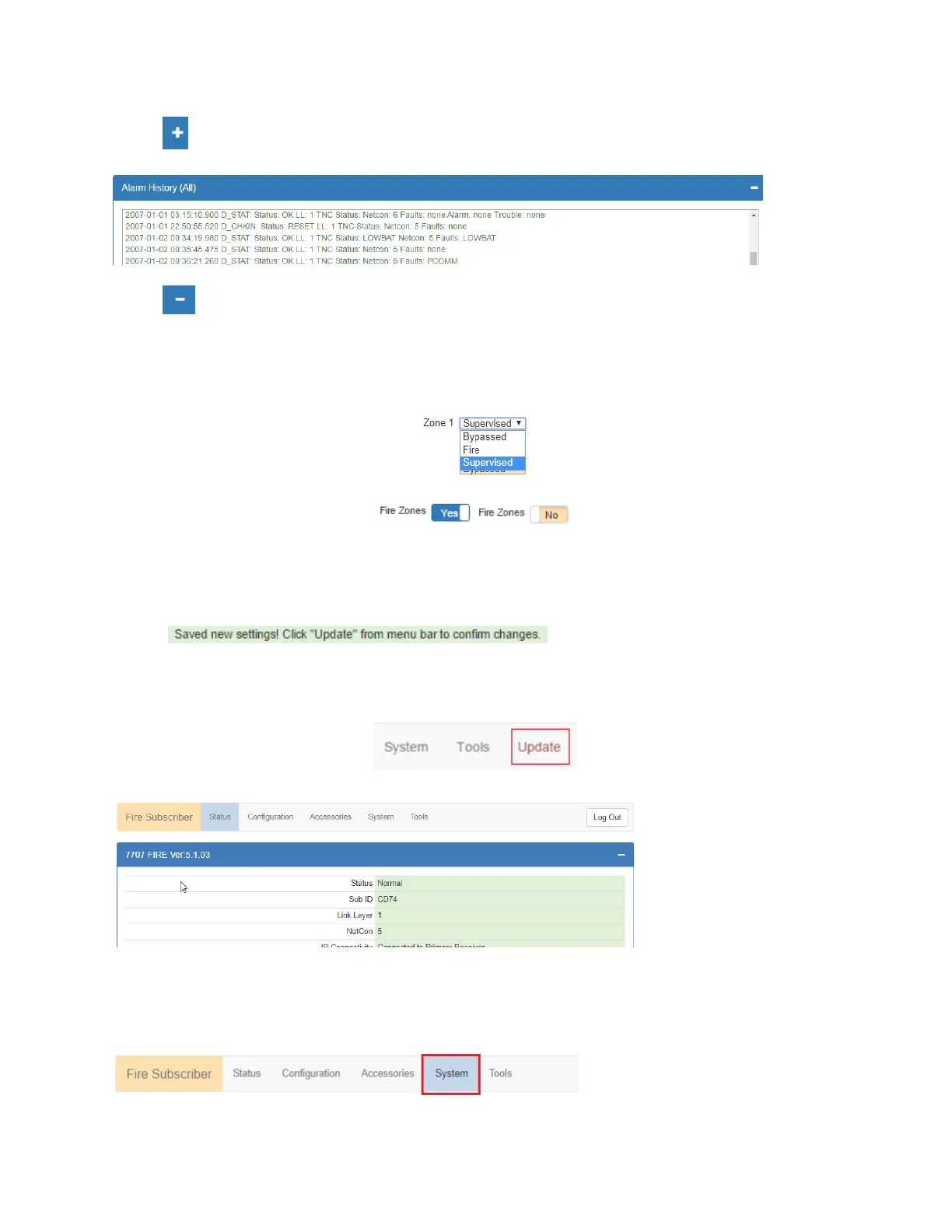
Use the control to expand the control window. In this example, expanding Alarm History allows view of
messages similar to the example below:
Use the control to collapse the window.
The Log Out control ends the configuration session and returns to the Login screen.
Making Configuration Changes
Configuration settings are made and changed using either the dropdown or slider switch controls in the window.
The dropdown provides a list to select from:
The slider switch provides one of two values to select:
Saving Configuration Changes
Saving configuration changes requires the following steps:
1. When you are finished making changes, select and click the Save Changes button. The Saved new
settings! acknowledgement appears:
2.
2. You may finish and save your changes immediately, or you can make additional changes and then save all
changes at once afterward.
3. If done making changes, click the Update tab shown in the browser (highlighted in red in the figure
below):
4. The Status window is displayed after changes are saved as shown below:
8.5 View 7707 Subscriber Software Version
The 7707 software version is visible in the System tab window under System Firmware Upgrade.
1. Select the System tab, as shown highlighted in the following figure:
2. The version number is displayed in the System Firmware Update section.
8.6 View 7794A IntelliPro Software Version


 To Next Page