AES 7707 RF Subscriber 28
Part No. 40-7707 Rev. 3a 10/23/2017
Radio and Internet: Radio Configuration, Central Receiver Configuration and Subscriber IP Address under
Advanced Configuration (refer also to the Dual Reporting diagram on page 21).
Radio and Internet Backup: Radio Configuration, Central Receiver Configuration and Subscriber IP
Address under Advanced Configuration. Refer also to the Single Reporting with Backup diagram on
page 20.
Internet and Radio Backup: Radio Configuration, Central Receiver Configuration and Subscriber IP
Address under Advanced Configuration. Refer also to the Single Reporting with AES Radio Network
Backup diagram on page 20.
Internet Only: Central Receiver Configuration, and Subscriber IP Address under Advanced Configuration.
Refer also to the Internet diagram on page 20.
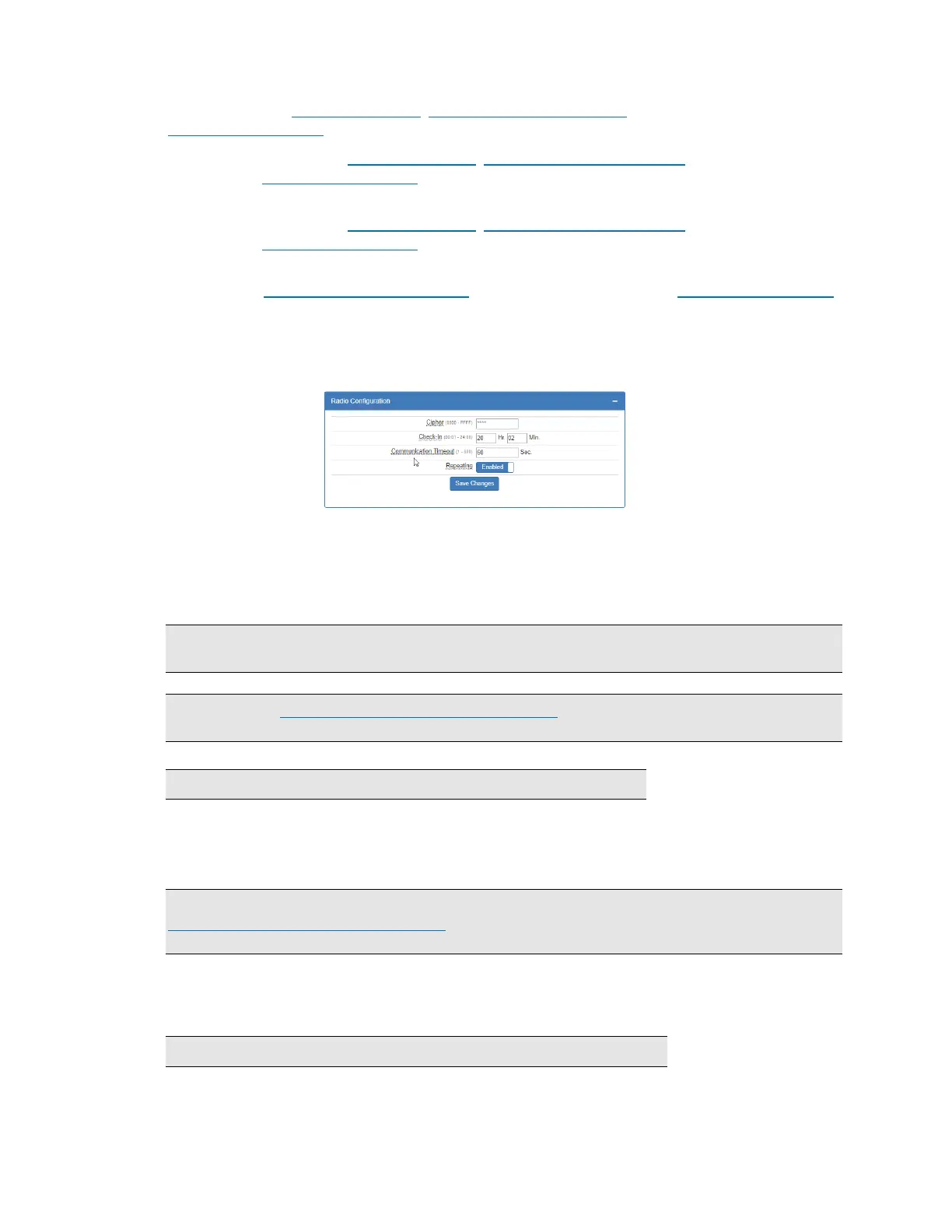
8.9 Radio Configuration
The Radio Configuration panel contains subscriber cipher code (dealer code), Check-In, Communication Timeout
and Repeating settings.
To set Radio Configuration:
1. Click the Configuration tab.
2. Scroll to the Radio Configuration panel.
Cipher: Enter the four-character hex (0‒9 and A‒F) cipher code (dealer code) assigned by the system
administrator. Valid values are 0000 to FFFF.
Note: The code must match the AES 7170 IP-Link cipher code for the network that the Subscriber is to
join. The Subscriber will not join the mesh network if the cipher code is incorrect.
Important! See Programming Options (UL Notice to Users) which starts on page 23 for software settings
permitted for the following parameters.
Check-In Time: Enter check-in hours and minutes. The default is 23:45 (23 hours 45 minutes).
Note: Using short check-in times generates more traffic on the network.
Communication Timeout: Communication Timeout is the time the Subscriber waits for an ACK as a
reply to a transmitted packet or when the Subscriber is at NetCon 7 and is waiting to join the mesh network.
The range is 1‒300 seconds. The default and maximum time allowed for this option is 60 seconds.
Repeating: Set Repeating to Enabled/Disabled by clicking on the Repeating switch.
Important! UL-864 compliant Fire Alarm installations require Repeating to be set to Yes. See the
Programming Options (UL Notice to Users) which starts on page 23 for software settings permitted for the
following parameter.
8.10 Central Receiver Configuration
The Central Receiver panel contains Internet connection settings to the MultiNet receiver.
Note: Central Receiver Configuration must be set when using IP Reporting.


 To Next Page