AES 7707 RF Subscriber 29
Part No. 40-7707 Rev. 3a 10/23/2017
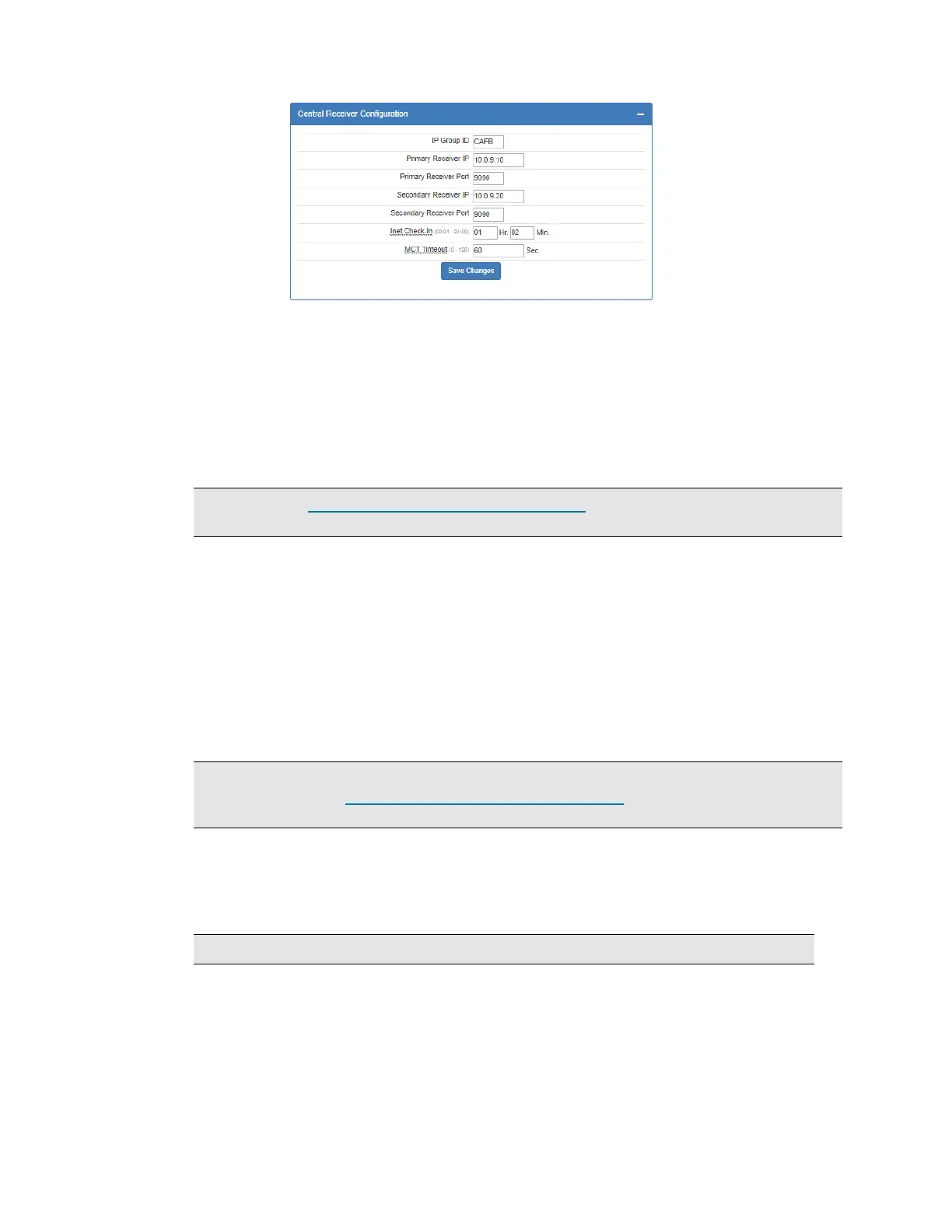
To set Central Receiver Configuration:
1. Click the Configuration tab.
2. Scroll to the Central Receiver panel.
IP Group ID: Enter the assigned ID as found in Business Unit Settings.
Primary Receiver IP: Enter the Primary Receiver IP address.
Primary Receiver Port: Enter the Primary Receiver Port number.
Secondary Receiver IP: Enter the Secondary Receiver IP address.
Secondary Receiver Port: Enter the Secondary Receiver Port number.
Important! See Programming Options (UL Notice to Users) which starts on page 23 for software
settings permitted for the following parameter. (Inet Check-In)
Inet Check-In: Enter the check-in time interval for the subscriber.
MCT Timeout: Enter the MCT (Multiple Communications Technology) Timeout. The MCT
Timeout sets the amount of time the subscriber tries to send messages though one communication
technology before giving up and switching to the other technology.
8.11 Advanced Configuration
From the Advanced Configurations menu, you can configure the ground fault reporting, Secondary Alarm Delay,
TTL (Time to Live) and the subscriber IP address. To configure these settings:
1. Select the Configuration tab.
2. Scroll to the Advanced Configuration panel.
Suppress Ground Fault Report
Important! UL-864 compliant Fire Alarm installations require Suppress Ground Fault Reporting
to be set to No. See the Programming Options (UL Notice to Users) which starts on page 23 for
software settings permitted for the following parameter.
Set Suppress Ground Fault Report to Yes/No by clicking the Suppress Ground Fault Report
switch.
Secondary Alarm Delay
Enter the number of seconds allowed between data transmissions from the Subscriber. The range is 1‒
330 seconds. The default and maximum time allowed for this setting is 10 seconds.
Note: The first message is sent immediately without delay. Messages that follow are delayed.
TTL (Time-To-Live) Configuration
Time-to-Live settings are for managing the performance of the AES mesh network. TTL is the length
of time a packet message transmission for a specific setting is retried by a Subscriber in the AES mesh
network. The Subscriber will stop attempting to transmit the packet when the TTL limit has expired.
To set Time-to-Live:
1. Scroll to the Configuration tab.
2. Select the Advanced Configuration panel and configure the setting:


 To Next Page