AES 7707 RF Subscriber 16
Part No. 40-7707 Rev. 3a 10/23/2017
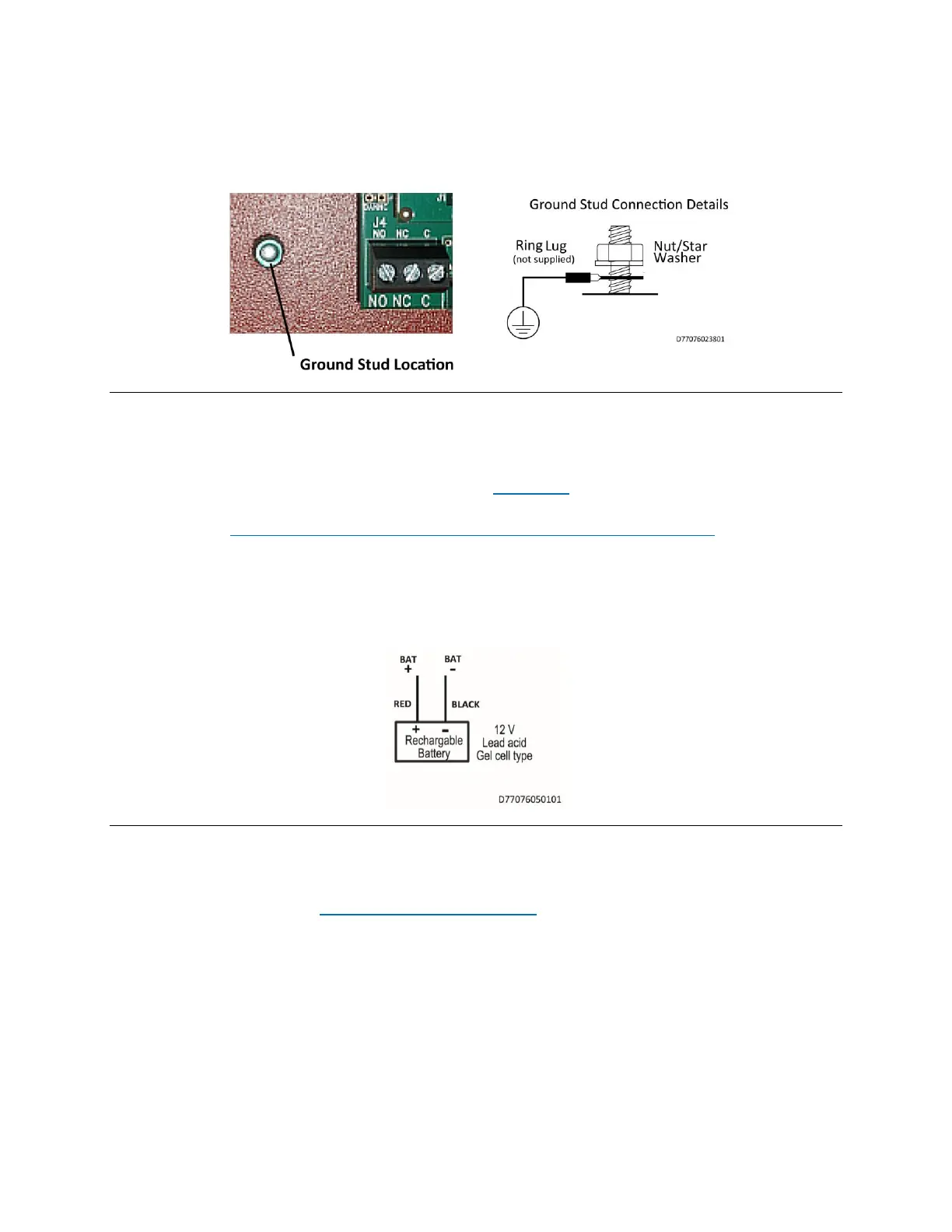
a suitable earth ground, which includes building steel, buried metallic cold water pipe, driven grounding rod, and
other electrical code approved grounding systems. The electrical ground from the electrical panel is not suitable.
Use a ring terminal to connect the ground wire to the ground stud on the enclosure back box. Assemble the
connection as shown in the diagram below. Scrape paint from beneath the ring lug to ensure good metal contact.
Figure 3. Earth Ground Connection
5.2 Secondary Power Wiring
Battery Connection
Determine the correct Ah rating for the application using the Battery Size information on page 10.
Place the battery in the subscriber enclosure with the battery quick-connect terminals located to the right side of the
enclosure (refer to Figure 2, Wire Separation - Non-Power Limited and Power Limited Circuits on page 15).
The following steps and diagram below explain how to connect the backup battery.
1. Connect the BLACK wire from J2 to the negative (–) side of the battery.
2. Connect the RED wire from J2 to the positive (+) side of the battery.
Figure 4. Connecting the Backup Battery
Battery Replacement
The battery should be replaced every 3 years or when testing indicates replacement is required. Replace with the
same size and type installed. See Battery Replacement Instructions on page 44 for details.
Battery Only Restart
The 7707 Subscriber without AC power (for test or diagnostic purposes) will power up and self-test with only the
battery connected.
Battery Supervision
When AC power is present, the battery is tested at approximately 30-second intervals.
When the battery voltage is below 11.6 V DC for two consecutive test intervals (approximately 60 seconds total
time), a low-battery trouble message is transmitted.
When AC power is present and a low battery reaches a charge voltage above 12 V DC, a restoral message is
transmitted.


 To Next Page