28
MT- S
2.4GHZ FH4T RADIO SYSTEM USER'S GUIDE
Telemetry System with Sanwa Synchronized Link Support
Section Continued on Next Page
FUNC MENU
TRIM, ANTILOCK BRAKE, THROTTLE OFFSET AND THROTTLE TYPE
SETTING
ALB MENU
[
Anti-Lock Brake
]
Anti-Lock Braking Programming Values can be changed while you're driving by
Assigning these functions to a Trim Switch. In addition, the Anti-Lock Braking
function can be toggled ON and OFF while you're driving by assigning this function
toanAuxiliarySwitch.Formoreinformation,seetheKEYASSIGNMenusectionon
pages 56 through 60.
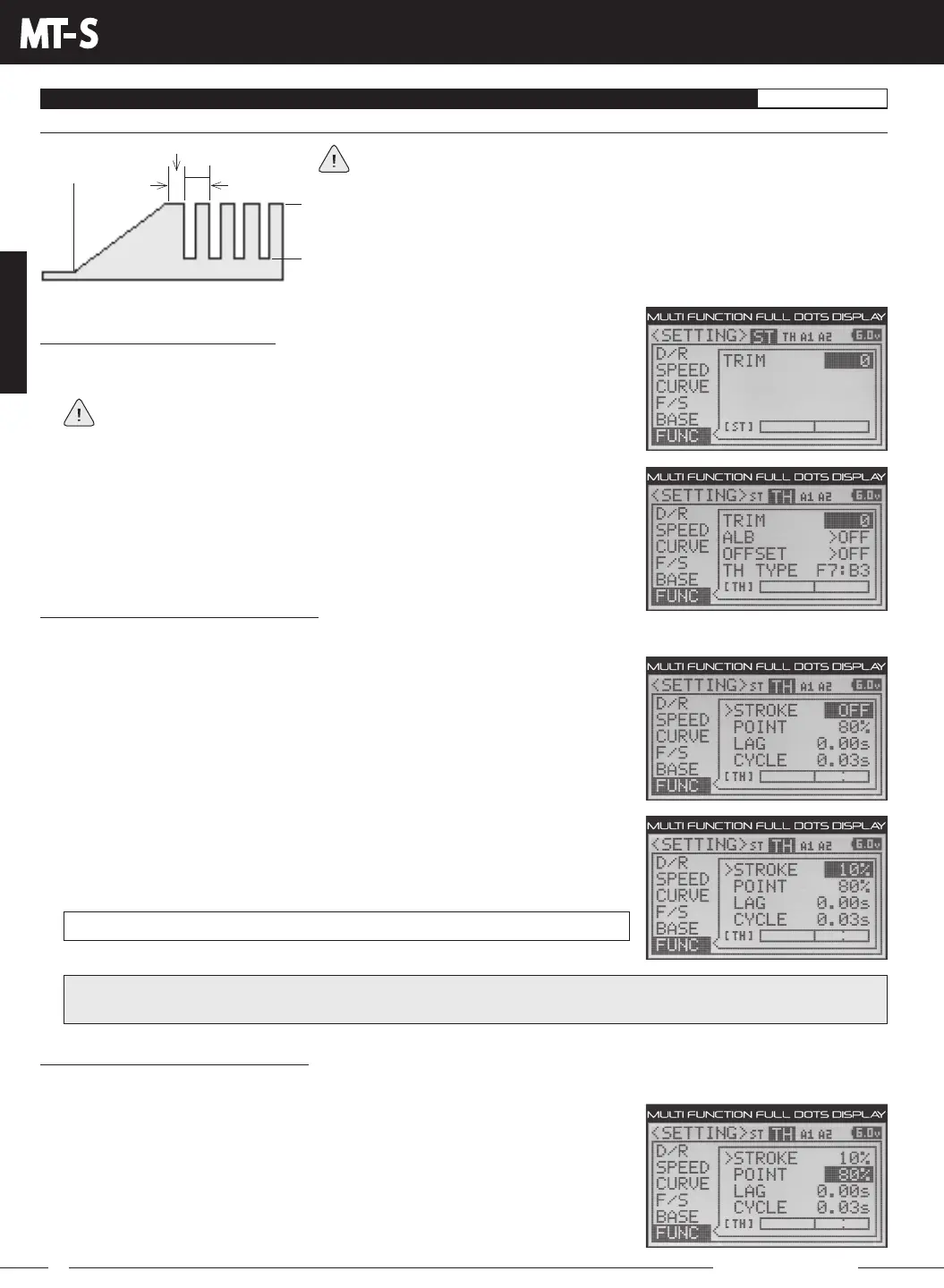
The diagram at right illustrates the relationship between the Point, Lag, Cycle and
Stroke functions, all of which can be programmed separately to suit your specific
model, track conditions and Anti-Lock Braking behavior.
Throttle
Neutral
Point
Lag
Cycle
Stroke
IMPORTANT: A Stroke percentage value of 1% or greater must be programmed for the Anti-Lock Braking function work.
If a Stroke value of OFF is chosen, the Anti-Lock Braking function will not work.
Selecting the Menu and Channel:
1) From within the SETTING menu, press the UP or DOWN keys to highlight the FUNC
menu. FUNC ST TRIM 0 will be highlighted.
If the cursor is flashing over Channel/Options, press the ENTER key to stop the
cursor flashing, then press the UP or DOWN keys to select the FUNC menu.
2) Press the BACK key so that the cursor is flashing over Channel/Options.
3) Press the UP or DOWN keys to highlight the Throttle channel, then press the ENTER key.
Changing the Stroke Percentage Value:
The Stroke percentage value determines the amount of Brake that's applied automatically when the Anti-Lock Braking
function is toggled ON.
2) Press the ENTER key, then press the UP or DOWN keys to choose the desired Stroke
percentage value. Increasing the Stroke percentage value will Increase Throttle
servo travel in the Brake direction and Decreasing the Stroke percentage value will
Decrease Throttle servo travel in the Brake direction.
FUNC ALB STROKE setting range is OFF to 100%. The default setting is OFF.
Changing the Point Percentage Value:
The Point percentage value determines the position along the length of Brake Side servo travel that the Anti-Lock Braking
function Activates at when toggled ON. For example, if set to 80%, you will have Normal
Braking from the Throttle Neutral Point to 79% of servo travel. At 80% of servo travel and
beyond, the Anti-Lock Braking function will Activate when turned ON.
1) PresstheDOWNkeytohighlightALB>OFF,thenpresstheENTERkeytoopenthe
ALB sub-menu. STROKE OFF will be highlighted.
1) From within the ALB sub-menu, press the UP or DOWN keys to highlight POINT 80%.



 To Next Page