35
MT- S
2.4GHZ FH4T RADIO SYSTEM USER'S GUIDE
Telemetry System with Sanwa Synchronized Link Support
Section Continued on Next Page
4WS MIX MENU
FOUR WHEEL STEERING MIXING
AUX
The Four Wheel Steering Mixing function provides you with two Steering channels. It allows you to control either the Front or
Rear Steering independently or Mix the Front and Rear Steering to have Parallel Four Wheel Steering (Crab) or Tandem Four
Wheel Steering. Use one of the Trim Switches to cycle through the different Four Wheel Steering options while you're driving
and use Auxiliary Switch Sw1 to toggle the Four Wheel Steering Mixing function ON and OFF.
This section details programming the Four Wheel Steering Mixing function for both Auxiliary 1 (Channel 3) and Auxiliary 2
(Channel 4), since programming each of them is the same. Choose either CH A1 for Auxiliary 1 (Channel 3) or CH A2 for
Auxiliary 2 (Channel 4), depending on which channel you want to program the Four Wheel
Steering Mixing function for.
Choosing the Four Wheel Steering Function:
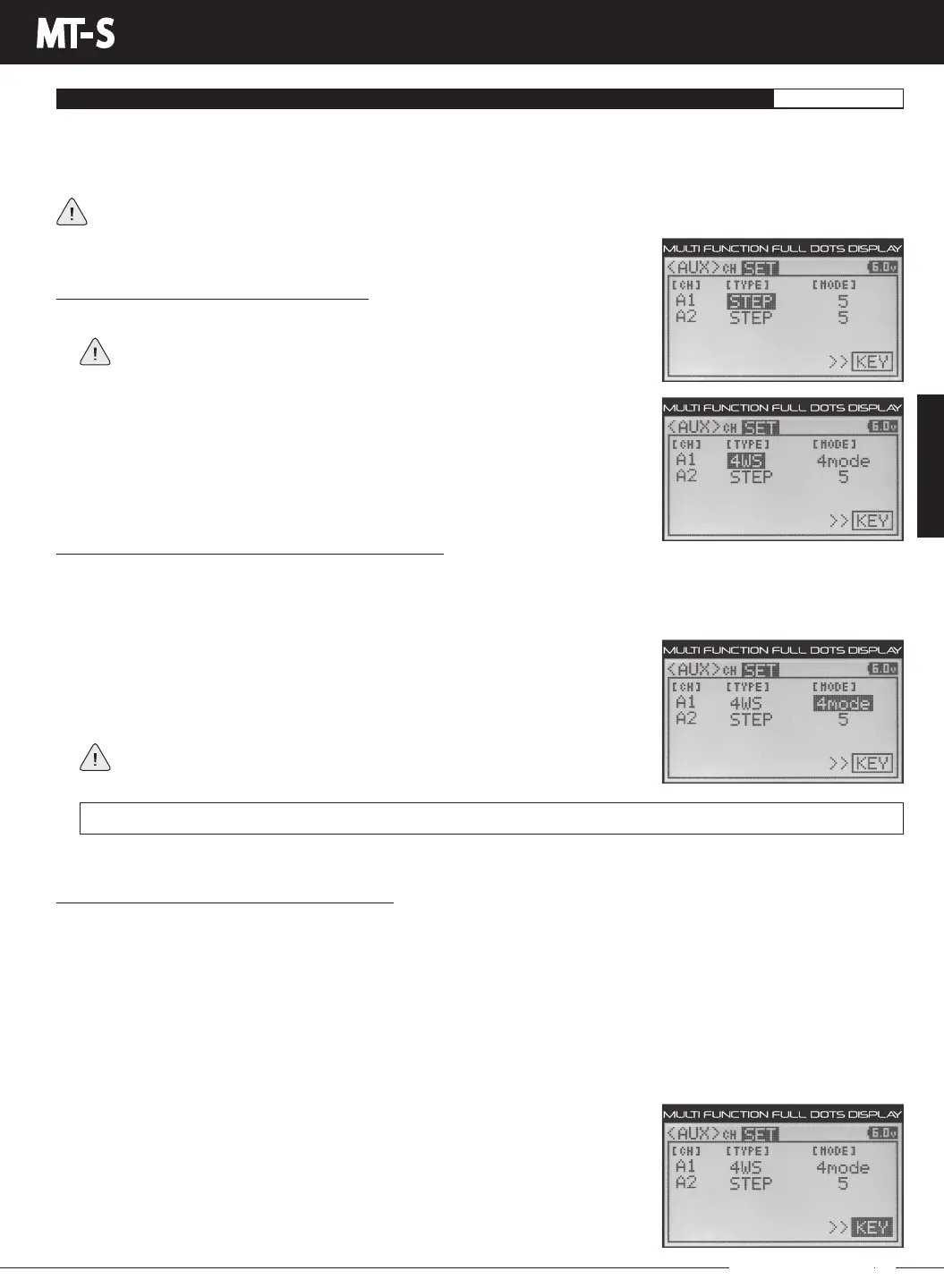
1) From within the AUX menu, press the UP or DOWN keys to highlight AUX SET.
If the cursor isn't flashing over Channel/Options, press the BACK key, then
press the UP or DOWN keys to highlight the AUX SET menu Option.
2) Press the ENTER key, then press the UP or DOWN keys to highlight either CH A1
TYPEorCHA2TYPE,dependingonwhichAuxiliarychannelyouwanttoprogram,
either Auxiliary 1 (Channel 3) or Auxiliary 2 (Channel 4).
3) Press the ENTER key, then press the UP or DOWN keys to choose the 4WS option for
the selected channel.
Changing the Four Wheel Steering Mixing Mode Value:
The Four Wheel Steering Mixing Mode value determines the number and type of Four Wheel Steering Mixing Modes that can
be selected in the AUX CH menu. For example, if you choose 2MODE, F-ST (Front Wheel Steering) or REV (Tandem Steering)
can be selected. If you choose 4MODE, all four Four Wheel Steering Mixing Modes can be selected. This allows you to choose
only the specific Four Wheel Steering Mixing Modes you want and none that you don't.
AUX SET 4WS MODE setting range is 2MODE, 3MODE and 4MODE. The default setting for both channels is 4MODE.
1) Press the ENTER key, then press the UP or DOWN keys to highlight either CH A1
MODE or CH A2 MODE, depending on which Auxiliary channel you're programming.
2) Press the ENTER key, then press the UP or DOWN keys to choose the desired Four
Wheel Steering Mode value. Choose from either 2MODE, 3MODE or 4MODE.
For a description of each Four Wheel Steering Mixing Mode, see the Choosing
the Four Wheel Steering Mixing Mode section on the next page.
2MODE-F-ST<>REV
|
3MODE-F-ST<>NOR<>REV
|
4MODE-F-ST<>NOR<>REV<>R-ST
Choosing the Key Option (Key Assign Function):
In the default configuration, AUX1 4WS is controlled by Auxiliary Switch Sw2 and AUX2 4WS is controlled by Auxiliary Switch Sw3.
TheKeyoptionisashortcuttotheKEYASSIGNmenu,whichallowsyoutoAssigntheFourWheelSteeringMixingfunctionto
a different Auxiliary Switch or a Trim Switch. The Four Wheel Steering Mixing function can be controlled several different ways,
depending on what Auxiliary Switch or Trim Switch you Assign the AUX1 4WS or AUX2 4WS function to and how many Four
Wheel Steering Mixing Modes you want to cycle between remotely. The function will behave as described below:
Auxiliary Switch Sw1 - Toggle the Four Wheel Steering Mixing function ON and OFF.
Auxiliary Switch Sw2 - Switch between (F-ST) Front Wheel Steering and the Four Wheel Steering Mixing Mode value selected
in the AUX CH menu. For more information, see the Choosing the Four Wheel Steering Mixing Mode section on the next page.
Auxiliary Switch Sw3 - Switch between (F-ST) Front Wheel Steering, (NOR) Parallel Steering and (REV) Tandem Steering,
regardless of the Four Wheel Steering Mixing Mode value selected previously.
Trim Switch Trm3 - Cycle back and forth between all four Four Wheel Steering Mixing
Modes, regardless of the Four Wheel Steering Mixing Mode value selected previously.
1) PresstheENTERkey,thenpresstheUPorDOWNkeystohighlightKEY.
2) PresstheENTERkeytoopentheKEYASSIGNmenu,thenAssignAUX14WSorAUX2
4WStothedesiredAuxiliarySwitchorTrimSwitch.Formoreinformation,seetheKEY
ASSIGN Menu section on pages 56 through 60.
AUX MENU



 To Next Page