63
MT- S
2.4GHZ FH4T RADIO SYSTEM USER'S GUIDE
Telemetry System with Sanwa Synchronized Link Support
SYSTEM MENU
LCD MENU
LCD CONTRAST AND BACKLIGHT OPTIONS
SYSTEM
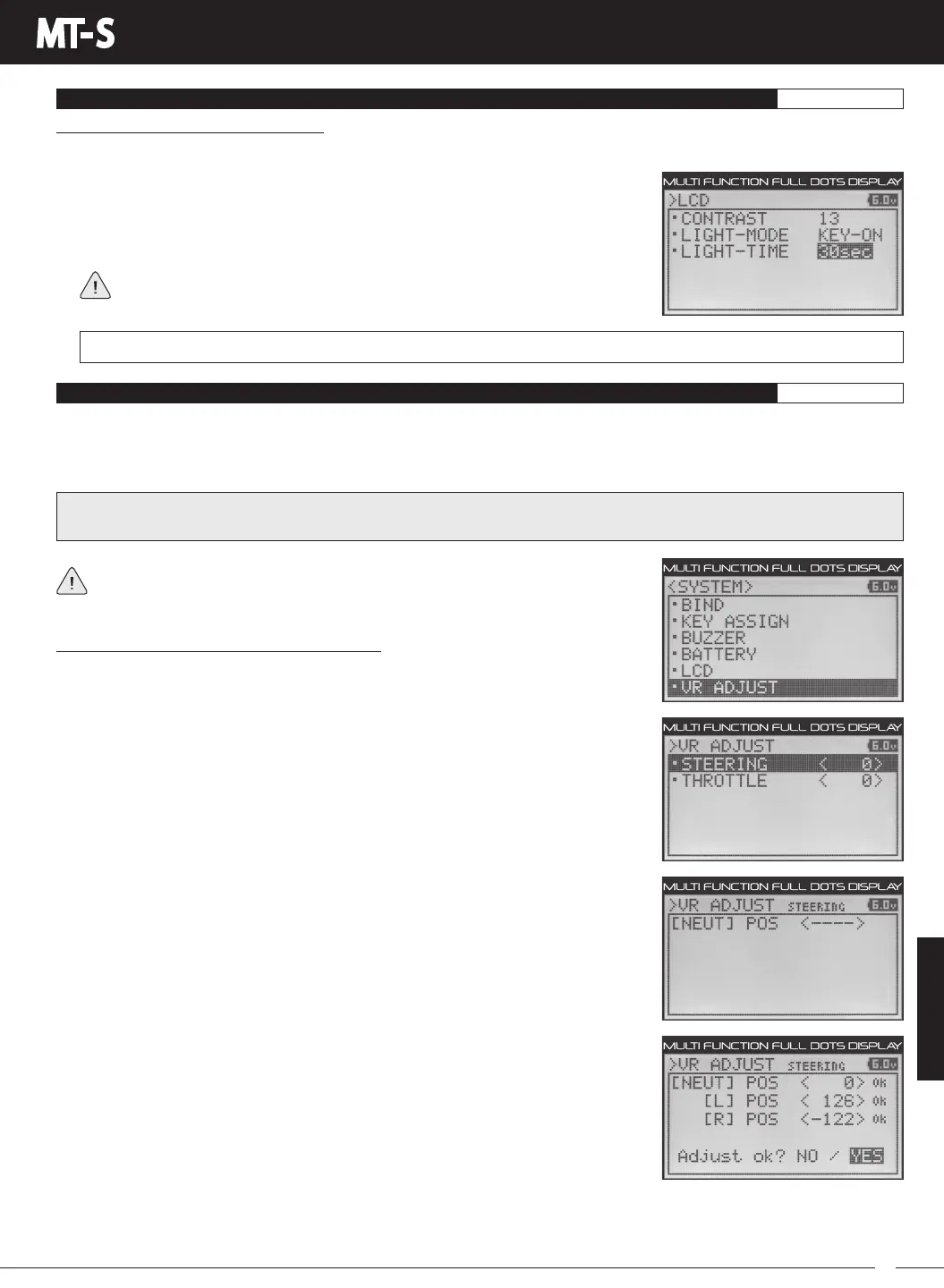
LCD LIGHT-TIME setting range is 1 to 30 seconds. The default setting is 10 seconds.
Changing the LCD Backlight On-Time:
The LCD Backlight On-Time determines how long the LCD Backlight will stay ON before turning OFF automatically.
1) From within the LCD menu, press the UP or DOWN keys to highlight LIGHT-TIME
10sec.
2) Press the ENTER key, then press the UP or DOWN keys to choose the desired LCD
Backlight On-Time value (in seconds).
IftheBacklightModeissettoALWAYSorOFF,changingtheLCDBacklight
On-Time value will have no effect.
VR ADJUST MENU
VARIABLE RATE ADJUSTMENT CONTROL CALIBRATION
SYSTEM
The Variable Rate Adjustment function allows you to calibrate the operation of the Steering Wheel and Throttle Trigger End
Points and Neutral positions. Over time, it's possible that the End Points and/or Neutral positions of these controls may change
slightly. Being able to calibrate these controls ensures precise operation at all times. We recommend using the Variable Rate
Adjustment function as part of a periodic maintenance schedule.
IMPORTANT: After using the Variable Rate Adjustment function, you should double-check the End Point Adjustments of each
saved model. If the End Points have moved, they will need to be readjusted using the End Point Adjustment function.
The steps required to calibrate the operation of the Steering Wheel and Throttle
Trigger are the same. The example shown in this section details calibrating the
Steering Wheel.
Calibrating the Steering and Throttle Controls:
1) Fromwithinthe SYSTEMmenu,press theUPor DOWNkeystohighlighttheVR
ADJUST menu.
2) PresstheENTERkeytoopentheVRADJUSTmenu.STEERING<0>willbehighlighted.
Depending on the current state of calibration, a value other than 0 may be
highlighted.
3) Press the UP or DOWN keys to choose which control you would like to calibrate, either
STEERING or THROTTLE.
7) PresstheUPorDOWNkeystohighlightYES,thenpresstheENTERkey.Executedwillflash,indicatingthatthecalibration
process is complete. If you want to cancel the calibration process for any reason, choose NO or press the BACK key.
8) If desired, repeat steps 3 through 7 to calibrate the remaining control, either STEERING or THROTTLE.
5) Press the ENTER key a second time. A menu with several position indicators will be
displayed and OK will be displayed next to the NEUT POS value.
6) Move the Steering Wheel (or the Throttle Trigger) all the way in one direction, then
allow the control to return to Neutral. Move the Steering Wheel (or the Throttle Trigger)
all the way in the opposite direction, then allow the control to return to Neutral. A
seriesofvaluesandAdjustok?NO/YESwillbedisplayed.
4) With the Steering Wheel (or the Throttle Trigger) in the Neutral position, press the
ENTER key. NEUT POS
<
----
>
will be displayed.



 To Next Page