54
MT- S
2.4GHZ FH4T RADIO SYSTEM USER'S GUIDE
Telemetry System with Sanwa Synchronized Link Support
WhenviewingtheTELEMETRYscreen,pressandHOLDtheDOWNkeytodisplaytheTelemetryDataMax(Maximum)values,
then release the DOWN key to revert to viewing current Telemetry Data values. The Telemetry Clear function allows you to
ResettheTelemetryDataMaximumvaluesdisplayedontheTELEMETRYMAXscreen
to the current values.
TELEMETRY SETTING MENU
CHANGE TELEMETRY SETTINGS
TELEMETRY
If the RPM sensor is mounted to your engine's flywheel or your motor's pinion gear to read the RPM directly, the Ratio
value should be set to 1.00 0.
TELEMETRYSETTINGRPMRATIOsettingrangeis1.000to64.999.Thedefaultsettingis1.000.
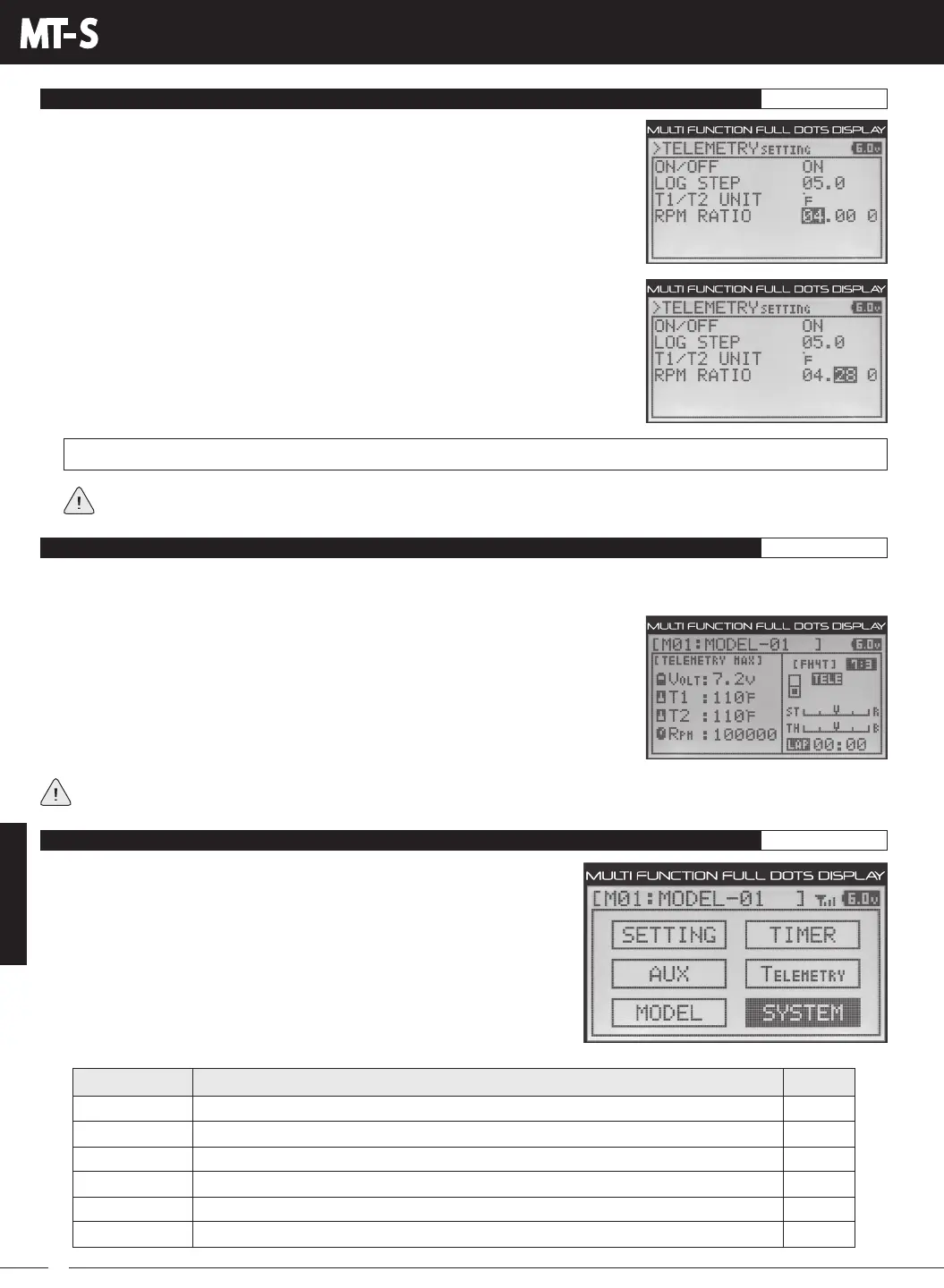
3) Press the ENTER key, then scroll DOWN to highlight the second Ratio value. Press
the ENTER key a second time, then scroll UP or DOWN to choose the desired second
Ratio value. If using the example on the previous page, choose 28.
4) If necessary, press the ENTER key, then scroll DOWN to highlight the third ratio value.
Press the ENTER key, then scroll UP or DOWN to choose the desired third Ratio value.
TECLR
TELEMETRY CLEAR FUNCTION
TELEMETRY
BIND
KEYASSIGN
BUZZER
BATTERY
LCD
VR ADJUST
PG. 55
PG. 56
PG. 60
PG. 60
PG. 62
PG. 63
MENU
PAGE #
MENU DESCRIPTION
Binding, Select Modulation Type and Channel Response Mode
Assign Functions to the Auxiliary Switches and Trim Switches
Adjust Audible Key Tone Volume and Tone
Specify Transmitter Battery Low Voltage and Limit Alarms
Adjust LCD Contrast and Backlight Options
Calibrate Steering and Throttle Controls
ThefollowingProgrammingMenusareavailablewithintheSYSTEMmenu:
ToaccessthevariousSYSTEMmenuProgrammingMenus,turnthetransmitter
ON, then press the ENTER key to open the PROGRAMMING screen.
Pressthe UPorDOWNkeys tohighlightthe SYSTEMmenu,then pressthe
ENTERkeytoopentheSYSTEMmenu.
SYSTEM MENU OVERVIEW SYSTEM
2) Press the ENTER key, then press the UP or DOWN keys to choose the desired first
Ratio value. If using the example on the previous page, choose 04.
This function will only work if with an Airtronics or Sanwa RX-461 or RX-462 FH4T Telemetry receiver. In addition, only the
TEMP1, TEMP2 and RPM Maximum values will be Reset. The VOLT Maximum value is unaffected.
The Telemetry Clear function can be assigned to Auxiliary Switch Sw1. When you press
Auxiliary Switch Sw1, the Temperature 1, Temperature 2 and RPM Maximum values will
be Reset to the Current values read by the Telemetry Sensors. For more information, see
theKEYASSIGNMenusectiononpages56through60.The TE-CLR function can only
be Assigned to Auxiliary Switch Sw1.



 To Next Page