49
MT- S
2.4GHZ FH4T RADIO SYSTEM USER'S GUIDE
Telemetry System with Sanwa Synchronized Link Support
Section Continued on Next Page
TIMER MENU
INT MENU
INTERVAL TIMER
TIMER
Stopping the Interval Timer:
1) To stop the Interval Timer, press and HOLD Auxiliary Switch Sw1 for 3 seconds. An audible double-tone will sound indicating
the Interval Timer is stopped and the Cumulative Time will be displayed on the STATUS screen and in the TIMER menu.
The Cumulative Time cannot be manually cleared. It will be automatically cleared when the Interval Timer is put
in Stand-by again.
Starting the Interval Timer:
1) In the default configuration, Auxiliary Switch Sw1 controls the Timer function (the Timer function can only be Assigned to
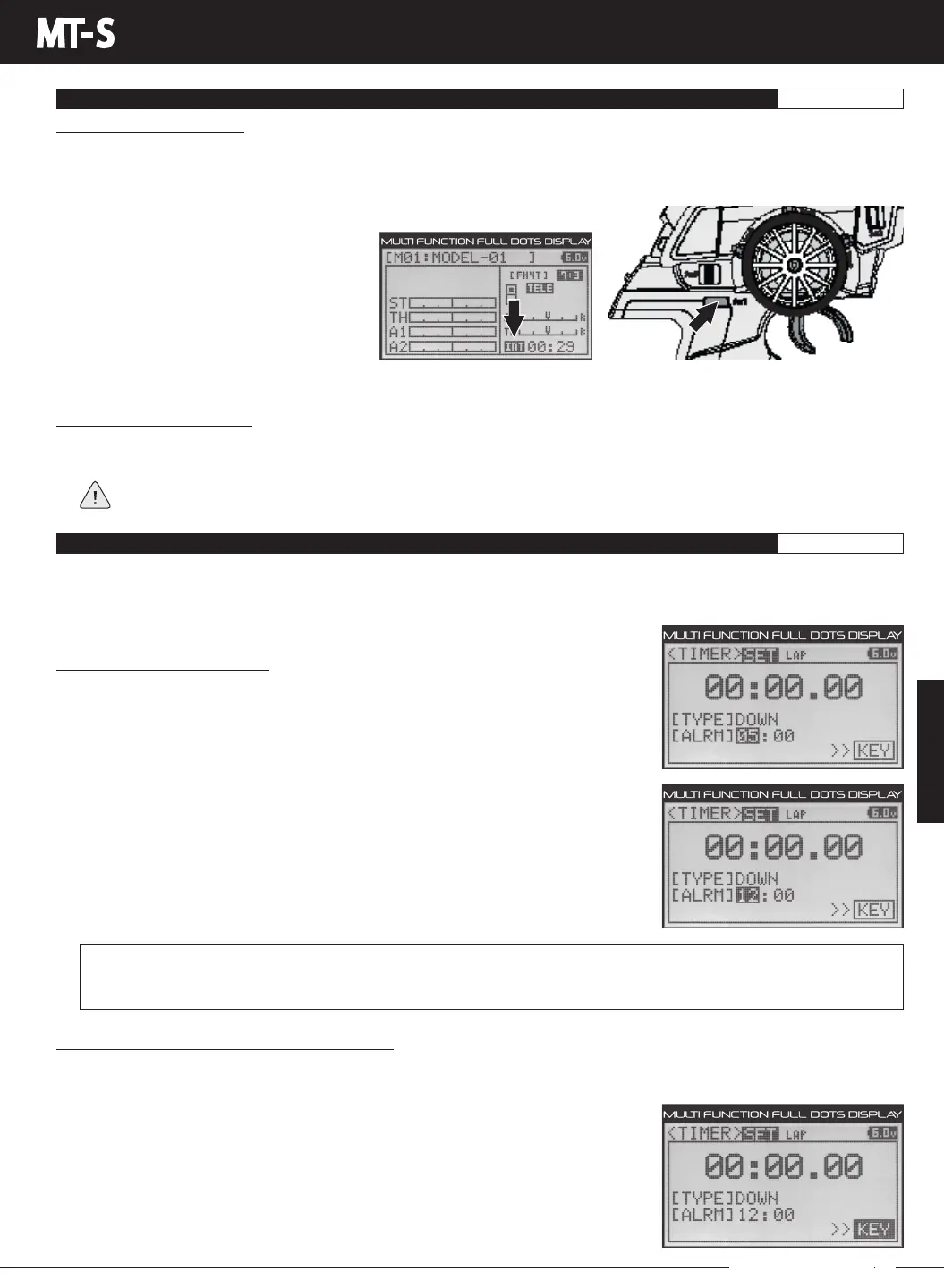
Auxiliary Switch Sw1). Press and HOLD Auxiliary Switch Sw1 for 3 seconds. An audible double-tone will sound, the TIMER
screen will appear for a short time and INT will flash on the STATUS screen indicating the Interval Timer is in Stand-by.
To start the Interval Timer, press Auxiliary Switch Sw1 a second time or pull
the Throttle Trigger. An audible double-tone
will sound and the Interval Timer will start
counting Up.
Each time the programmed Interval Time
elapses, an audible double-tone will sound
and the Interval Timer will restart from zero
and the Cumulative Time will be displayed
on the STATUS screen.
YoucanmanuallyrestarttheIntervalTimerfromzerobypressingAuxiliarySwitchSw1whiletheIntervalTimerisrunning.
DOWN MENU
COUNTDOWN TIMER
TIMER
The Countdown Timer function can be used to notify you of your model’s running time. For example, you can set the
Countdown Timer to alert you when it's time to refuel. When the Countdown Timer expires, a long audible tone will sound and
the Count Up Timer function begins automatically. This allows you to check the time elapsed since the Countdown Timer ran out.
Setting the Countdown Alarm:
1) Following the steps in the Changing the Timer Type section on page 46, choose the
TYPEDOWNoption.
2) From within the TIMER menu, scroll DOWN to highlight ALRM 05.
3) Press the ENTER key, then scroll UP or DOWN to set the desired Alarm Minutes value.
4) To set the Alarm Seconds value, press the ENTER key, then scroll DOWN to highlight
00. Press the ENTER key a second time, then scroll UP and DOWN to set the desired
Alarm Seconds value.
TIMER SET ALRM setting range is 00:00 to 99:59. The default setting is 5:00 minutes. An audible tone will sound in 1 second
intervals 5 seconds before reaching the Countdown Alarm Time. When the Countdown Alarm Time is reached, a long
audible tone will sound.
Choosing the Key Option (Key Assign Function):
Inthedefaultconfiguration,theTimerfunctioniscontrolledbyAuxiliarySwitchSw1.TheKeyoptionisashortcuttotheKEY
ASSIGN menu, which allows you to Assign the Timer function to Auxiliary Switch Sw1 if another function has been Assigned to
it. The Timer function can only be Assigned to Auxiliary Switch Sw1.
1) PresstheENTERkey,thenpresstheUPorDOWNkeystohighlightKEY.
2) PresstheENTERkeytoopentheKEYASSIGNmenu,thenAssignTIMERtoAuxiliary
SwitchSw1.Formoreinformation,seetheKEYASSIGNMenusectiononpages56
through 60.



 To Next Page