32
MT- S
2.4GHZ FH4T RADIO SYSTEM USER'S GUIDE
Telemetry System with Sanwa Synchronized Link Support
Section Continued on Next Page
STEP AUX MENU
STEP AUXILIARY
AUX
The Step Auxiliary function allows you to program the Auxiliary 1 (Channel 3) and Auxiliary 2 (Channel 4) servos to move a
defined amount when toggled using an Auxiliary Switch. For example, when AUX1 STEP is Assigned to Auxiliary Switch Sw1
and the Step Auxiliary Position value is set to 50, the Auxiliary 1 (Channel 3) servo will travel from the Neutral position to 50%
of travel when the Auxiliary Switch Sw1 is pressed. Press Auxiliary Switch Sw1 a second time and the Auxiliary 1 (Channel 3)
servo will travel back to the Neutral position. This is useful to control simple ON/OFF functions, such as a reverse servo for a
transmission or a mechanical switch to turn lights ON and OFF, etc.
This section details programming the Step Auxiliary function for both Auxiliary 1 (Channel 3) and Auxiliary 2 (Channel 4),
since programming each of them is the same. Choose either CH A1 for Auxiliary 1 (Channel 3) or CH A2 for Auxiliary 2
(Channel 4), depending on which channel you want to program the Step Auxiliary function for.
Choosing the Step Auxiliary Function:
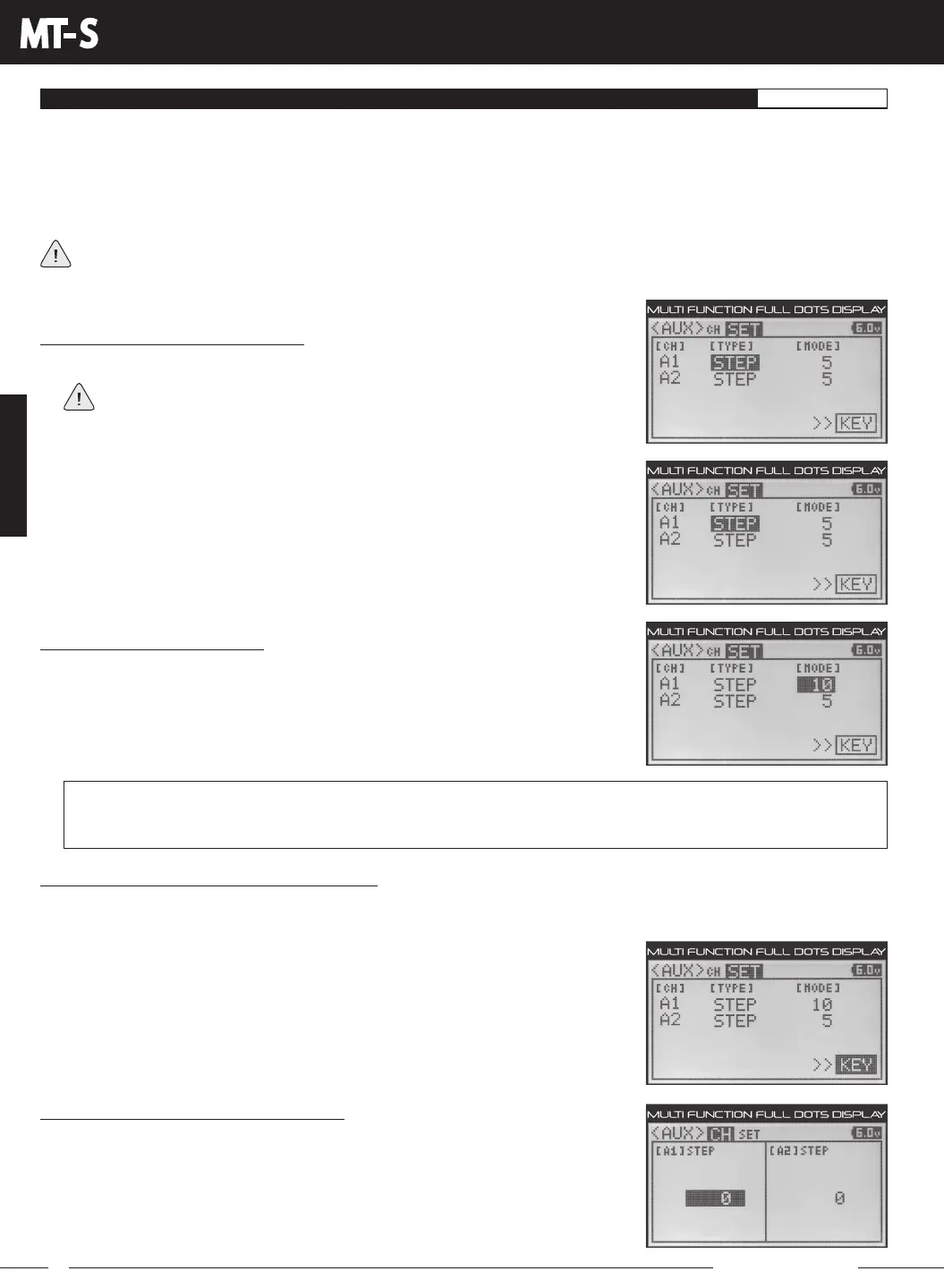
1) From within the AUX menu, press the UP or DOWN keys to highlight AUX SET.
If the cursor isn't flashing over Channel/Options, press the BACK key, then
press the UP or DOWN keys to highlight the AUX SET menu Option.
2) Press the ENTER key, then press the UP or DOWN keys to highlight either CH A1
TYPEorCHA2TYPE,dependingonwhichAuxiliarychannelyouwanttoprogram,
either Auxiliary 1 (Channel 3) or Auxiliary 2 (Channel 4).
3) Press the ENTER key, then press the UP or DOWN keys to choose the STEP option
for the selected channel.
Changing the Step Mode Value:
1) Press the ENTER key, then press the UP or DOWN keys to highlight either CH A1
MODE or CH A2 MODE, depending on which Auxiliary channel you're programming.
2) Press the ENTER key, then press the UP or DOWN keys to choose the desired Step
Mode value. The Step Mode value determines the increments that the Step Auxiliary
Position value will change when setting it in the AUX CH menu.
AUX SET STEP MODE setting range is 1, 2, 5, 10, 20, 25, 50 and 100. The default setting for both channels is 5. Use a smaller
value (e.g. 2) if you want to set the Step Auxiliary Position value in the AUX CH menu to a lower value (such as 8) or use a
higher value (e.g. 10) if you want to set the Step Auxiliary Position value in the AUX CH menu to a higher value (such as 30).
Choosing the Key Option (Key Assign Function):
In the default configuration, AUX1 STEP is controlled by Auxiliary Switch Sw2 and AUX2 STEP is controlled by Auxiliary Switch
Sw3.TheKeyoptionisashortcuttotheKEYASSIGNmenu,whichallowsyoutoAssigntheStepAuxiliaryfunctiontoa
different Auxiliary Switch or a Trim Switch. The Step Auxiliary function is best suited to be
controlled by Auxiliary Switch Sw1 or Sw2, since these are 2-position switches. Auxiliary
Switch Sw3 is not suitable for controlling the Step Auxiliary function, since it's a
3-position switch. A Trim Switch is not suitable either.
1) PresstheENTERkey,thenpresstheUPorDOWNkeystohighlightKEY.
2) Press the ENTER key to open the KEY ASSIGNmenu, then Assign AUX1 STEP or
AUX2STEPtoAuxiliarySwitchSw1orSw2.Formoreinformation,seetheKEYASSIGN
Menu section on pages 56 through 60.
Changing the Step Auxiliary Position Value:
The Step Auxiliary Position value determines the amount the Auxiliary 1 (Channel 3) or
Auxiliary 2 (Channel 4) servos will move when the Step Auxiliary function is toggled.
1) From within the AUX SET menu, press the BACK key so the cursor is flashing over
Channel/Options.
2) Press the UP or DOWN keys to highlight AUX CH, then press the ENTER key to open
the AUX CH menu.



 To Next Page