50
MT- S
2.4GHZ FH4T RADIO SYSTEM USER'S GUIDE
Telemetry System with Sanwa Synchronized Link Support
DOWN MENU
COUNTDOWN TIMER
TIMER
Stopping the Countdown Timer:
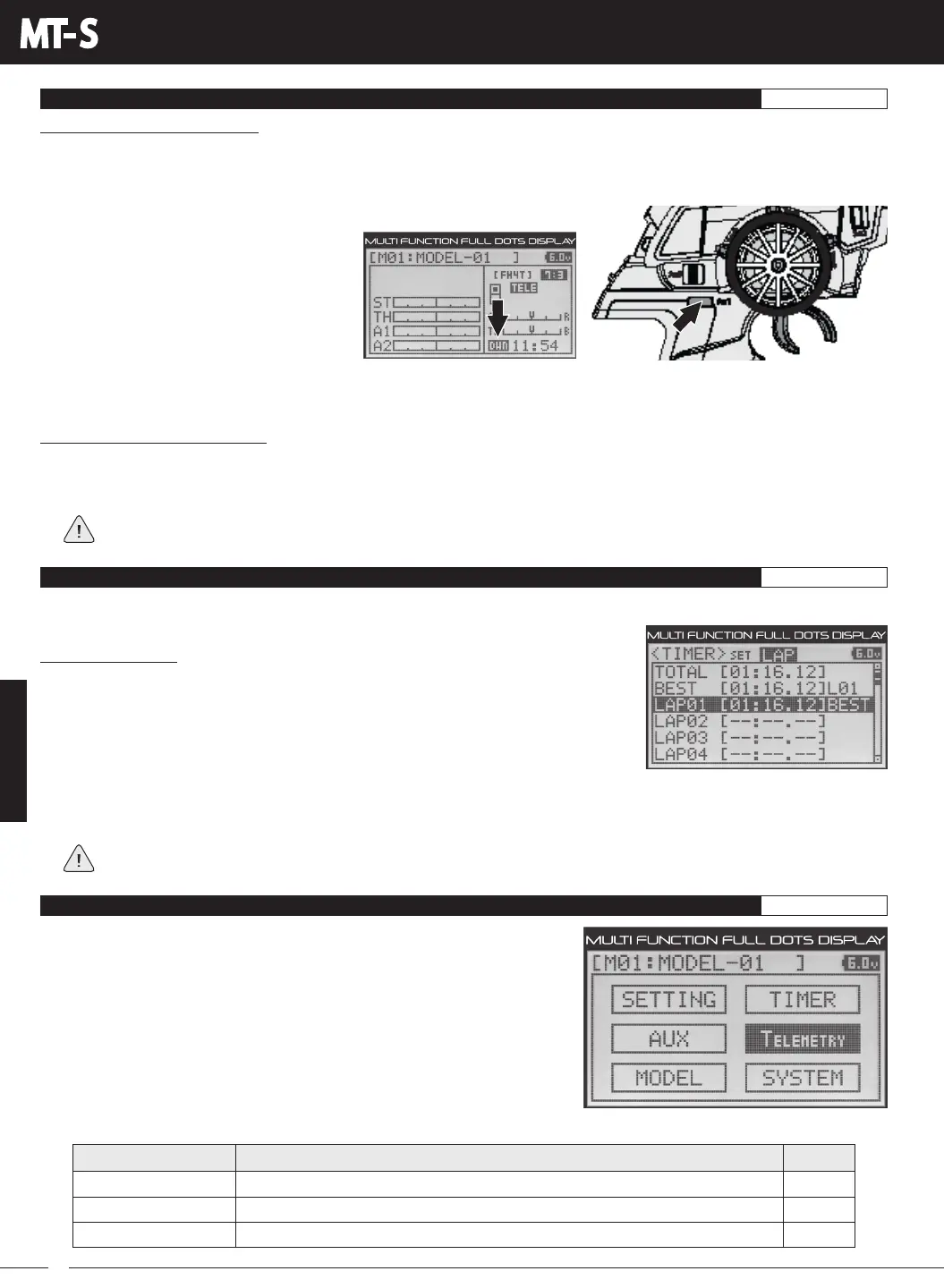
1) To stop the Countdown Timer, press and HOLD Auxiliary Switch Sw1 for 3 seconds. An audible double-tone will sound
indicating the Countdown Timer is stopped and either the remaining Countdown Time or elapsed Count Up Time will be
displayed on the STATUS screen and in the TIMER menu.
The remaining Countdown Time or Count Up Time cannot be manually cleared. It will be automatically cleared when
the Countdown Timer is put in Stand-by again.
Starting the Countdown Timer:
1) In the default configuration, Auxiliary Switch Sw1 controls the Timer function (the Timer function can only be Assigned to
Auxiliary Switch Sw1). Press and HOLD Auxiliary Switch Sw1 for 3 seconds. An audible double-tone will sound, the TIMER
screen will appear for a short time and DWN will flash on the STATUS screen indicating the Countdown Timer is in Stand-by.
To start the Countdown Timer, press Auxiliary Switch Sw1 a second time or
pull the Throttle Trigger. An audible double-
tone will sound and the Countdown Timer
will start counting down.
An audible tone will sound in 1 second
intervals 5 seconds before reaching zero.
When zero is reached, a long audible tone
will sound and the Countdown Timer will
begin counting Up.
YoucanmanuallystoptheCountdownTimeratanytimebypressingAuxiliarySwitchSw1andpressingAuxiliarySwitch
Sw1 again will start the Countdown Timer from where it was stopped.
VIEWING LAP TIMES TIMER
The Lap Times are displayed in the LAP menu. A total of up to 99 laps can be recorded using the Lap Timer function. Each Lap
Time is displayed along with the Best Lap Time and the Total (Cumulative) Lap Time.
3) Press the UP or DOWN keys to view the stored Lap Times. Lap Times are stored from the time you start the Lap Timer to
the time you Stop the Lap Timer. The Total (Cumulative) Lap Time and your Best Lap Time are always displayed at the
top of the list.
Lap Times are stored until you restart the Lap Timer function. When the Lap Timer function is restarted, old Lap
Times are cleared and new Lap Times are stored.
Viewing Lap Times:
1) From within the TIMER menu, press the BACK key so the cursor is flashing over
Channel/Options.
2) Press the UP or DOWN keys to highlight the LAP option, then press the ENTER key to
open the LAP menu.
LOGGER
ALERT SETTING
TELEMETRYSETTING
PG. 51
PG. 52
PG. 52
MENU
PAGE #
MENU DESCRIPTION
View Temperature 1, Temperature 2, Voltage and RPM Telemetry Data Logs
Program Telemetry Alert Alarms
Turn the Telemetry Function ON and OFF and Change Telemetry Settings
ThefollowingProgrammingMenusareavailablewithintheTELEMETRYmenu:
To access the various TELEMETRY menu Programming Menus, turn the
transmitter ON, then press the ENTER key to open the PROGRAMMING screen.
PresstheUPorDOWNkeystohighlighttheTELEMETRYmenu,thenpressthe
ENTERkeytoopentheTELEMETRYmenu.
TELEMETRY MENU OVERVIEW TELEMETRY



 To Next Page