38
MT- S
2.4GHZ FH4T RADIO SYSTEM USER'S GUIDE
Telemetry System with Sanwa Synchronized Link Support
MOA MIX MENU
MOTOR ON AXLE MIXING
AUX
Changing the Motor on Axle Mixing Power Distribution Options:
YouareabletoprogramOFF(Balanced),DigandBurnfunctionsbychangingthePowerDistributionbetweentheFrontand
Rear motors.
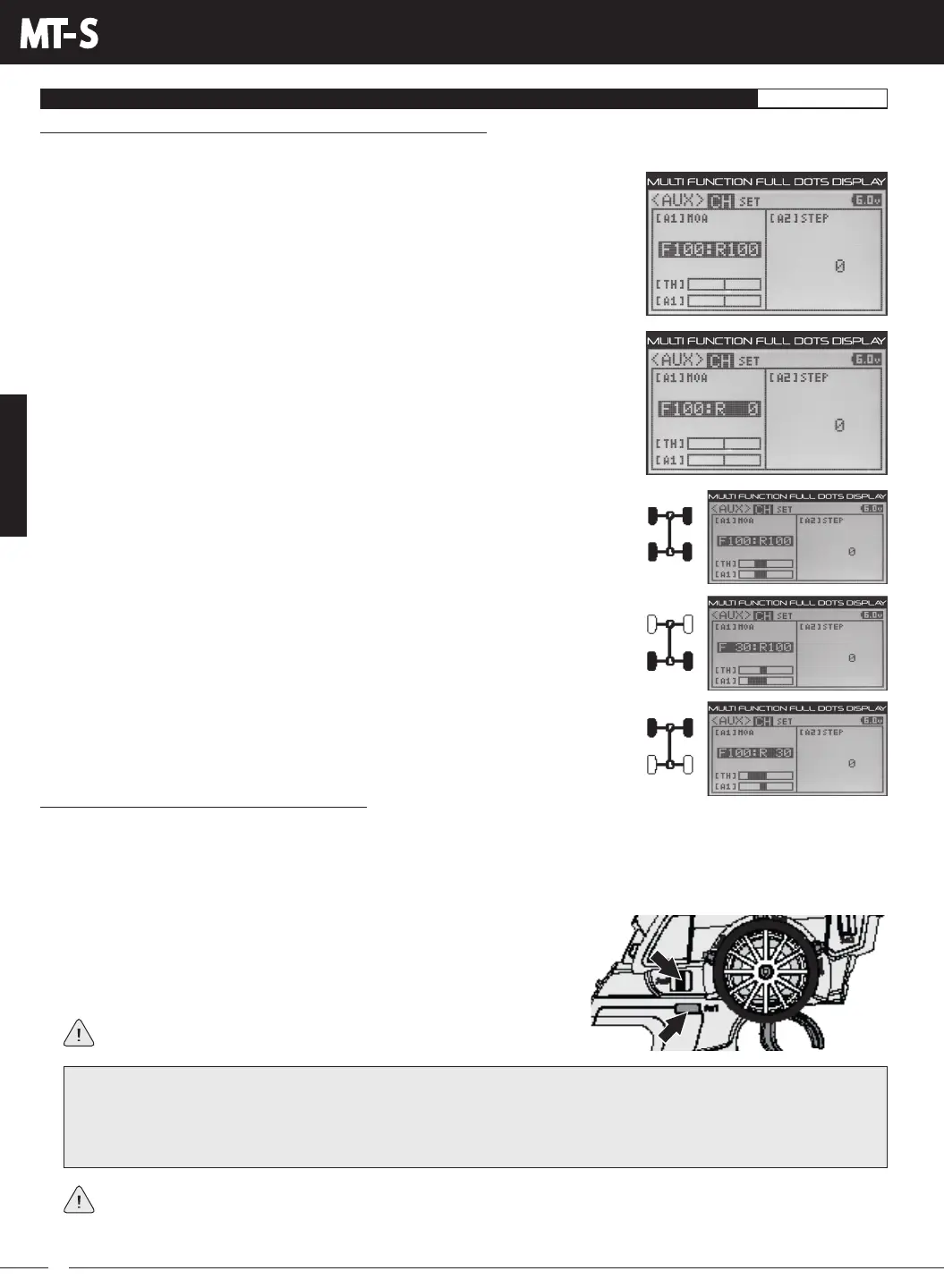
1) From within the AUX SET menu, press the BACK key so the cursor is flashing over
Channel/Options.
2) Press the UP or DOWN keys to highlight AUX CH, then press the ENTER key to open
the AUX CH menu.
3) Press the UP or DOWN Keys to choose A1 MOA or A2 MOA, depending on which
Auxiliary channel you want to change the Motor on Axle Power Distribution Values for.
4) Press the ENTER key, then press the UP or DOWN keys to change the Power
Distribution between the Front and Rear motors. Reducing the R value will reduce
the available power to the Rear motor (Dig) and reducing the F value will reduce the
power to the Front motor (Burn).
REAR Throttle (BURN) - When set to 0:100, power will only be distributed to the Rear
motor. Power can be distributed proportionally between the Front and Rear motors
from 0:100 to 99:100.
FRONT Throttle (DIG) - When set to 100:0, power will only be distributed to the Front
motor. Power can be distributed proportionally between the Front and Rear motors
from 100:0 to 100:99.
OFF (Balanced) - When set to 100:100 or other balanced value, power will be evenly
distributed between the Front and Rear motors.
1) Slide the Auxiliary Switch back and forth to switch between Dig and Burn
or press the Trim Switch forward and backward to variably change Power
Distribution values on the fly. If programmed, press Auxiliary Switch Sw1 to
toggle the Motor on Axle Mixing function ON and OFF.
If you're unable to switch between Motor on Axle Mixing Modes, verify
that the AUX1 MOA or AUX2 MOA function isn't toggled OFF.
Controlling the Motor on Axle Mixing Function:
How you control the Motor on Axle Mixing function will depend on how you want to use it. For example, if you want to switch only
between Dig or Burn and OFF (Balanced), you can Assign AUX1 MOA or AUX2 MOA to Auxiliary Switch Sw2. Or, if you want to
have both Dig and Burn on the same switch, you can Assign AUX1 MOA or AUX2 MOA to Auxiliary Switch Sw3 and use it to switch
betweenthem,thenuseAuxiliarySwitchSw1totogglebetweenDigorBurnandOFF(Balanced).YoucouldevenAssignAUX1
MOA or AUX2 MOA to Trim Switch Trm3 and variably control the amount of Dig or Burn on the fly, then use Auxiliary Switch Sw1
to toggle the Motor on Axle Mixing function ON and OFF (Balanced).
When using the Motor on Axle Mixing function, it's important to adjust the Throttle channel and Auxiliary 1 (Channel 3)
or Auxiliary 2 (Channel 4) Sub-Trim values so both motors are OFF when the Throttle Trigger is in the Neutral position.
In addition, you are able to independently adjust the Throttle channel and Auxiliary 1 (Channel 3) or Auxiliary 2 (Channel 4) ARC,
Sub-Trim, EPA and Servo Speed settings to fine tune each channel for the best Motor on Axle Mixing setup.
IMPORTANT: If you want Dig, OFF and Burn functions all on the same Auxiliary Switch, without needing to toggle
the Motor on Axle Mixing function ON and OFF with a separate switch, Assign AUX1 MOA or AUX2 MOA to Auxiliary
Switch Sw3. Verify that the Tweak values are set to TWEAK1 (2) +100, (3) -100 / TWEAK 2 (1) +100, (3) -100, then make
sure F100:R100 is programmed in the AUX CH menu. This will give you full Dig, OFF (Balanced) and full Burn when the
Auxiliary Switch Sw3 is in the (1), (2) and (3) positions, respectively.



 To Next Page