Seat heating: If your car is equipped with seat heating function, press the “Seat Heating” icon and it will
start charging. When seat heating is turned on, the default position is the highest position 3. Click the
button once to reduce by 1 level.
WARNING: Internal air circulation reduces the air exchange. Therefore air quality decreases. This leads to
tiredness periods of driver and passengers. Don’t drive too long in internal circulation mode.
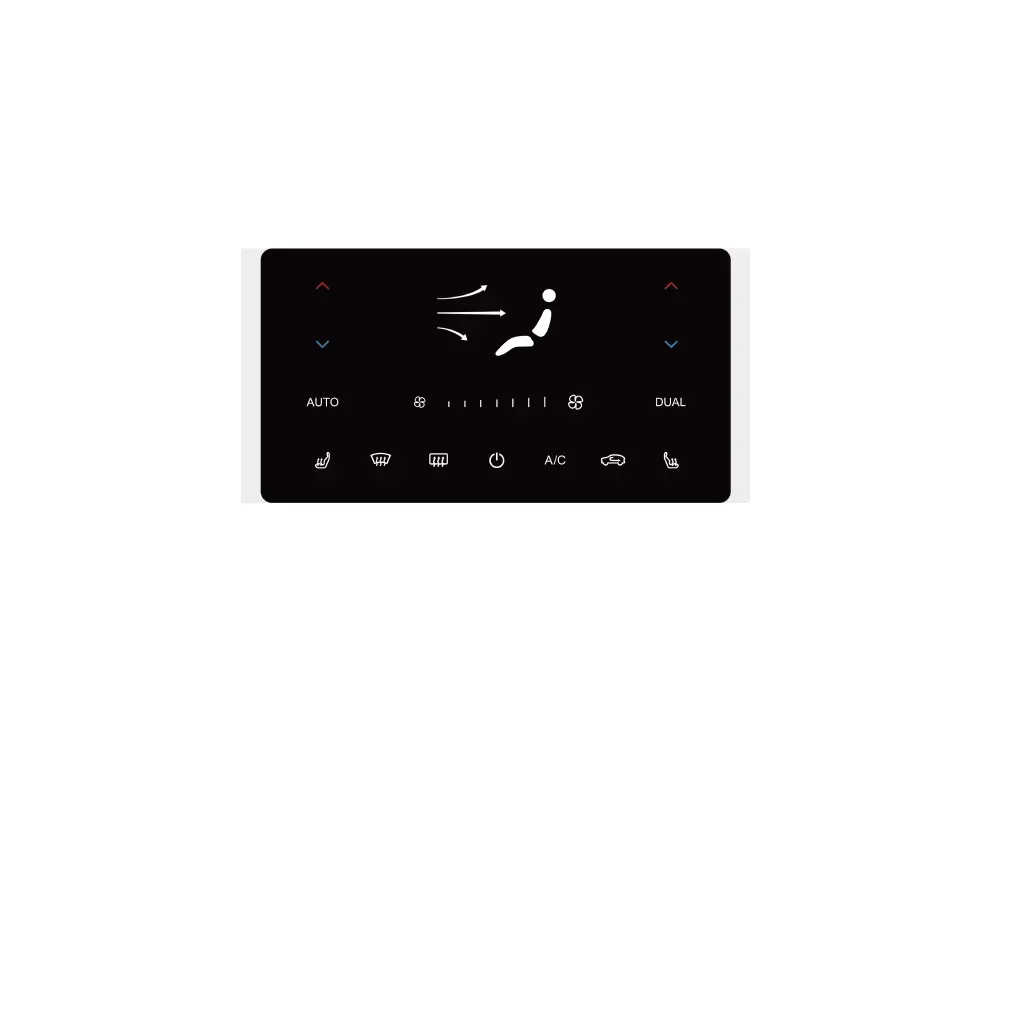
If your vehicle is equipped with an air conditioning touch panel, you can also adjust the air conditioning
here.
Short press the red up arrow to increase the temperature by 0.5℃, short press the blue down arrow to
decrease the temperature by 0.5℃; long press the red up arrow to increase the temperature quickly, long
press the blue down arrow to decrease the temperature quickly.
Press the red or blue adjustment arrow on the driver's side to enter the dual-area air-conditioning mode.
In this case, the front passenger can adjust the temperature on their side as desired without affecting the
temperature on the driver side.
Touch the fan icon on the left to decrease the air volume, or touch the fan icon on the right to increase the
air volume.
Touch the head, upper body, or and other positions on the person icon to adjust the blowing direction of
the air conditioner such as blowing front, blowing face, and blowing feet and etc.
The meaning of other icons is consistent with those of the console air conditioning control interface in IVI.
84 | AIWAYS U5



 To Next Page