A
L
B
E
D
O
T
e
l
e
c
o
m
-
J
o
a
n
d
’
À
u
s
t
r
i
a
,
1
1
2
-
B
a
r
c
e
l
o
n
a
-
0
8
0
1
8
-
w
w
w
.
a
l
b
e
d
o
t
e
l
e
c
o
m
.
c
o
m
User Guide
98
5.1.2. Error Counts
xGenius is prepared to get any defect or fault in the received data stream. These faults
include invalid checksum, alignment or size and frame structure defects. If configured
in pass-through mode, the test unit, automatically drops frames with errors but these
are still counted and presented in the error statistics panels. To access to the error
statistics:
1. From the Home panel, go to RESULTS,
The test port results panel is displayed.
2. Select either Port A or Port B to enter in the port specific results.
3. Enter in Error statistics.
4. Check the FCS, Undersized, Oversized, Jabbers, IPv4 / IPv6 errors, UDP errors
and TCP errors counters.
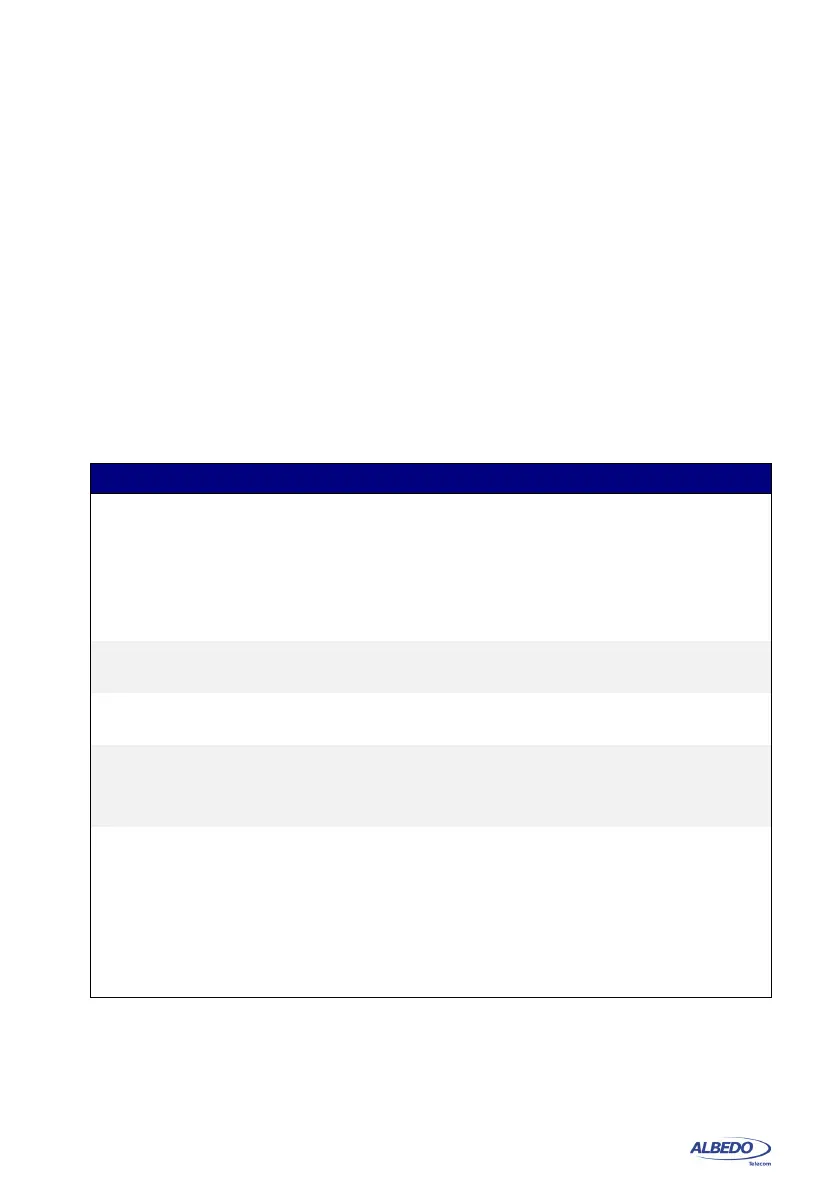
Table 5.2: Global Error Counts
Metric Description
FCS Count of all the FCS errors detected from the beginning of
the test.
A frame with a FCS error is a frame with a legal size which
contains an invalid FCS field. FCS errors are caused by
transmission errors. An optical Ethernet link with a poor
power budget may experience FCS errors
Undersized Total number of received frames which are smaller than
64 bytes.
Oversized Total number of received frames which are larger than the
configured MTU.
Jabbers Jabber count from the beginning of the test.
A Jabber is defined as a frame greater than 1518 bytes with
a bad CRC.
IPv4 / IPv6 errors Displays information about the total number of errored IPv4
and IPv6 packets.
An IPv4 or IPv6 packet is declared an errored packet if it is
improperly built: Datagram header has an unexpected struc-
ture, field values are different to the expected ones or it has
an unexpected length. An IPv4 datagram is also considered
to be invalid if it contains checksum errors.



 To Next Page