Connection to the Network
27
Once the tester has been connected to the network and the right connector type as
been configured, follow these steps to check auto-negotiation results:
1. From the Home panel, go to RESULTS,
The test port results panel is displayed.
2. Select Port A or Port B to enter in the port specific results.
3. Press Auto-negotiation
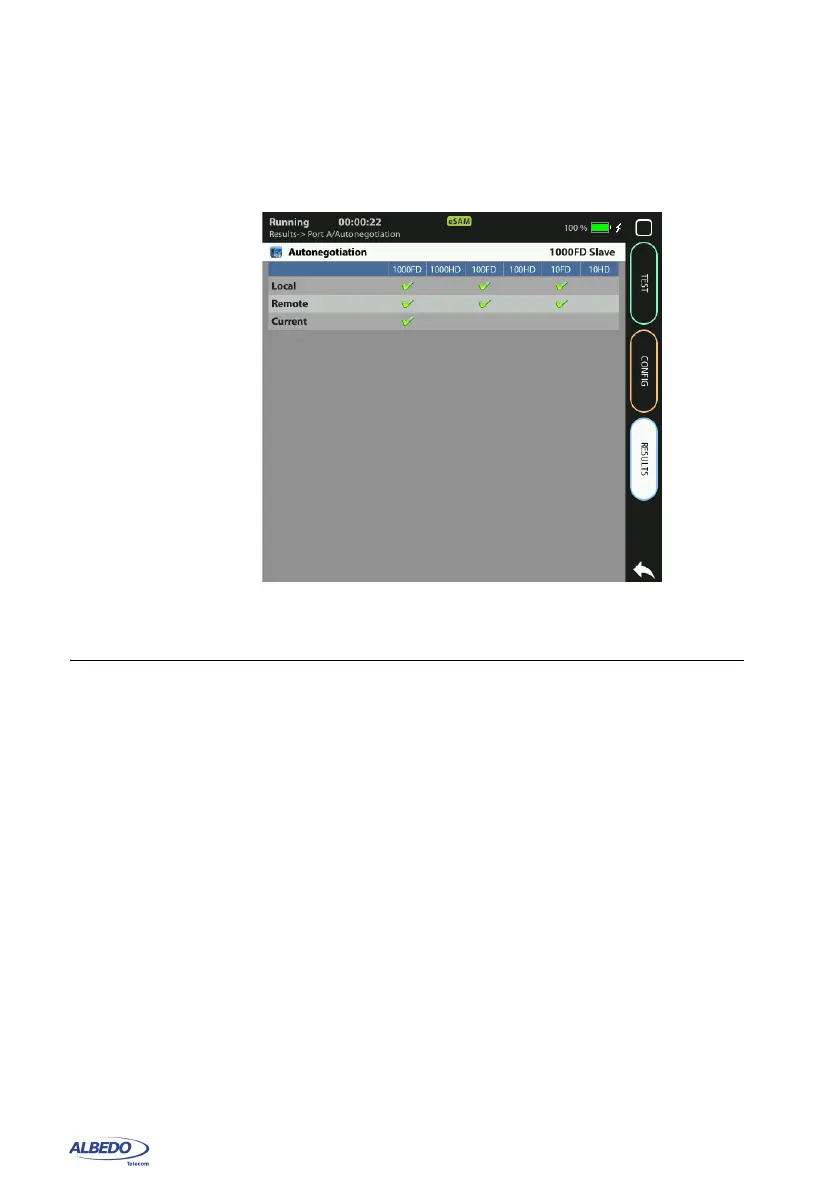
The auto-negotiation status table for the current port is displayed.
4. Verify which bit rate / duplex modes combinations are supported by the local inter-
face and the remote peer in the Local and Remote rows. Check the current speed
and duplex mode in the Current row.
2.3.Entering the Port Local Settings
Ethernet devices do not normally require any configuration to work other than their
factory-set MAC address but when the equipment is configured in IP Endpoint mode it
behaves like any other IP host in the network. That means that the test unit should be
able to receive traffic directed to it or transmit test and signalling traffic to other devices.
Figure 2.3: Albedo xGenius auto-negotiation results panel.



 To Next Page